---
title: 2.2 كيفية إنشاء مكتبة التدريبات الخاصة بي
description: يشرح هذا المقال كيفية إنشاء التدريبات الخاصة بك، إضافة التفاصيل إلى بطاقة التدريب، ورسم التمارين الخاصة بك.
---
[تخطى الى المحتوى](https://support.iterpro.com/ar-eg/guide/2.2-كيفية-إنشاء-مكتبة-التدريبات-الخاصة-بي#main-content)
- [العربية - مصر](https://support.iterpro.com/ar-eg/guide/2.2-%D9%83%D9%8A%D9%81%D9%8A%D8%A9-%D8%A5%D9%86%D8%B4%D8%A7%D8%A1-%D9%85%D9%83%D8%AA%D8%A8%D8%A9-%D8%A7%D9%84%D8%AA%D8%AF%D8%B1%D9%8A%D8%A8%D8%A7%D8%AA-%D8%A7%D9%84%D8%AE%D8%A7%D8%B5%D8%A9-%D8%A8%D9%8A)
- [English](https://support.iterpro.com/en/guide/how-to-create-my-drill-library)
- [Español](https://support.iterpro.com/es/guide/2.2creartugaleriadeejercicios)
- [Nederlands](https://support.iterpro.com/nl/guide/2.2-hoe-maak-ik-mijn-drillbibliotheek)
- [日本語](https://support.iterpro.com/ja/guide/2.2-自分のドリルライブラリを作成する方法)
العربية - مصر
إظهار القائمة الفرعية للترجمات
[بوابة العميل](https://support.iterpro.com/tickets?hsLang=ar-eg)
![Iterpro full logo white - ORANGE-3.png\]](https://support.iterpro.com/hs-fs/hubfs/Iterpro%20full%20logo%20white%20-%20ORANGE-3.png?height=40&name=Iterpro%20full%20logo%20white%20-%20ORANGE-3.png)
- [Default HubSpot Blog](https://iterpro.hubspotpagebuilder.com/blog)
فتح التنقل الرئيسي
إغلاق التنقل الرئيسي
- [Default HubSpot Blog](https://iterpro.hubspotpagebuilder.com/blog)
- - [العربية - مصر](https://support.iterpro.com/ar-eg/guide/2.2-%D9%83%D9%8A%D9%81%D9%8A%D8%A9-%D8%A5%D9%86%D8%B4%D8%A7%D8%A1-%D9%85%D9%83%D8%AA%D8%A8%D8%A9-%D8%A7%D9%84%D8%AA%D8%AF%D8%B1%D9%8A%D8%A8%D8%A7%D8%AA-%D8%A7%D9%84%D8%AE%D8%A7%D8%B5%D8%A9-%D8%A8%D9%8A)
- [English](https://support.iterpro.com/en/guide/how-to-create-my-drill-library)
- [Español](https://support.iterpro.com/es/guide/2.2creartugaleriadeejercicios)
- [Nederlands](https://support.iterpro.com/nl/guide/2.2-hoe-maak-ik-mijn-drillbibliotheek)
- [日本語](https://support.iterpro.com/ja/guide/2.2-自分のドリルライブラリを作成する方法)
العربية - مصر
إظهار القائمة الفرعية للترجمات
- [بوابة العميل](https://support.iterpro.com/tickets)
- Contact Us
Contact Us
كيف يمكننا مساعدتك?
- لا توجد اقتراحات لأن حقل البحث فارغ.
1. [User Guide](https://support.iterpro.com/ar-eg/guide?hsLang=ar-eg)
2. [مدير](https://support.iterpro.com/ar-eg/guide/%D9%85%D8%AF%D9%8A%D8%B1?hsLang=ar-eg)
3. [التخطيط](https://support.iterpro.com/ar-eg/guide/%D9%85%D8%AF%D9%8A%D8%B1?hsLang=ar-eg#%D8%A7%D9%84%D8%AA%D8%AE%D8%B7%D9%8A%D8%B7)
# 2.2 كيفية إنشاء مكتبة التدريبات الخاصة بي
## يشرح هذا المقال كيفية إنشاء التدريبات الخاصة بك، إضافة التفاصيل إلى بطاقة التدريب، ورسم التمارين الخاصة بك.
### **إعداد الموضوعات والأهداف لفريقك**
- **00:23** إعداد الموضوعات والأهداف
- **00:59** أهمية إعداد هذه الحقول
### **إنشاء مكتبة التدريبات الخاصة بك**
- **00:28** إنشاء تدريب جديد
- **01:06** مشاركة التدريب مع المستخدمين
- **01:30** تحميل الملفات
### **رسم التدريبات الخاصة بك**
- **00:09** إنشاء رسم جديد
- **00:31** استكشاف خيارات الرسم
- **01:11** حفظ الرسم
### **وصف الميزة**
### **إعداد الموضوعات والأهداف لفريقك**
قبل إنشاء مكتبة التدريبات الخاصة بك، من الضروري ضبط الموضوعات والأهداف لفريقك. للقيام بذلك، انتقل إلى **الإعدادات \> الفريق \> المقاييس**. في قسم **مقاييس الفريق**، يمكنك تحديد المعلومات الأساسية التي ستظهر على كل بطاقة تدريب، بما في ذلك موضوعات التدريب، والأهداف التكتيكية، والبدنية، والفنية.
لإعدادها، اضغط على **تحرير**، ثم افتح قسم الموضوعات وقم بإدارة القيم المتاحة. يمكنك تفعيل أو تعطيل أو إنشاء قيم مخصصة حسب الحاجة.
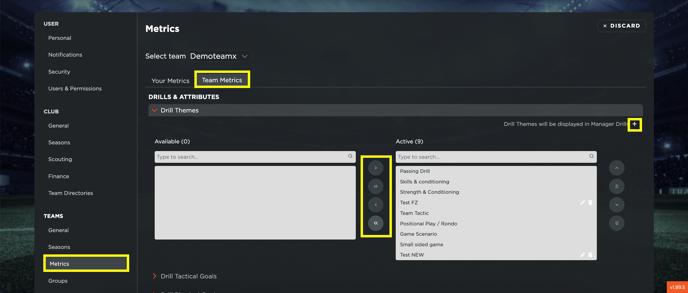
ينطبق نفس الإجراء على الأهداف التكتيكية، البدنية، والفنية.
هذه الإعدادات ضرورية للأقسام المختلفة في الفريق:
- يمكن لمدربي اللياقة تتبع التدريبات بناءً على الأهداف مثل التحمل والقوة.
- يمكن للأقسام الطبية والفنية مراقبة التدريبات وفقًا للأهداف التكتيكية والبدنية.
بمجرد الانتهاء من الإعدادات، اضغط على **حفظ** لتطبيق التغييرات.
### **إنشاء مكتبة التدريبات الخاصة بك**
في قسم **الإدارة**، يمكن للمستخدمين إنشاء مكتبة تدريبات مخصصة. تتيح هذه المكتبة تتبع التدريبات الميدانية، بالإضافة إلى تمارين الصالة الرياضية، والتدريبات الفنية، والتكتيكية، والبدنية المتخصصة.
#### **لإنشاء تدريب جديد:**
1. اضغط على **إضافة جديد** واملأ التفاصيل المطلوبة.
2. حدد الخصائص الأساسية مثل العنوان، الموضوع، الأهداف التكتيكية، الفنية، والبدنية (المحددة مسبقًا في مقاييس الفريق).
3. قم بتحديد تفاصيل إضافية مثل الفئة العمرية، حجم الملعب، عدد اللاعبين، المدة، القواعد، النقاط التدريبية، والوصف.
4. قم بإدارة إعدادات المشاركة: يمكن فقط للمستخدمين المحددين في قائمة **مشاركة مع** عرض التدريب في قسمي التدريبات والتخطيط.
5. قم بتحميل أي ملفات ذات صلة، بما في ذلك الصور، مقاطع الفيديو، أو المستندات.
في الخطوة التالية، ستتمكن أيضًا من رسم مخططات مخصصة لتدريباتك.
### **رسم التدريبات**
لإنشاء تمثيل مرئي لتدريباتك، انتقل إلى **لوحة رسم التدريبات**. هنا، يمكنك تحرير الرسومات الحالية أو إنشاء لوحة جديدة من الصفر.
#### **خطوات إنشاء رسم تدريبي:**
1. أضف عنوانًا واختر خلفية (مثل ملعب كرة القدم).
2. استخدم الأدوات المتاحة مثل الأشكال، معدات التدريب، اللاعبين (إصدار القمصان أو النقاط)، وخيارات النصوص (حروف/أرقام) لتخصيص الرسم التخطيطي.
3. قم بتحريك وضبط العناصر بحرية لإنشاء التمرين المطلوب.
#### **بعد الانتهاء، يمكنك:**
- حفظ الرسم.
- تحميله كصورة.
- ربطه بتدريب موجود ليظهر مباشرة على بطاقة التدريب.
**من خلال اتباع هذه الخطوات، يمكنك إنشاء مكتبة تدريبات منظمة تحتوي على أوصاف تفصيلية ومخططات مرئية لسهولة الرجوع إليها.**
- [إعداد الحساب وأخرى](https://support.iterpro.com/ar-eg/guide/%D8%A5%D8%B9%D8%AF%D8%A7%D8%AF-%D8%A7%D9%84%D8%AD%D8%B3%D8%A7%D8%A8-%D9%88%D8%A3%D8%AE%D8%B1%D9%89?hsLang=ar-eg#main-content)
- [تسجيل الدخول ونظرة عامة على Iterpro](https://support.iterpro.com/ar-eg/guide/%D8%A5%D8%B9%D8%AF%D8%A7%D8%AF-%D8%A7%D9%84%D8%AD%D8%B3%D8%A7%D8%A8-%D9%88%D8%A3%D8%AE%D8%B1%D9%89?hsLang=ar-eg#%D8%AA%D8%B3%D8%AC%D9%8A%D9%84-%D8%A7%D9%84%D8%AF%D8%AE%D9%88%D9%84-%D9%88%D9%86%D8%B8%D8%B1%D8%A9-%D8%B9%D8%A7%D9%85%D8%A9-%D8%B9%D9%84%D9%89-iterpro)
- [الإعدادات](https://support.iterpro.com/ar-eg/guide/%D8%A5%D8%B9%D8%AF%D8%A7%D8%AF-%D8%A7%D9%84%D8%AD%D8%B3%D8%A7%D8%A8-%D9%88%D8%A3%D8%AE%D8%B1%D9%89?hsLang=ar-eg#%D8%A7%D9%84%D8%A5%D8%B9%D8%AF%D8%A7%D8%AF%D8%A7%D8%AA)
- [إنشاء وأرشفة وحذف اللاعبين](https://support.iterpro.com/ar-eg/guide/%D8%A5%D8%B9%D8%AF%D8%A7%D8%AF-%D8%A7%D9%84%D8%AD%D8%B3%D8%A7%D8%A8-%D9%88%D8%A3%D8%AE%D8%B1%D9%89?hsLang=ar-eg#%D8%A5%D9%86%D8%B4%D8%A7%D8%A1-%D9%88%D8%A3%D8%B1%D8%B4%D9%81%D8%A9-%D9%88%D8%AD%D8%B0%D9%81-%D8%A7%D9%84%D9%84%D8%A7%D8%B9%D8%A8%D9%8A%D9%86)
- [أخرى](https://support.iterpro.com/ar-eg/guide/%D8%A5%D8%B9%D8%AF%D8%A7%D8%AF-%D8%A7%D9%84%D8%AD%D8%B3%D8%A7%D8%A8-%D9%88%D8%A3%D8%AE%D8%B1%D9%89?hsLang=ar-eg#%D8%A3%D8%AE%D8%B1%D9%89)
- [مدير](https://support.iterpro.com/ar-eg/guide/%D9%85%D8%AF%D9%8A%D8%B1?hsLang=ar-eg#main-content)
- [التكتيكات](https://support.iterpro.com/ar-eg/guide/%D9%85%D8%AF%D9%8A%D8%B1?hsLang=ar-eg#%D8%A7%D9%84%D8%AA%D9%83%D8%AA%D9%8A%D9%83%D8%A7%D8%AA)
- [التخطيط](https://support.iterpro.com/ar-eg/guide/%D9%85%D8%AF%D9%8A%D8%B1?hsLang=ar-eg#%D8%A7%D9%84%D8%AA%D8%AE%D8%B7%D9%8A%D8%B7)
- [معرض الفيديو](https://support.iterpro.com/ar-eg/guide/%D9%85%D8%AF%D9%8A%D8%B1?hsLang=ar-eg#%D9%85%D8%B9%D8%B1%D8%B6-%D8%A7%D9%84%D9%81%D9%8A%D8%AF%D9%8A%D9%88)
- [التدريبات](https://support.iterpro.com/ar-eg/guide/%D9%85%D8%AF%D9%8A%D8%B1?hsLang=ar-eg#%D8%A7%D9%84%D8%AA%D8%AF%D8%B1%D9%8A%D8%A8%D8%A7%D8%AA)
- [الحضور](https://support.iterpro.com/ar-eg/guide/%D9%85%D8%AF%D9%8A%D8%B1?hsLang=ar-eg#%D8%A7%D9%84%D8%AD%D8%B6%D9%88%D8%B1)
- [أداء](https://support.iterpro.com/ar-eg/guide/%D8%A3%D8%AF%D8%A7%D8%A1?hsLang=ar-eg#main-content)
- [تحليل الجلسة](https://support.iterpro.com/ar-eg/guide/%D8%A3%D8%AF%D8%A7%D8%A1?hsLang=ar-eg#%D8%AA%D8%AD%D9%84%D9%8A%D9%84-%D8%A7%D9%84%D8%AC%D9%84%D8%B3%D8%A9)
- [تحليل عبئ العمل](https://support.iterpro.com/ar-eg/guide/%D8%A3%D8%AF%D8%A7%D8%A1?hsLang=ar-eg#%D8%AA%D8%AD%D9%84%D9%8A%D9%84-%D8%B9%D8%A8%D8%A6-%D8%A7%D9%84%D8%B9%D9%85%D9%84)
- [التقييمات](https://support.iterpro.com/ar-eg/guide/%D8%A3%D8%AF%D8%A7%D8%A1?hsLang=ar-eg#%D8%A7%D9%84%D8%AA%D9%82%D9%8A%D9%8A%D9%85%D8%A7%D8%AA)
- [الاستعداد](https://support.iterpro.com/ar-eg/guide/%D8%A3%D8%AF%D8%A7%D8%A1?hsLang=ar-eg#%D8%A7%D9%84%D8%A7%D8%B3%D8%AA%D8%B9%D8%AF%D8%A7%D8%AF)
- [طبي](https://support.iterpro.com/ar-eg/guide/%D8%B7%D8%A8%D9%8A?hsLang=ar-eg#main-content)
- [السجلات الطبية](https://support.iterpro.com/ar-eg/guide/%D8%B7%D8%A8%D9%8A?hsLang=ar-eg#%D8%A7%D9%84%D8%B3%D8%AC%D9%84%D8%A7%D8%AA-%D8%A7%D9%84%D8%B7%D8%A8%D9%8A%D8%A9)
- [المستوصف](https://support.iterpro.com/ar-eg/guide/%D8%B7%D8%A8%D9%8A?hsLang=ar-eg#%D8%A7%D9%84%D9%85%D8%B3%D8%AA%D9%88%D8%B5%D9%81)
- [الامتحانات](https://support.iterpro.com/ar-eg/guide/%D8%B7%D8%A8%D9%8A?hsLang=ar-eg#%D8%A7%D9%84%D8%A7%D9%85%D8%AA%D8%AD%D8%A7%D9%86%D8%A7%D8%AA)
- [الإحصائيات الطبية](https://support.iterpro.com/ar-eg/guide/%D8%B7%D8%A8%D9%8A?hsLang=ar-eg#%D8%A7%D9%84%D8%A5%D8%AD%D8%B5%D8%A7%D8%A6%D9%8A%D8%A7%D8%AA-%D8%A7%D9%84%D8%B7%D8%A8%D9%8A%D8%A9)
- [اللاعبون](https://support.iterpro.com/ar-eg/guide/%D8%A7%D9%84%D9%84%D8%A7%D8%B9%D8%A8%D9%88%D9%86?hsLang=ar-eg#main-content)
- [فريقي](https://support.iterpro.com/ar-eg/guide/%D8%A7%D9%84%D9%84%D8%A7%D8%B9%D8%A8%D9%88%D9%86?hsLang=ar-eg#%D9%81%D8%B1%D9%8A%D9%82%D9%8A)
- [الكشافة](https://support.iterpro.com/ar-eg/guide/%D8%A7%D9%84%D9%84%D8%A7%D8%B9%D8%A8%D9%88%D9%86?hsLang=ar-eg#%D8%A7%D9%84%D9%83%D8%B4%D8%A7%D9%81%D8%A9)
- [التحويلات](https://support.iterpro.com/ar-eg/guide/%D8%A7%D9%84%D9%84%D8%A7%D8%B9%D8%A8%D9%88%D9%86?hsLang=ar-eg#%D8%A7%D9%84%D8%AA%D8%AD%D9%88%D9%8A%D9%84%D8%A7%D8%AA)
- [إدارة](https://support.iterpro.com/ar-eg/guide/%D8%A5%D8%AF%D8%A7%D8%B1%D8%A9?hsLang=ar-eg#main-content)
- [فريق](https://support.iterpro.com/ar-eg/guide/%D8%A5%D8%AF%D8%A7%D8%B1%D8%A9?hsLang=ar-eg#%D9%81%D8%B1%D9%8A%D9%82)
- [نظرة عامة على التمويل](https://support.iterpro.com/ar-eg/guide/%D8%A5%D8%AF%D8%A7%D8%B1%D8%A9?hsLang=ar-eg#%D9%86%D8%B8%D8%B1%D8%A9-%D8%B9%D8%A7%D9%85%D8%A9-%D8%B9%D9%84%D9%89-%D8%A7%D9%84%D8%AA%D9%85%D9%88%D9%8A%D9%84)
- [تتبع المكافأة](https://support.iterpro.com/ar-eg/guide/%D8%A5%D8%AF%D8%A7%D8%B1%D8%A9?hsLang=ar-eg#%D8%AA%D8%AA%D8%A8%D8%B9-%D8%A7%D9%84%D9%85%D9%83%D8%A7%D9%81%D8%A3%D8%A9)
- [التدفق النقدي](https://support.iterpro.com/ar-eg/guide/%D8%A5%D8%AF%D8%A7%D8%B1%D8%A9?hsLang=ar-eg#%D8%A7%D9%84%D8%AA%D8%AF%D9%81%D9%82-%D8%A7%D9%84%D9%86%D9%82%D8%AF%D9%8A)
- [المعاملات](https://support.iterpro.com/ar-eg/guide/%D8%A5%D8%AF%D8%A7%D8%B1%D8%A9?hsLang=ar-eg#%D8%A7%D9%84%D9%85%D8%B9%D8%A7%D9%85%D9%84%D8%A7%D8%AA)
- [تسجيل](https://support.iterpro.com/ar-eg/guide/%D8%A5%D8%AF%D8%A7%D8%B1%D8%A9?hsLang=ar-eg#%D8%AA%D8%B3%D8%AC%D9%8A%D9%84)
- [تطبيقات الجوال](https://support.iterpro.com/ar-eg/guide/%D8%AA%D8%B7%D8%A8%D9%8A%D9%82%D8%A7%D8%AA-%D8%A7%D9%84%D8%AC%D9%88%D8%A7%D9%84?hsLang=ar-eg#main-content)
- [تطبيق المشغل](https://support.iterpro.com/ar-eg/guide/%D8%AA%D8%B7%D8%A8%D9%8A%D9%82%D8%A7%D8%AA-%D8%A7%D9%84%D8%AC%D9%88%D8%A7%D9%84?hsLang=ar-eg#%D8%AA%D8%B7%D8%A8%D9%8A%D9%82-%D8%A7%D9%84%D9%85%D8%B4%D8%BA%D9%84)
- [تطبيق المدرب](https://support.iterpro.com/ar-eg/guide/%D8%AA%D8%B7%D8%A8%D9%8A%D9%82%D8%A7%D8%AA-%D8%A7%D9%84%D8%AC%D9%88%D8%A7%D9%84?hsLang=ar-eg#%D8%AA%D8%B7%D8%A8%D9%8A%D9%82-%D8%A7%D9%84%D9%85%D8%AF%D8%B1%D8%A8)
- [تطبيق المدير](https://support.iterpro.com/ar-eg/guide/%D8%AA%D8%B7%D8%A8%D9%8A%D9%82%D8%A7%D8%AA-%D8%A7%D9%84%D8%AC%D9%88%D8%A7%D9%84?hsLang=ar-eg#%D8%AA%D8%B7%D8%A8%D9%8A%D9%82-%D8%A7%D9%84%D9%85%D8%AF%D9%8A%D8%B1)
- [FAQs](https://support.iterpro.com/ar-eg/guide/faqs?hsLang=ar-eg)
- [Default HubSpot Blog](https://iterpro.hubspotpagebuilder.com/blog)
[](https://iterpro.com/)
حقوق النشر © 2026، Iterpro Support Team