PLAYER, STAFF & AGENT BONUSES
- 00.02: explanation of bonuses being tracked
- 00.13: how to filter the bonus table
- 00.36: review the active bonuses being tracked
- 00.43: explanation of how the automatic tracking works
- 00.53: how to mark a bonus as reached, confirmed, and paid.
- 01.16: total bonus calculations
- 01.25: PDF and CSV export
TEAM BONUSES
- 00.06: explanation of team bonuses
- 00.20: create a new team bonus
- 00.25: adding team bonus type
- 00.32: adding details of team bonus
- 00.43: managing and tracking team bonus
Feature Description
Player, Staff, and Agent Bonuses
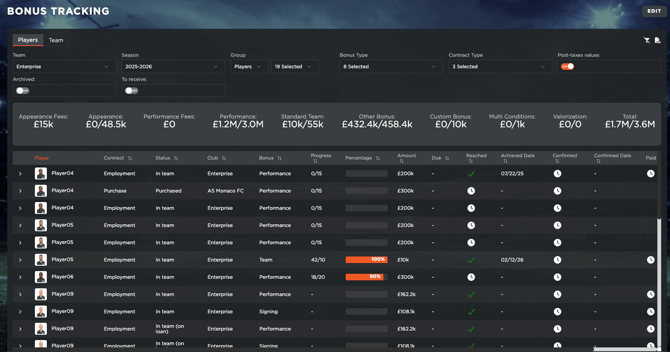
The Bonus Tracking section allows users to monitor all active bonuses that have been integrated into your digitalized player, staff, and agent contracts after notarization. Within this section, users can:
-
Switch between different teams to analyze bonuses for accessible teams.
-
Review past seasons.
-
Change between stakeholder groups (players, staff, agents) to focus on specific data.
-
Analyze bonuses to receive (sales contracts or players on loan), as well as from archived players.
-
Filter between bonus and contract types
Viewing and Tracking Bonuses
The table displays all bonuses as outlined in the player's contract, but more importantly, it also tracks their progress. Thanks to our partnership with Wyscout, we are able to sync and update performance statistics daily, enabling real-time tracking of contract conditions.
Through this data collection, you will be able to see the count and percentage progression and be notified about it (see article about notifications), but most importantly, you will be able to see exactly in which events the condition got tracked.
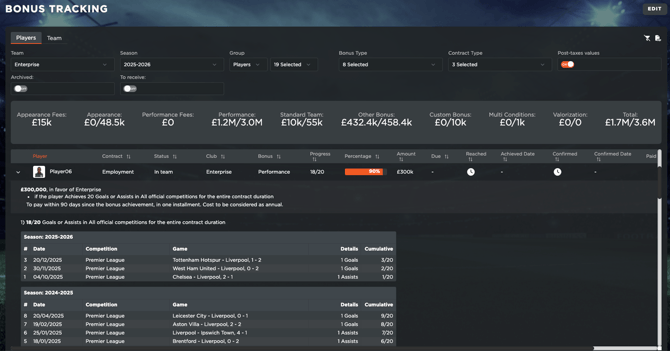
Once a bonus is achieved, the system will automatically mark it as reached, displaying the corresponding date. This can however, be edited manually by each user.
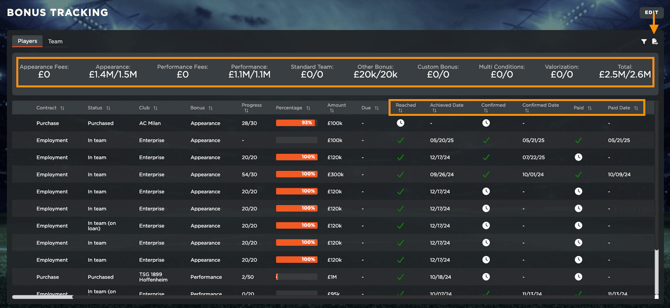
The system further tracks each stage of a bonus:
-
Achieved Date: Date when bonus was reached (manually or automatically)
-
Confirmed: The bonus has been validated, and confirmed that it's been achieved. This is a manual operation.
-
Paid: The bonus has been successfully processed and paid to the player, agent, or staff. This is a manual operation.
At the top of the table, users will find total amounts categorized per bonus type, providing a clear overview of the total bonuses due for the current season.
All data can be exported in PDF or CSV format for deeper analysis and reporting.
Team Bonuses
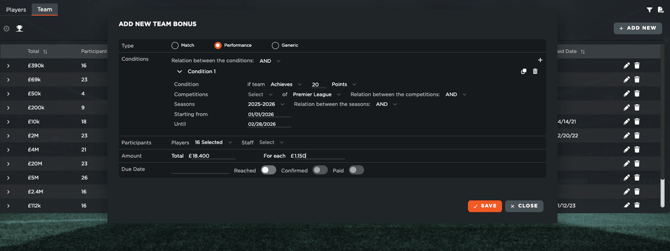
The Team Bonus section allows users to create and monitor all active bonuses that may apply to your whole team (or specific players/staff). To avoid you having to add all of them manually inside each person's contract, you can create in 'bulk' throug here.
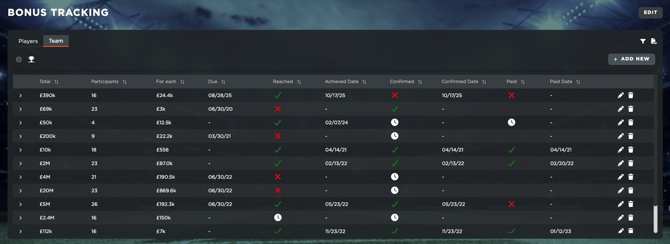
To do so, you will simply have to:
-
Go to Team tab inside the Bonus table
-
Click on 'Add' to open the creation modal
-
You will be able to add the bonus type (Match, Performance, or Custom), all relevant values, participants, and conditions.
-
Automatically set the division of amounts per player or per selected people.
-
Track and get notified automatically on your team's bonuses