---
title: 6.5 How to analyze your team's financial performance
description: This article will explain how you can interpret and analyze the data being displayed in Finance Overview. This will include the overall team and individual player financial KPIs, like ROI, Total Investment Costs, Contract Costs, salaries, losses by injuries.
---
[Skip to content](https://support.iterpro.com/en/guide/6.5-how-to-analyze-your-teams-financial-performance#main-content)
- [English](https://support.iterpro.com/en/guide/6.5-how-to-analyze-your-teams-financial-performance)
- [Español](https://support.iterpro.com/es/guide/6.5-cómo-analizar-el-rendimiento-financiero-de-tu-equipo)
- [Nederlands](https://support.iterpro.com/nl/guide/6.5-hoe-analyseer-je-de-financiële-prestaties-van-je-team)
- [العربية - مصر](https://support.iterpro.com/ar-eg/guide/6.5-كيف-تحلل-الأداء-المالي-لفريقك)
- [日本語](https://support.iterpro.com/ja/guide/6.5-チームの財務パフォーマンスを分析する方法)
English
Show submenu for translations
[](https://app.iterpro.com/auth/login)
- [Iterpro Login Page](https://app.iterpro.com/auth/login)
- [Contact Support](https://share.hsforms.com/1rE7NvsvuTIWBm7WQ1dhslQ1uo0p)
Open main navigation
Close main navigation
- [Iterpro Login Page](https://app.iterpro.com/auth/login)
- [Contact Support](https://share.hsforms.com/1rE7NvsvuTIWBm7WQ1dhslQ1uo0p)
- - [English](https://support.iterpro.com/en/guide/6.5-how-to-analyze-your-teams-financial-performance)
- [Español](https://support.iterpro.com/es/guide/6.5-cómo-analizar-el-rendimiento-financiero-de-tu-equipo)
- [Nederlands](https://support.iterpro.com/nl/guide/6.5-hoe-analyseer-je-de-financiële-prestaties-van-je-team)
- [العربية - مصر](https://support.iterpro.com/ar-eg/guide/6.5-كيف-تحلل-الأداء-المالي-لفريقك)
- [日本語](https://support.iterpro.com/ja/guide/6.5-チームの財務パフォーマンスを分析する方法)
English
Show submenu for translations
How can we help you?
- There are no suggestions because the search field is empty.
1. [User Guide](https://support.iterpro.com/en/guide?hsLang=en)
2. [Administration](https://support.iterpro.com/en/guide/administration?hsLang=en)
3. [Finance Overview](https://support.iterpro.com/en/guide/administration?hsLang=en#finance-overview)
# 6.5 How to analyze your team's financial performance
## This article will explain how you can interpret and analyze the data being displayed in Finance Overview. This will include the overall team and individual player financial KPIs.
### FINANCE OVERVIEW - TEAM
- 00.13: explanation of the various calculations and KPIs taken from the contracts
- 00.37: investment performance KPIs
- 01.15: net and gross values
- 01.21: analyze different teams and seasons within your club
- 01.27: PDF export
### FINANCE OVERVIEW - PLAYER
- 00.03: accessing the individual player overview
- 00.14: explanation of current contract details
- 00.21: explanation of capital gain/loss KPIs
- 00.31: explanation of investment performance KPIs
- 00.48: formulas to calculate investment performance KPIs
- 00.52: setting different scenarios for the investment performance simulation
### FINANCE ANALYSIS
- 00.08: how to access the financial analysis chart
- 00.13: how to add participants and metrics to the chart
- 00.30: explanation of the different actions available in the chart
- 00.44: PDF and CSV export
### ***Feature Description***
The **Finance Overview - Team** section allows users to analyze their team's overall financial performance after inputting and notarizing player and staff contracts. By navigating to this tab, users can review key financial metrics such as:
- **Total Squad Value**: Derived from the valuation section of individual player profiles.
- **Employment Contract Performance**: Displays total salary, average contract length, and other KPIs related to staff and player contracts.
- **Contract Expiry Overview**: Provides insights into the expiration dates of player contracts.
- **Fixed Wages and Bonuses Analysis**: Breakdown of wages and bonuses achieved or yet to be achieved by players and staff.
- **Investment Performance**: A comprehensive financial assessment integrating data from multiple departments, allowing for calculations of:
- **Average Player Availability** (using medical department data)
- **Losses Due to Injury** (total games missed per player)
- **Return on Investment (ROI)** per player and overall team ROI
- **Capital Gains** for the entire squad, based on individual player performance
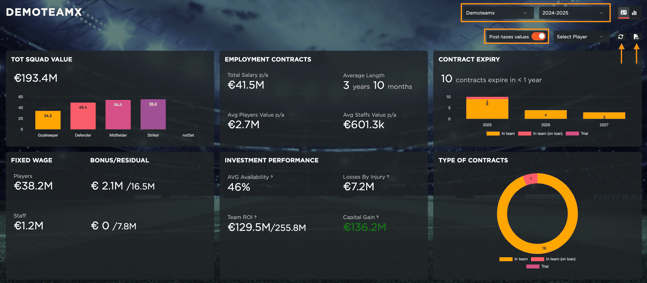
Users can switch between **gross and net values**, compare current and past seasons, and analyze all accessible teams. This section also allows users to **export** the financial data in **PDF format** for reporting purposes.
**Finance Overview - Player**
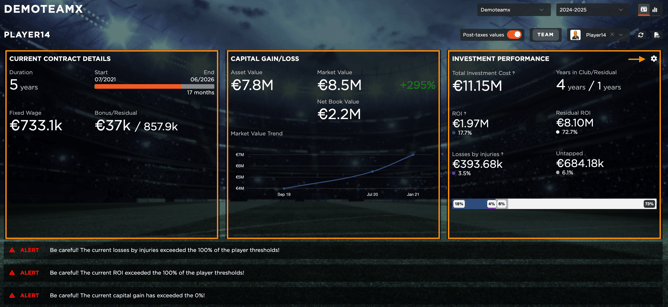
The **Finance Overview - Player** section provides a detailed financial analysis of individual players. Users can select a player via the dropdown menu and access key financial insights, including:
- **Current Contract Details**: Duration, fixed wages, and achievable bonuses.
- **Capital Gain Metrics**: Displays asset value, market value, and net book value, alongside trend analysis (also accessible via the squad valuation tab).
- **Investment Performance**: Provides a financial breakdown, integrating contract data to calculate:
- **Total Investment Cost**
- **Return on Investment (ROI)**
- **Losses Due to Injury**
- **Residual and Untapped Financial Values**
Users can view **calculation tooltips** for each metric and modify variables to simulate **different scenarios**, including the **current season, current contract, and player history**.
****
**Finance Analysis**
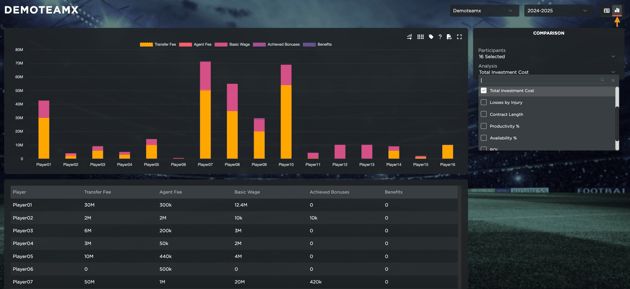
The **Finance Analysis** tab provides a **dynamic visualization** of financial statistics using **interactive charts**. Users can analyze financial performance by:
- Selecting **multiple participants** (players)
- Choosing **two metrics** for comparative analysis
- Customizing chart views, sorting tables, and adjusting labels for clarity
- Reviewing metric explanations via an interactive legend
The analysis can be exported as **PDF or CSV files**, allowing for additional external evaluation and reporting. This feature ensures an intuitive and comparative approach to understanding financial data across the team.
- [What's New](https://support.iterpro.com/en/guide/whats-new?hsLang=en)
- [Quick Onboarding](https://support.iterpro.com/en/guide/quick-onboarding?hsLang=en)
- [Account set-up and other](https://support.iterpro.com/en/guide/account-set-up-and-other?hsLang=en#main-content)
- [Login & Iterpro overview](https://support.iterpro.com/en/guide/account-set-up-and-other?hsLang=en#login-iterpro-overview)
- [Settings](https://support.iterpro.com/en/guide/account-set-up-and-other?hsLang=en#settings)
- [Create, archive and delete players](https://support.iterpro.com/en/guide/account-set-up-and-other?hsLang=en#create-archive-and-delete-players)
- [Other](https://support.iterpro.com/en/guide/account-set-up-and-other?hsLang=en#other)
- [Manager](https://support.iterpro.com/en/guide/manager?hsLang=en#main-content)
- [Tactics](https://support.iterpro.com/en/guide/manager?hsLang=en#tactics)
- [Planning](https://support.iterpro.com/en/guide/manager?hsLang=en#planning)
- [Videogallery](https://support.iterpro.com/en/guide/manager?hsLang=en#videogallery)
- [Drills](https://support.iterpro.com/en/guide/manager?hsLang=en#drills)
- [Attendances](https://support.iterpro.com/en/guide/manager?hsLang=en#attendances)
- [Performance](https://support.iterpro.com/en/guide/performance?hsLang=en#main-content)
- [Session Analysis](https://support.iterpro.com/en/guide/performance?hsLang=en#session-analysis)
- [Workload Analysis](https://support.iterpro.com/en/guide/performance?hsLang=en#workload-analysis)
- [Assessments](https://support.iterpro.com/en/guide/performance?hsLang=en#assessments)
- [Readiness](https://support.iterpro.com/en/guide/performance?hsLang=en#readiness)
- [Medical](https://support.iterpro.com/en/guide/medical?hsLang=en#main-content)
- [Medical Records](https://support.iterpro.com/en/guide/medical?hsLang=en#medical-records)
- [Infirmary](https://support.iterpro.com/en/guide/medical?hsLang=en#infirmary)
- [Examinations](https://support.iterpro.com/en/guide/medical?hsLang=en#examinations)
- [Medical Statistics](https://support.iterpro.com/en/guide/medical?hsLang=en#medical-statistics)
- [Player](https://support.iterpro.com/en/guide/player?hsLang=en#main-content)
- [My Team](https://support.iterpro.com/en/guide/player?hsLang=en#my-team)
- [Scouting](https://support.iterpro.com/en/guide/player?hsLang=en#scouting)
- [Transfers](https://support.iterpro.com/en/guide/player?hsLang=en#transfers)
- [Administration](https://support.iterpro.com/en/guide/administration?hsLang=en#main-content)
- [Squads](https://support.iterpro.com/en/guide/administration?hsLang=en#squads)
- [Finance Overview](https://support.iterpro.com/en/guide/administration?hsLang=en#finance-overview)
- [Bonus Tracking](https://support.iterpro.com/en/guide/administration?hsLang=en#bonus-tracking)
- [Cash Flow](https://support.iterpro.com/en/guide/administration?hsLang=en#cash-flow)
- [Transactions](https://support.iterpro.com/en/guide/administration?hsLang=en#transactions)
- [Registrations](https://support.iterpro.com/en/guide/administration?hsLang=en#registrations)
- [Mobile apps](https://support.iterpro.com/en/guide/mobile-apps?hsLang=en#main-content)
- [Player App](https://support.iterpro.com/en/guide/mobile-apps?hsLang=en#player-app)
- [Coach App](https://support.iterpro.com/en/guide/mobile-apps?hsLang=en#coach-app)
- [Director App](https://support.iterpro.com/en/guide/mobile-apps?hsLang=en#director-app)
- [Iterpro Login Page](https://app.iterpro.com/auth/login)
- [Contact Support](https://share.hsforms.com/1rE7NvsvuTIWBm7WQ1dhslQ1uo0p)
- [Terms & Conditions](https://www.iubenda.com/terms-and-conditions/53739842)
- [Privacy Policy](https://www.iubenda.com/privacy-policy/53739842)
[](https://iterpro.com/)
Copyright © 2025, Iterpro Support Team
```json
{
"@context" : "https://schema.org",
"@type" : "VideoObject",
"contentUrl" : "https://stream.mux.com/BsFQFg00a6YSK8EMuDOKn1Pj7mtfm9ksFxK9yszlg24M/capped-1080p.mp4",
"dateModified" : "2025-02-05T09:44:00.799Z",
"duration" : "PT1M36S",
"height" : 720,
"name" : "6.5 How to analyze your teams financial performance - part1",
"thumbnailUrl" : "https://3110425.fs1.hubspotusercontent-na1.net/hubfs/3110425/6.5%20How%20to%20analyze%20your%20teams%20financial%20performance%20-%20part1.mp4/medium.jpg",
"uploadDate" : "2025-02-05T09:44:00.794Z",
"width" : 1280
}
```
```json
{
"@context" : "https://schema.org",
"@type" : "VideoObject",
"contentUrl" : "https://stream.mux.com/SkToT3x8nalQ6pWA6GyNM7UrDKy00Dy00s9Dg4YqkmfG00/capped-1080p.mp4",
"dateModified" : "2025-02-05T09:44:00.096Z",
"duration" : "PT59.667S",
"height" : 720,
"name" : "6.5 How to analyze your teams financial performance - part2",
"thumbnailUrl" : "https://3110425.fs1.hubspotusercontent-na1.net/hubfs/3110425/6.5%20How%20to%20analyze%20your%20teams%20financial%20performance%20-%20part2.mp4/medium.jpg",
"uploadDate" : "2025-02-05T09:44:00.091Z",
"width" : 1280
}
```
```json
{
"@context" : "https://schema.org",
"@type" : "VideoObject",
"contentUrl" : "https://stream.mux.com/jxdic4GkKDqo2Ik2yVBP4Xt56PfwPICOCBJqw1ckC74/capped-1080p.mp4",
"dateModified" : "2025-02-05T09:44:00.485Z",
"duration" : "PT52S",
"height" : 720,
"name" : "6.5 How to analyze your teams financial performance - part3",
"thumbnailUrl" : "https://3110425.fs1.hubspotusercontent-na1.net/hubfs/3110425/6.5%20How%20to%20analyze%20your%20teams%20financial%20performance%20-%20part3.mp4/medium.jpg",
"uploadDate" : "2025-02-05T09:44:00.480Z",
"width" : 1280
}
```