---
title: 7.3 How to setup the reminder for the Wellness and RPE notifications that my players receive
description: This article showcases how you can set up the time for which your players receive an automatic reminder in the Player app to complete the wellness and RPE surveys.
---
[Skip to content](https://support.iterpro.com/en/guide/7.3-how-to-setup-the-time-for-the-wellness-and-rpe-notifications-that-my-players-receive#main-content)
- [English](https://support.iterpro.com/en/guide/7.3-how-to-setup-the-time-for-the-wellness-and-rpe-notifications-that-my-players-receive)
- [Español](https://support.iterpro.com/es/guide/7.3-cómo-configurar-el-recordatorio-para-las-notificaciones-de-wellness-y-rpe-que-reciben-mis-jugadores)
- [Nederlands](https://support.iterpro.com/nl/guide/7.3-hoe-stel-je-de-herinnering-in-voor-de-wellness-en-rpe-meldingen-die-mijn-spelers-ontvangen)
- [العربية - مصر](https://support.iterpro.com/ar-eg/guide/7.3-كيفية-إعداد-التذكير-لإشعارات-الحالة-الصحية-وrpe-التي-يتلقاها-اللاعبون)
- [日本語](https://support.iterpro.com/ja/guide/7.3-プレイヤーが受け取るウェルネスおよびrpe通知のリマインダーを設定する方法)
English
Show submenu for translations
[](https://app.iterpro.com/auth/login)
- [Iterpro Login Page](https://app.iterpro.com/auth/login)
- [Contact Support](https://share.hsforms.com/1rE7NvsvuTIWBm7WQ1dhslQ1uo0p)
Open main navigation
Close main navigation
- [Iterpro Login Page](https://app.iterpro.com/auth/login)
- [Contact Support](https://share.hsforms.com/1rE7NvsvuTIWBm7WQ1dhslQ1uo0p)
- - [English](https://support.iterpro.com/en/guide/7.3-how-to-setup-the-time-for-the-wellness-and-rpe-notifications-that-my-players-receive)
- [Español](https://support.iterpro.com/es/guide/7.3-cómo-configurar-el-recordatorio-para-las-notificaciones-de-wellness-y-rpe-que-reciben-mis-jugadores)
- [Nederlands](https://support.iterpro.com/nl/guide/7.3-hoe-stel-je-de-herinnering-in-voor-de-wellness-en-rpe-meldingen-die-mijn-spelers-ontvangen)
- [العربية - مصر](https://support.iterpro.com/ar-eg/guide/7.3-كيفية-إعداد-التذكير-لإشعارات-الحالة-الصحية-وrpe-التي-يتلقاها-اللاعبون)
- [日本語](https://support.iterpro.com/ja/guide/7.3-プレイヤーが受け取るウェルネスおよびrpe通知のリマインダーを設定する方法)
English
Show submenu for translations
How can we help you?
- There are no suggestions because the search field is empty.
1. [User Guide](https://support.iterpro.com/en/guide?hsLang=en)
2. [Mobile apps](https://support.iterpro.com/en/guide/mobile-apps?hsLang=en)
3. [Player App](https://support.iterpro.com/en/guide/mobile-apps?hsLang=en#player-app)
# 7.3 How to setup the reminder for the Wellness and RPE notifications that my players receive
## This article showcases how you can set up the time for which your players receive an automatic reminder in the Player app to complete the wellness and RPE surveys.
- 00.09: accessing the team notifications section
- 00.14: accessing wellness notifications
- 00.29: explanation of reminder sent to players
- 00.36: explanation of RPE reminders
### ***FEATURE DESCRIPTION***
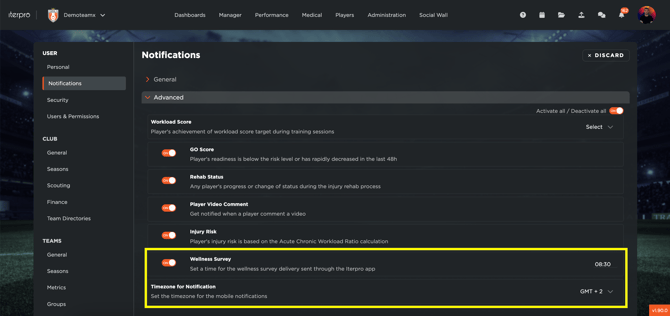
To ensure your players receive timely reminders for wellness surveys and RPE (post-session evaluations), you need to configure the notifications from the **Settings** menu. Follow these steps:
- **Access the Notification Settings**
- Navigate to **Settings \> Notifications** in your dashboard.
- Select the relevant team and locate the **Advanced** category.
- **Configure the Wellness Survey Reminder**
- Click **Edit** to modify the time when the wellness survey should be sent to your players.
- Choose the appropriate time zone to ensure accurate scheduling.
- Click **Save** to confirm your changes.
Once saved, the wellness survey will be automatically sent to your players at the specified time every morning.
Keep in mind that players will have to enable the notifications for the Player App as well to receive them. For more information, you can read this [article](https://support.iterpro.com/en/guide/why-dont-i-receive-the-notifications-on-my-mobile-phone?hsLang=en).
- **Set Up RPE Reminders**
- The system will automatically send an RPE reminder to players set as participants once a training session or a game event is completed. No manual setup is required for this function.
- [What's New](https://support.iterpro.com/en/guide/whats-new?hsLang=en)
- [Quick Onboarding](https://support.iterpro.com/en/guide/quick-onboarding?hsLang=en)
- [Account set-up and other](https://support.iterpro.com/en/guide/account-set-up-and-other?hsLang=en#main-content)
- [Login & Iterpro overview](https://support.iterpro.com/en/guide/account-set-up-and-other?hsLang=en#login-iterpro-overview)
- [Settings](https://support.iterpro.com/en/guide/account-set-up-and-other?hsLang=en#settings)
- [Create, archive and delete players](https://support.iterpro.com/en/guide/account-set-up-and-other?hsLang=en#create-archive-and-delete-players)
- [Other](https://support.iterpro.com/en/guide/account-set-up-and-other?hsLang=en#other)
- [Manager](https://support.iterpro.com/en/guide/manager?hsLang=en#main-content)
- [Tactics](https://support.iterpro.com/en/guide/manager?hsLang=en#tactics)
- [Planning](https://support.iterpro.com/en/guide/manager?hsLang=en#planning)
- [Videogallery](https://support.iterpro.com/en/guide/manager?hsLang=en#videogallery)
- [Drills](https://support.iterpro.com/en/guide/manager?hsLang=en#drills)
- [Attendances](https://support.iterpro.com/en/guide/manager?hsLang=en#attendances)
- [Performance](https://support.iterpro.com/en/guide/performance?hsLang=en#main-content)
- [Session Analysis](https://support.iterpro.com/en/guide/performance?hsLang=en#session-analysis)
- [Workload Analysis](https://support.iterpro.com/en/guide/performance?hsLang=en#workload-analysis)
- [Assessments](https://support.iterpro.com/en/guide/performance?hsLang=en#assessments)
- [Readiness](https://support.iterpro.com/en/guide/performance?hsLang=en#readiness)
- [Medical](https://support.iterpro.com/en/guide/medical?hsLang=en#main-content)
- [Medical Records](https://support.iterpro.com/en/guide/medical?hsLang=en#medical-records)
- [Infirmary](https://support.iterpro.com/en/guide/medical?hsLang=en#infirmary)
- [Examinations](https://support.iterpro.com/en/guide/medical?hsLang=en#examinations)
- [Medical Statistics](https://support.iterpro.com/en/guide/medical?hsLang=en#medical-statistics)
- [Player](https://support.iterpro.com/en/guide/player?hsLang=en#main-content)
- [My Team](https://support.iterpro.com/en/guide/player?hsLang=en#my-team)
- [Scouting](https://support.iterpro.com/en/guide/player?hsLang=en#scouting)
- [Transfers](https://support.iterpro.com/en/guide/player?hsLang=en#transfers)
- [Administration](https://support.iterpro.com/en/guide/administration?hsLang=en#main-content)
- [Squads](https://support.iterpro.com/en/guide/administration?hsLang=en#squads)
- [Finance Overview](https://support.iterpro.com/en/guide/administration?hsLang=en#finance-overview)
- [Bonus Tracking](https://support.iterpro.com/en/guide/administration?hsLang=en#bonus-tracking)
- [Cash Flow](https://support.iterpro.com/en/guide/administration?hsLang=en#cash-flow)
- [Transactions](https://support.iterpro.com/en/guide/administration?hsLang=en#transactions)
- [Registrations](https://support.iterpro.com/en/guide/administration?hsLang=en#registrations)
- [Mobile apps](https://support.iterpro.com/en/guide/mobile-apps?hsLang=en#main-content)
- [Player App](https://support.iterpro.com/en/guide/mobile-apps?hsLang=en#player-app)
- [Coach App](https://support.iterpro.com/en/guide/mobile-apps?hsLang=en#coach-app)
- [Director App](https://support.iterpro.com/en/guide/mobile-apps?hsLang=en#director-app)
- [Iterpro Login Page](https://app.iterpro.com/auth/login)
- [Contact Support](https://share.hsforms.com/1rE7NvsvuTIWBm7WQ1dhslQ1uo0p)
- [Terms & Conditions](https://www.iubenda.com/terms-and-conditions/53739842)
- [Privacy Policy](https://www.iubenda.com/privacy-policy/53739842)
[](https://iterpro.com/)
Copyright © 2025, Iterpro Support Team
```json
{
"@context" : "https://schema.org",
"@type" : "VideoObject",
"contentUrl" : "https://stream.mux.com/mQFGRJc9v01vHjLhp7x00jnYJxbW6W10034854D9R6wvpg/capped-1080p.mp4",
"dateModified" : "2025-02-05T09:48:33.045Z",
"duration" : "PT51S",
"height" : 720,
"name" : "7.3 How to setup the reminder for the Wellness and RPE notifications that my players receive_",
"thumbnailUrl" : "https://3110425.fs1.hubspotusercontent-na1.net/hubfs/3110425/7.3%20How%20to%20setup%20the%20reminder%20for%20the%20Wellness%20and%20RPE%20notifications%20that%20my%20players%20receive_.mp4/medium.jpg",
"uploadDate" : "2025-02-05T09:48:33.040Z",
"width" : 1280
}
```