---
title: Can I send scouting players to recommended transfer deals?
description: This article explains how you will be able to send your scouting players to recommended transfer deals. This step will then allow directors to manage the negotiations and transfer stages of the players.
---
[Skip to content](https://support.iterpro.com/en/guide/can-i-send-scouting-players-to-recommended-transfer-deals#main-content)
- [English](https://support.iterpro.com/en/guide/can-i-send-scouting-players-to-recommended-transfer-deals)
- [Español](https://support.iterpro.com/es/guide/puedo-enviar-jugadores-de-scouting-a-ofertas-de-transferencia-recomendadas)
- [Italiano](https://support.iterpro.com/it/guide/posso-inviare-giocatori-dello-scouting-nelle-trattative-di-trasferimento-consigliate)
- [Nederlands](https://support.iterpro.com/nl/guide/kan-ik-scouting-spelers-naar-aanbevolen-transferdeals-sturen)
- [العربية - مصر](https://support.iterpro.com/ar-eg/guide/هل-يمكنني-إرسال-لاعبي-الاستكشاف-إلى-صفقات-الانتقال-الموصى-بها)
- [日本語](https://support.iterpro.com/ja/guide/スカウティング選手を推薦移籍案件に送ることはできますか)
English
Show submenu for translations
[](https://app.iterpro.com/auth/login)
- [Iterpro Login Page](https://app.iterpro.com/auth/login)
- [Contact Support](https://share.hsforms.com/1rE7NvsvuTIWBm7WQ1dhslQ1uo0p)
Open main navigation
Close main navigation
- [Iterpro Login Page](https://app.iterpro.com/auth/login)
- [Contact Support](https://share.hsforms.com/1rE7NvsvuTIWBm7WQ1dhslQ1uo0p)
- - [English](https://support.iterpro.com/en/guide/can-i-send-scouting-players-to-recommended-transfer-deals)
- [Español](https://support.iterpro.com/es/guide/puedo-enviar-jugadores-de-scouting-a-ofertas-de-transferencia-recomendadas)
- [Italiano](https://support.iterpro.com/it/guide/posso-inviare-giocatori-dello-scouting-nelle-trattative-di-trasferimento-consigliate)
- [Nederlands](https://support.iterpro.com/nl/guide/kan-ik-scouting-spelers-naar-aanbevolen-transferdeals-sturen)
- [العربية - مصر](https://support.iterpro.com/ar-eg/guide/هل-يمكنني-إرسال-لاعبي-الاستكشاف-إلى-صفقات-الانتقال-الموصى-بها)
- [日本語](https://support.iterpro.com/ja/guide/スカウティング選手を推薦移籍案件に送ることはできますか)
English
Show submenu for translations
How can we help you?
- There are no suggestions because the search field is empty.
1. [User Guide](https://support.iterpro.com/en/guide?hsLang=en)
2. [Player](https://support.iterpro.com/en/guide/player?hsLang=en)
3. [Transfers](https://support.iterpro.com/en/guide/player?hsLang=en#transfers)
# Can I send scouting players to recommended transfer deals?
## This article explains how you will be able to send your scouting players to recommended transfer deals. This step will then allow directors to manage the negotiations and transfer stages of the players.
To send a player from the scouting database into a recommended transfer deal, follow these simple steps:
1. **Select the Scouting Profile**
- Navigate to the **Scouting** section.
- Choose the desired **scouting profile** that contains the player you want to recommend.
2. **Access the Player’s Passport**
- Click on the player to open their **passport**.
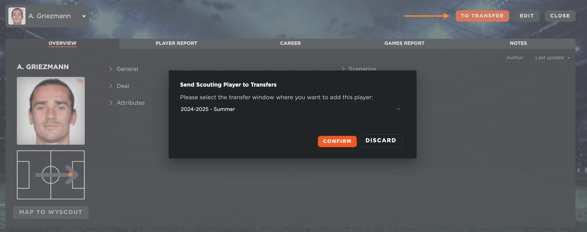
- Locate the **"To Transfers"** button in the top-right corner and select it.
3. **Choose the Transfer Window**
- A prompt will ask you to **select the transfer window** to which you want to send the player.
- Confirm your selection to proceed.
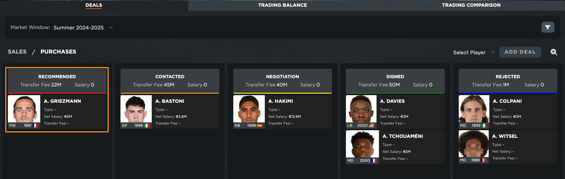
4. **Player Added to Transfers**
- The player will now automatically appear in the selected **transfer window** as a recommended deal.
This feature streamlines the process of moving scouted players into transfer negotiations, making it easier to manage potential signings efficiently.
- [What's New](https://support.iterpro.com/en/guide/whats-new?hsLang=en)
- [Quick Onboarding](https://support.iterpro.com/en/guide/quick-onboarding?hsLang=en)
- [Account set-up and other](https://support.iterpro.com/en/guide/account-set-up-and-other?hsLang=en#main-content)
- [Login & Iterpro overview](https://support.iterpro.com/en/guide/account-set-up-and-other?hsLang=en#login-iterpro-overview)
- [Settings](https://support.iterpro.com/en/guide/account-set-up-and-other?hsLang=en#settings)
- [Create, archive and delete players](https://support.iterpro.com/en/guide/account-set-up-and-other?hsLang=en#create-archive-and-delete-players)
- [Other](https://support.iterpro.com/en/guide/account-set-up-and-other?hsLang=en#other)
- [Manager](https://support.iterpro.com/en/guide/manager?hsLang=en#main-content)
- [Tactics](https://support.iterpro.com/en/guide/manager?hsLang=en#tactics)
- [Planning](https://support.iterpro.com/en/guide/manager?hsLang=en#planning)
- [Videogallery](https://support.iterpro.com/en/guide/manager?hsLang=en#videogallery)
- [Drills](https://support.iterpro.com/en/guide/manager?hsLang=en#drills)
- [Attendances](https://support.iterpro.com/en/guide/manager?hsLang=en#attendances)
- [Performance](https://support.iterpro.com/en/guide/performance?hsLang=en#main-content)
- [Session Analysis](https://support.iterpro.com/en/guide/performance?hsLang=en#session-analysis)
- [Workload Analysis](https://support.iterpro.com/en/guide/performance?hsLang=en#workload-analysis)
- [Assessments](https://support.iterpro.com/en/guide/performance?hsLang=en#assessments)
- [Readiness](https://support.iterpro.com/en/guide/performance?hsLang=en#readiness)
- [Medical](https://support.iterpro.com/en/guide/medical?hsLang=en#main-content)
- [Medical Records](https://support.iterpro.com/en/guide/medical?hsLang=en#medical-records)
- [Infirmary](https://support.iterpro.com/en/guide/medical?hsLang=en#infirmary)
- [Examinations](https://support.iterpro.com/en/guide/medical?hsLang=en#examinations)
- [Medical Statistics](https://support.iterpro.com/en/guide/medical?hsLang=en#medical-statistics)
- [Player](https://support.iterpro.com/en/guide/player?hsLang=en#main-content)
- [My Team](https://support.iterpro.com/en/guide/player?hsLang=en#my-team)
- [Scouting](https://support.iterpro.com/en/guide/player?hsLang=en#scouting)
- [Transfers](https://support.iterpro.com/en/guide/player?hsLang=en#transfers)
- [Administration](https://support.iterpro.com/en/guide/administration?hsLang=en#main-content)
- [Squads](https://support.iterpro.com/en/guide/administration?hsLang=en#squads)
- [Finance Overview](https://support.iterpro.com/en/guide/administration?hsLang=en#finance-overview)
- [Bonus Tracking](https://support.iterpro.com/en/guide/administration?hsLang=en#bonus-tracking)
- [Cash Flow](https://support.iterpro.com/en/guide/administration?hsLang=en#cash-flow)
- [Transactions](https://support.iterpro.com/en/guide/administration?hsLang=en#transactions)
- [Registrations](https://support.iterpro.com/en/guide/administration?hsLang=en#registrations)
- [Mobile apps](https://support.iterpro.com/en/guide/mobile-apps?hsLang=en#main-content)
- [Player App](https://support.iterpro.com/en/guide/mobile-apps?hsLang=en#player-app)
- [Coach App](https://support.iterpro.com/en/guide/mobile-apps?hsLang=en#coach-app)
- [Director App](https://support.iterpro.com/en/guide/mobile-apps?hsLang=en#director-app)
- [Iterpro Login Page](https://app.iterpro.com/auth/login)
- [Contact Support](https://share.hsforms.com/1rE7NvsvuTIWBm7WQ1dhslQ1uo0p)
- [Terms & Conditions](https://www.iubenda.com/terms-and-conditions/53739842)
- [Privacy Policy](https://www.iubenda.com/privacy-policy/53739842)
[](https://iterpro.com/)
Copyright © 2025, Iterpro Support Team