---
title: How can I set the financial details of my club (Currency, Payment Frequency, VAT, Tax %)?
description: This article explains how you will be able to set up the different preferences that impact the Administration and Finance modules of the platform.
---
[Skip to content](https://support.iterpro.com/en/guide/how-can-i-set-the-financial-details-of-my-club-currency-payment-frequency-vat-tax#main-content)
- [English](https://support.iterpro.com/en/guide/how-can-i-set-the-financial-details-of-my-club-currency-payment-frequency-vat-tax)
- [Español](https://support.iterpro.com/es/guide/cómo-puedo-configurar-los-detalles-financieros-de-mi-club-moneda-frecuencia-de-pago-iva-tasa-de-impuesto)
- [Italiano](https://support.iterpro.com/it/guide/come-posso-impostare-i-dettagli-finanziari-del-mio-club-valuta-frequenza-di-pagamento-iva-tasso-fiscale)
- [Nederlands](https://support.iterpro.com/nl/guide/hoe-stel-ik-de-financiële-details-van-mijn-club-in-valuta-betalingsfrequentie-btw-belastingtarief)
- [العربية - مصر](https://support.iterpro.com/ar-eg/guide/كيف-يمكنني-إعداد-التفاصيل-المالية-لناديي-العملة-تكرار-الدفع-ضريبة-القيمة-المضافة-معدل-الضريبة)
- [日本語](https://support.iterpro.com/ja/guide/クラブの財務詳細通貨-支払い頻度-vat-税率を設定するには)
English
Show submenu for translations
[](https://app.iterpro.com/auth/login)
- [Iterpro Login Page](https://app.iterpro.com/auth/login)
- [Contact Support](https://share.hsforms.com/1rE7NvsvuTIWBm7WQ1dhslQ1uo0p)
Open main navigation
Close main navigation
- [Iterpro Login Page](https://app.iterpro.com/auth/login)
- [Contact Support](https://share.hsforms.com/1rE7NvsvuTIWBm7WQ1dhslQ1uo0p)
- - [English](https://support.iterpro.com/en/guide/how-can-i-set-the-financial-details-of-my-club-currency-payment-frequency-vat-tax)
- [Español](https://support.iterpro.com/es/guide/cómo-puedo-configurar-los-detalles-financieros-de-mi-club-moneda-frecuencia-de-pago-iva-tasa-de-impuesto)
- [Italiano](https://support.iterpro.com/it/guide/come-posso-impostare-i-dettagli-finanziari-del-mio-club-valuta-frequenza-di-pagamento-iva-tasso-fiscale)
- [Nederlands](https://support.iterpro.com/nl/guide/hoe-stel-ik-de-financiële-details-van-mijn-club-in-valuta-betalingsfrequentie-btw-belastingtarief)
- [العربية - مصر](https://support.iterpro.com/ar-eg/guide/كيف-يمكنني-إعداد-التفاصيل-المالية-لناديي-العملة-تكرار-الدفع-ضريبة-القيمة-المضافة-معدل-الضريبة)
- [日本語](https://support.iterpro.com/ja/guide/クラブの財務詳細通貨-支払い頻度-vat-税率を設定するには)
English
Show submenu for translations
How can we help you?
- There are no suggestions because the search field is empty.
1. [User Guide](https://support.iterpro.com/en/guide?hsLang=en)
2. [Administration](https://support.iterpro.com/en/guide/administration?hsLang=en)
3. [Finance Overview](https://support.iterpro.com/en/guide/administration?hsLang=en#finance-overview)
# How can I set the financial details of my club (Currency, Payment Frequency, VAT, Tax %)?
## This article explains how you will be able to set up the different preferences that impact the Administration and Finance modules of the platform.
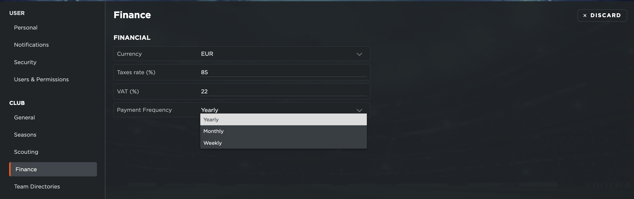
To set up your financial settings, navigate to the **Settings** section of your account and access the Club \> Finance tab. Here, you can customize the following:
- **Currency**: Select the preferred system of money to visualize and utilize within the platform.
- **Tax Rate & VAT %**: Define the percentage of tax applicable to your country. This ensures accurate calculations and simulations of net and gross values.
- **Payment Frequency**: Choose how contracts are structured—weekly, monthly, or yearly. Based on your selection, the system enables value input and calculates all financial details at that level of granularity.
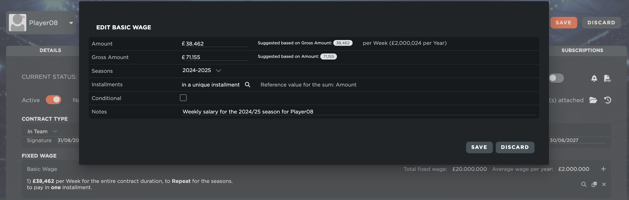
If you update the payment frequency after creating a contract, the system automatically converts previously entered values to align with the new selection. For example, if a yearly value is converted to weekly, it will be divided by 52 weeks to ensure consistency. This feature simplifies contract management and ensures accurate financial reporting based on your region and processes.
- [What's New](https://support.iterpro.com/en/guide/whats-new?hsLang=en)
- [Quick Onboarding](https://support.iterpro.com/en/guide/quick-onboarding?hsLang=en)
- [Account set-up and other](https://support.iterpro.com/en/guide/account-set-up-and-other?hsLang=en#main-content)
- [Login & Iterpro overview](https://support.iterpro.com/en/guide/account-set-up-and-other?hsLang=en#login-iterpro-overview)
- [Settings](https://support.iterpro.com/en/guide/account-set-up-and-other?hsLang=en#settings)
- [Create, archive and delete players](https://support.iterpro.com/en/guide/account-set-up-and-other?hsLang=en#create-archive-and-delete-players)
- [Other](https://support.iterpro.com/en/guide/account-set-up-and-other?hsLang=en#other)
- [Manager](https://support.iterpro.com/en/guide/manager?hsLang=en#main-content)
- [Tactics](https://support.iterpro.com/en/guide/manager?hsLang=en#tactics)
- [Planning](https://support.iterpro.com/en/guide/manager?hsLang=en#planning)
- [Videogallery](https://support.iterpro.com/en/guide/manager?hsLang=en#videogallery)
- [Drills](https://support.iterpro.com/en/guide/manager?hsLang=en#drills)
- [Attendances](https://support.iterpro.com/en/guide/manager?hsLang=en#attendances)
- [Performance](https://support.iterpro.com/en/guide/performance?hsLang=en#main-content)
- [Session Analysis](https://support.iterpro.com/en/guide/performance?hsLang=en#session-analysis)
- [Workload Analysis](https://support.iterpro.com/en/guide/performance?hsLang=en#workload-analysis)
- [Assessments](https://support.iterpro.com/en/guide/performance?hsLang=en#assessments)
- [Readiness](https://support.iterpro.com/en/guide/performance?hsLang=en#readiness)
- [Medical](https://support.iterpro.com/en/guide/medical?hsLang=en#main-content)
- [Medical Records](https://support.iterpro.com/en/guide/medical?hsLang=en#medical-records)
- [Infirmary](https://support.iterpro.com/en/guide/medical?hsLang=en#infirmary)
- [Examinations](https://support.iterpro.com/en/guide/medical?hsLang=en#examinations)
- [Medical Statistics](https://support.iterpro.com/en/guide/medical?hsLang=en#medical-statistics)
- [Player](https://support.iterpro.com/en/guide/player?hsLang=en#main-content)
- [My Team](https://support.iterpro.com/en/guide/player?hsLang=en#my-team)
- [Scouting](https://support.iterpro.com/en/guide/player?hsLang=en#scouting)
- [Transfers](https://support.iterpro.com/en/guide/player?hsLang=en#transfers)
- [Administration](https://support.iterpro.com/en/guide/administration?hsLang=en#main-content)
- [Squads](https://support.iterpro.com/en/guide/administration?hsLang=en#squads)
- [Finance Overview](https://support.iterpro.com/en/guide/administration?hsLang=en#finance-overview)
- [Bonus Tracking](https://support.iterpro.com/en/guide/administration?hsLang=en#bonus-tracking)
- [Cash Flow](https://support.iterpro.com/en/guide/administration?hsLang=en#cash-flow)
- [Transactions](https://support.iterpro.com/en/guide/administration?hsLang=en#transactions)
- [Registrations](https://support.iterpro.com/en/guide/administration?hsLang=en#registrations)
- [Mobile apps](https://support.iterpro.com/en/guide/mobile-apps?hsLang=en#main-content)
- [Player App](https://support.iterpro.com/en/guide/mobile-apps?hsLang=en#player-app)
- [Coach App](https://support.iterpro.com/en/guide/mobile-apps?hsLang=en#coach-app)
- [Director App](https://support.iterpro.com/en/guide/mobile-apps?hsLang=en#director-app)
- [Iterpro Login Page](https://app.iterpro.com/auth/login)
- [Contact Support](https://share.hsforms.com/1rE7NvsvuTIWBm7WQ1dhslQ1uo0p)
- [Terms & Conditions](https://www.iubenda.com/terms-and-conditions/53739842)
- [Privacy Policy](https://www.iubenda.com/privacy-policy/53739842)
[](https://iterpro.com/)
Copyright © 2025, Iterpro Support Team