---
title: How do I apply my active metrics to other users or teams?
description: Active notifications, Apply metrics, Your Metrics, Team Metrics, Iterpro features.
---
[Skip to content](https://support.iterpro.com/en/guide/how-do-i-apply-my-active-metrics-to-other-users-or-teams#main-content)
- [English](https://support.iterpro.com/en/guide/how-do-i-apply-my-active-metrics-to-other-users-or-teams)
- [Español](https://support.iterpro.com/es/guide/cómo-aplico-mis-métricas-activas-a-otros-usuarios)
- [Italiano](https://support.iterpro.com/it/guide/come-applico-le-mie-metriche-attive-ad-altri-utenti-o-squadre)
- [Nederlands](https://support.iterpro.com/nl/guide/hoe-pas-ik-mijn-actieve-statistieken-toe-op-andere-gebruikers)
- [العربية - مصر](https://support.iterpro.com/ar-eg/guide/كيف-أطبِق-مقياساتِي-النّشِطة-على-مستخدمين-آخرين)
- [日本語](https://support.iterpro.com/ja/guide/アクティブな指標を他のユーザーやチームに適用するには)
English
Show submenu for translations
[](https://app.iterpro.com/auth/login)
- [Iterpro Login Page](https://app.iterpro.com/auth/login)
- [Contact Support](https://share.hsforms.com/1rE7NvsvuTIWBm7WQ1dhslQ1uo0p)
Open main navigation
Close main navigation
- [Iterpro Login Page](https://app.iterpro.com/auth/login)
- [Contact Support](https://share.hsforms.com/1rE7NvsvuTIWBm7WQ1dhslQ1uo0p)
- - [English](https://support.iterpro.com/en/guide/how-do-i-apply-my-active-metrics-to-other-users-or-teams)
- [Español](https://support.iterpro.com/es/guide/cómo-aplico-mis-métricas-activas-a-otros-usuarios)
- [Italiano](https://support.iterpro.com/it/guide/come-applico-le-mie-metriche-attive-ad-altri-utenti-o-squadre)
- [Nederlands](https://support.iterpro.com/nl/guide/hoe-pas-ik-mijn-actieve-statistieken-toe-op-andere-gebruikers)
- [العربية - مصر](https://support.iterpro.com/ar-eg/guide/كيف-أطبِق-مقياساتِي-النّشِطة-على-مستخدمين-آخرين)
- [日本語](https://support.iterpro.com/ja/guide/アクティブな指標を他のユーザーやチームに適用するには)
English
Show submenu for translations
How can we help you?
- There are no suggestions because the search field is empty.
1. [User Guide](https://support.iterpro.com/en/guide?hsLang=en)
2. [Account set-up and other](https://support.iterpro.com/en/guide/account-set-up-and-other?hsLang=en)
3. [Settings](https://support.iterpro.com/en/guide/account-set-up-and-other?hsLang=en#settings)
# How do I apply my active metrics to other users or teams?
## Discover how to apply saved metrics to multiple users or teams.
Iterpro allows you to apply metrics of a user or team to multiple users or teams. There are different functionalities available for these operations:
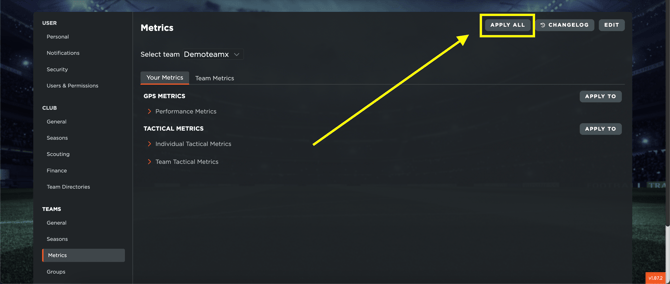
- **"APPLY ALL" in the Metrics section**:
This button, located in the top-right corner of the Metrics section, allows you to apply the saved metrics (both Your Metrics and Team Metrics) of the user performing the action to all users in all teams. Note that this functionality applies the metrics to the entire team and cannot target an individual user within a team. When selecting a team, the metrics will be applied to all users who have access to that team.
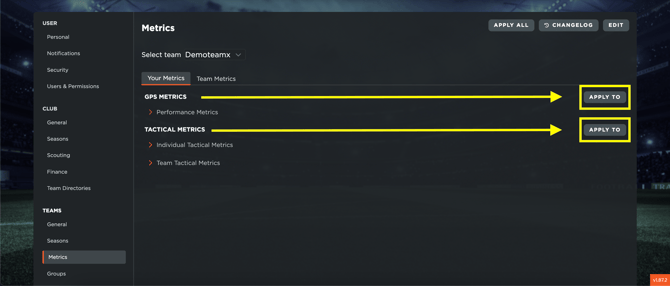
- **"APPLY TO" in the Your Metrics section**:
Use these buttons to apply your active metrics to one or more users across different teams. If a user has access to multiple teams, you can choose to apply the metrics for that user to specific teams only.
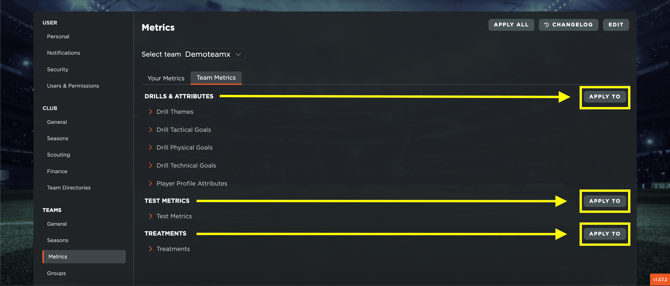
- **"APPLY TO" in the Team Metrics section**:
These buttons allow you to apply team metrics to all users in one or more teams. Remember that team metrics apply to the entire team and cannot be assigned to an individual user. Selecting a team will apply the metrics to all users who have access to that team.
- [What's New](https://support.iterpro.com/en/guide/whats-new?hsLang=en)
- [Quick Onboarding](https://support.iterpro.com/en/guide/quick-onboarding?hsLang=en)
- [Account set-up and other](https://support.iterpro.com/en/guide/account-set-up-and-other?hsLang=en#main-content)
- [Login & Iterpro overview](https://support.iterpro.com/en/guide/account-set-up-and-other?hsLang=en#login-iterpro-overview)
- [Settings](https://support.iterpro.com/en/guide/account-set-up-and-other?hsLang=en#settings)
- [Create, archive and delete players](https://support.iterpro.com/en/guide/account-set-up-and-other?hsLang=en#create-archive-and-delete-players)
- [Other](https://support.iterpro.com/en/guide/account-set-up-and-other?hsLang=en#other)
- [Manager](https://support.iterpro.com/en/guide/manager?hsLang=en#main-content)
- [Tactics](https://support.iterpro.com/en/guide/manager?hsLang=en#tactics)
- [Planning](https://support.iterpro.com/en/guide/manager?hsLang=en#planning)
- [Videogallery](https://support.iterpro.com/en/guide/manager?hsLang=en#videogallery)
- [Drills](https://support.iterpro.com/en/guide/manager?hsLang=en#drills)
- [Attendances](https://support.iterpro.com/en/guide/manager?hsLang=en#attendances)
- [Performance](https://support.iterpro.com/en/guide/performance?hsLang=en#main-content)
- [Session Analysis](https://support.iterpro.com/en/guide/performance?hsLang=en#session-analysis)
- [Workload Analysis](https://support.iterpro.com/en/guide/performance?hsLang=en#workload-analysis)
- [Assessments](https://support.iterpro.com/en/guide/performance?hsLang=en#assessments)
- [Readiness](https://support.iterpro.com/en/guide/performance?hsLang=en#readiness)
- [Medical](https://support.iterpro.com/en/guide/medical?hsLang=en#main-content)
- [Medical Records](https://support.iterpro.com/en/guide/medical?hsLang=en#medical-records)
- [Infirmary](https://support.iterpro.com/en/guide/medical?hsLang=en#infirmary)
- [Examinations](https://support.iterpro.com/en/guide/medical?hsLang=en#examinations)
- [Medical Statistics](https://support.iterpro.com/en/guide/medical?hsLang=en#medical-statistics)
- [Player](https://support.iterpro.com/en/guide/player?hsLang=en#main-content)
- [My Team](https://support.iterpro.com/en/guide/player?hsLang=en#my-team)
- [Scouting](https://support.iterpro.com/en/guide/player?hsLang=en#scouting)
- [Transfers](https://support.iterpro.com/en/guide/player?hsLang=en#transfers)
- [Administration](https://support.iterpro.com/en/guide/administration?hsLang=en#main-content)
- [Squads](https://support.iterpro.com/en/guide/administration?hsLang=en#squads)
- [Finance Overview](https://support.iterpro.com/en/guide/administration?hsLang=en#finance-overview)
- [Bonus Tracking](https://support.iterpro.com/en/guide/administration?hsLang=en#bonus-tracking)
- [Cash Flow](https://support.iterpro.com/en/guide/administration?hsLang=en#cash-flow)
- [Transactions](https://support.iterpro.com/en/guide/administration?hsLang=en#transactions)
- [Registrations](https://support.iterpro.com/en/guide/administration?hsLang=en#registrations)
- [Mobile apps](https://support.iterpro.com/en/guide/mobile-apps?hsLang=en#main-content)
- [Player App](https://support.iterpro.com/en/guide/mobile-apps?hsLang=en#player-app)
- [Coach App](https://support.iterpro.com/en/guide/mobile-apps?hsLang=en#coach-app)
- [Director App](https://support.iterpro.com/en/guide/mobile-apps?hsLang=en#director-app)
- [Iterpro Login Page](https://app.iterpro.com/auth/login)
- [Contact Support](https://share.hsforms.com/1rE7NvsvuTIWBm7WQ1dhslQ1uo0p)
- [Terms & Conditions](https://www.iubenda.com/terms-and-conditions/53739842)
- [Privacy Policy](https://www.iubenda.com/privacy-policy/53739842)
[](https://iterpro.com/)
Copyright © 2025, Iterpro Support Team