---
title: How do I change the email address for a user?
description: This article explains how to edit the email address for an already existing user. This operation can be done ONLY by an Admin user.
---
[Skip to content](https://support.iterpro.com/en/guide/how-do-i-change-the-email-address-for-a-user#main-content)
- [English](https://support.iterpro.com/en/guide/how-do-i-change-the-email-address-for-a-user)
- [Español](https://support.iterpro.com/es/guide/cómo-puedo-cambiar-la-dirección-de-correo-electrónico-de-un-usuario)
- [Italiano](https://support.iterpro.com/it/guide/come-posso-cambiare-lindirizzo-email-di-un-utente)
- [Nederlands](https://support.iterpro.com/nl/guide/hoe-kan-ik-het-e-mailadres-van-een-gebruiker-wijzigen)
- [العربية - مصر](https://support.iterpro.com/ar-eg/guide/كيف-يمكنني-تغيير-عنوان-البريد-الإلكتروني-لمستخدم)
- [日本語](https://support.iterpro.com/ja/guide/アクティブな通知を他のユーザーに適用するにはどうすればよいですか-1)
English
Show submenu for translations
[](https://app.iterpro.com/auth/login)
- [Iterpro Login Page](https://app.iterpro.com/auth/login)
- [Contact Support](https://share.hsforms.com/1rE7NvsvuTIWBm7WQ1dhslQ1uo0p)
Open main navigation
Close main navigation
- [Iterpro Login Page](https://app.iterpro.com/auth/login)
- [Contact Support](https://share.hsforms.com/1rE7NvsvuTIWBm7WQ1dhslQ1uo0p)
- - [English](https://support.iterpro.com/en/guide/how-do-i-change-the-email-address-for-a-user)
- [Español](https://support.iterpro.com/es/guide/cómo-puedo-cambiar-la-dirección-de-correo-electrónico-de-un-usuario)
- [Italiano](https://support.iterpro.com/it/guide/come-posso-cambiare-lindirizzo-email-di-un-utente)
- [Nederlands](https://support.iterpro.com/nl/guide/hoe-kan-ik-het-e-mailadres-van-een-gebruiker-wijzigen)
- [العربية - مصر](https://support.iterpro.com/ar-eg/guide/كيف-يمكنني-تغيير-عنوان-البريد-الإلكتروني-لمستخدم)
- [日本語](https://support.iterpro.com/ja/guide/アクティブな通知を他のユーザーに適用するにはどうすればよいですか-1)
English
Show submenu for translations
How can we help you?
- There are no suggestions because the search field is empty.
1. [User Guide](https://support.iterpro.com/en/guide?hsLang=en)
2. [Account set-up and other](https://support.iterpro.com/en/guide/account-set-up-and-other?hsLang=en)
3. [Login & Iterpro overview](https://support.iterpro.com/en/guide/account-set-up-and-other?hsLang=en#login-iterpro-overview)
# How do I change the email address for a user?
## This article explains how to edit the email address for an already existing user. This operation can be done ONLY by an Admin user.
When the email of a user must be changed, only an **Admin user** can do it, following the steps below (but not that our suggestion is always to delete the previous user and create a new one with the new email address):
- Access Settings - User - Users & Permissions
- Search for the user who needs to change the email address
- Click on the profile cell
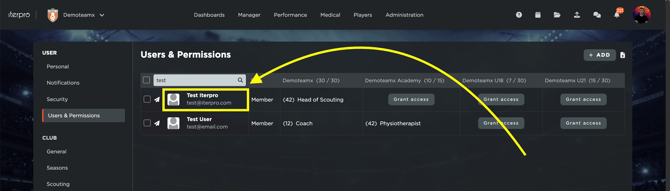
- Edit the email address
- Click on SAVE
Note that, once this operation has been done, no Welcome email needs to be sent and the selected user will now be able to login into Iterpro using the new email and the password previously stored.
- [What's New](https://support.iterpro.com/en/guide/whats-new?hsLang=en)
- [Quick Onboarding](https://support.iterpro.com/en/guide/quick-onboarding?hsLang=en)
- [Account set-up and other](https://support.iterpro.com/en/guide/account-set-up-and-other?hsLang=en#main-content)
- [Login & Iterpro overview](https://support.iterpro.com/en/guide/account-set-up-and-other?hsLang=en#login-iterpro-overview)
- [Settings](https://support.iterpro.com/en/guide/account-set-up-and-other?hsLang=en#settings)
- [Create, archive and delete players](https://support.iterpro.com/en/guide/account-set-up-and-other?hsLang=en#create-archive-and-delete-players)
- [Other](https://support.iterpro.com/en/guide/account-set-up-and-other?hsLang=en#other)
- [Manager](https://support.iterpro.com/en/guide/manager?hsLang=en#main-content)
- [Tactics](https://support.iterpro.com/en/guide/manager?hsLang=en#tactics)
- [Planning](https://support.iterpro.com/en/guide/manager?hsLang=en#planning)
- [Videogallery](https://support.iterpro.com/en/guide/manager?hsLang=en#videogallery)
- [Drills](https://support.iterpro.com/en/guide/manager?hsLang=en#drills)
- [Attendances](https://support.iterpro.com/en/guide/manager?hsLang=en#attendances)
- [Performance](https://support.iterpro.com/en/guide/performance?hsLang=en#main-content)
- [Session Analysis](https://support.iterpro.com/en/guide/performance?hsLang=en#session-analysis)
- [Workload Analysis](https://support.iterpro.com/en/guide/performance?hsLang=en#workload-analysis)
- [Assessments](https://support.iterpro.com/en/guide/performance?hsLang=en#assessments)
- [Readiness](https://support.iterpro.com/en/guide/performance?hsLang=en#readiness)
- [Medical](https://support.iterpro.com/en/guide/medical?hsLang=en#main-content)
- [Medical Records](https://support.iterpro.com/en/guide/medical?hsLang=en#medical-records)
- [Infirmary](https://support.iterpro.com/en/guide/medical?hsLang=en#infirmary)
- [Examinations](https://support.iterpro.com/en/guide/medical?hsLang=en#examinations)
- [Medical Statistics](https://support.iterpro.com/en/guide/medical?hsLang=en#medical-statistics)
- [Player](https://support.iterpro.com/en/guide/player?hsLang=en#main-content)
- [My Team](https://support.iterpro.com/en/guide/player?hsLang=en#my-team)
- [Scouting](https://support.iterpro.com/en/guide/player?hsLang=en#scouting)
- [Transfers](https://support.iterpro.com/en/guide/player?hsLang=en#transfers)
- [Administration](https://support.iterpro.com/en/guide/administration?hsLang=en#main-content)
- [Squads](https://support.iterpro.com/en/guide/administration?hsLang=en#squads)
- [Finance Overview](https://support.iterpro.com/en/guide/administration?hsLang=en#finance-overview)
- [Bonus Tracking](https://support.iterpro.com/en/guide/administration?hsLang=en#bonus-tracking)
- [Cash Flow](https://support.iterpro.com/en/guide/administration?hsLang=en#cash-flow)
- [Transactions](https://support.iterpro.com/en/guide/administration?hsLang=en#transactions)
- [Registrations](https://support.iterpro.com/en/guide/administration?hsLang=en#registrations)
- [Mobile apps](https://support.iterpro.com/en/guide/mobile-apps?hsLang=en#main-content)
- [Player App](https://support.iterpro.com/en/guide/mobile-apps?hsLang=en#player-app)
- [Coach App](https://support.iterpro.com/en/guide/mobile-apps?hsLang=en#coach-app)
- [Director App](https://support.iterpro.com/en/guide/mobile-apps?hsLang=en#director-app)
- [Iterpro Login Page](https://app.iterpro.com/auth/login)
- [Contact Support](https://share.hsforms.com/1rE7NvsvuTIWBm7WQ1dhslQ1uo0p)
- [Terms & Conditions](https://www.iubenda.com/terms-and-conditions/53739842)
- [Privacy Policy](https://www.iubenda.com/privacy-policy/53739842)
[](https://iterpro.com/)
Copyright © 2025, Iterpro Support Team