---
title: How do I create groups for my team players?
description: This article showcases how you can create groups of your players, which will allow you to visualize the grouped profile's data in the different sections of the platform.
---
[Skip to content](https://support.iterpro.com/en/guide/how-do-i-create-groups-for-my-team-players#main-content)
- [English](https://support.iterpro.com/en/guide/how-do-i-create-groups-for-my-team-players)
- [Español](https://support.iterpro.com/es/guide/cómo-crear-grupos-para-los-jugadores-de-tu-equipo)
- [Italiano](https://support.iterpro.com/it/guide/come-creare-gruppi-per-i-giocatori-della-tua-squadra)
- [Nederlands](https://support.iterpro.com/nl/guide/hoe-maak-je-groepen-voor-je-teamspelers-aan)
- [العربية - مصر](https://support.iterpro.com/ar-eg/guide/كيف-تنشئ-مجموعات-للاعبي-فريقك)
- [日本語](https://support.iterpro.com/ja/guide/チームの選手グループを作成するにはどうすればよいですか)
English
Show submenu for translations
[](https://app.iterpro.com/auth/login)
- [Iterpro Login Page](https://app.iterpro.com/auth/login)
- [Contact Support](https://share.hsforms.com/1rE7NvsvuTIWBm7WQ1dhslQ1uo0p)
Open main navigation
Close main navigation
- [Iterpro Login Page](https://app.iterpro.com/auth/login)
- [Contact Support](https://share.hsforms.com/1rE7NvsvuTIWBm7WQ1dhslQ1uo0p)
- - [English](https://support.iterpro.com/en/guide/how-do-i-create-groups-for-my-team-players)
- [Español](https://support.iterpro.com/es/guide/cómo-crear-grupos-para-los-jugadores-de-tu-equipo)
- [Italiano](https://support.iterpro.com/it/guide/come-creare-gruppi-per-i-giocatori-della-tua-squadra)
- [Nederlands](https://support.iterpro.com/nl/guide/hoe-maak-je-groepen-voor-je-teamspelers-aan)
- [العربية - مصر](https://support.iterpro.com/ar-eg/guide/كيف-تنشئ-مجموعات-للاعبي-فريقك)
- [日本語](https://support.iterpro.com/ja/guide/チームの選手グループを作成するにはどうすればよいですか)
English
Show submenu for translations
How can we help you?
- There are no suggestions because the search field is empty.
1. [User Guide](https://support.iterpro.com/en/guide?hsLang=en)
2. [Account set-up and other](https://support.iterpro.com/en/guide/account-set-up-and-other?hsLang=en)
3. [Settings](https://support.iterpro.com/en/guide/account-set-up-and-other?hsLang=en#settings)
# How do I create groups for my team players?
## This article showcases how you can create groups of your players, which allows you to visualize the grouped profile's data in the different sections of the platform.
To create groups within your teams in Iterpro, navigate to **Settings \> Teams \> Groups**. This section allows you to customize and manage groups with the players you choose. For example, you can create a group called “TEAM” and include specific players based on your needs.
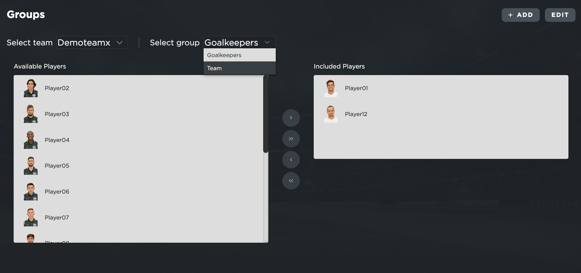
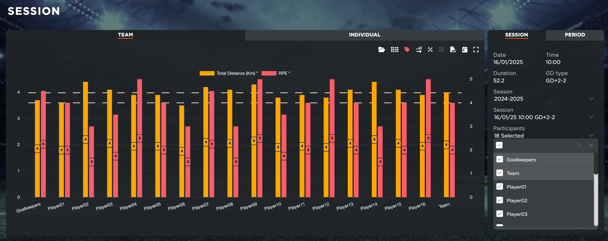
Creating groups offers powerful benefits: you can view and analyze data for grouped profiles. This feature enables you to generate average metrics calculation for your groups across key areas, including **Session Analysis**, **Workload Analysis**, and **Stats Analysis**.
By grouping players, you can efficiently track performance trends, compare workloads, and gain deeper insights into your team’s overall progress. Whether you’re managing sub-teams, positions, or special units, this functionality ensures you have the flexibility and data you need to make informed decisions.
- [What's New](https://support.iterpro.com/en/guide/whats-new?hsLang=en)
- [Quick Onboarding](https://support.iterpro.com/en/guide/quick-onboarding?hsLang=en)
- [Account set-up and other](https://support.iterpro.com/en/guide/account-set-up-and-other?hsLang=en#main-content)
- [Login & Iterpro overview](https://support.iterpro.com/en/guide/account-set-up-and-other?hsLang=en#login-iterpro-overview)
- [Settings](https://support.iterpro.com/en/guide/account-set-up-and-other?hsLang=en#settings)
- [Create, archive and delete players](https://support.iterpro.com/en/guide/account-set-up-and-other?hsLang=en#create-archive-and-delete-players)
- [Other](https://support.iterpro.com/en/guide/account-set-up-and-other?hsLang=en#other)
- [Manager](https://support.iterpro.com/en/guide/manager?hsLang=en#main-content)
- [Tactics](https://support.iterpro.com/en/guide/manager?hsLang=en#tactics)
- [Planning](https://support.iterpro.com/en/guide/manager?hsLang=en#planning)
- [Videogallery](https://support.iterpro.com/en/guide/manager?hsLang=en#videogallery)
- [Drills](https://support.iterpro.com/en/guide/manager?hsLang=en#drills)
- [Attendances](https://support.iterpro.com/en/guide/manager?hsLang=en#attendances)
- [Performance](https://support.iterpro.com/en/guide/performance?hsLang=en#main-content)
- [Session Analysis](https://support.iterpro.com/en/guide/performance?hsLang=en#session-analysis)
- [Workload Analysis](https://support.iterpro.com/en/guide/performance?hsLang=en#workload-analysis)
- [Assessments](https://support.iterpro.com/en/guide/performance?hsLang=en#assessments)
- [Readiness](https://support.iterpro.com/en/guide/performance?hsLang=en#readiness)
- [Medical](https://support.iterpro.com/en/guide/medical?hsLang=en#main-content)
- [Medical Records](https://support.iterpro.com/en/guide/medical?hsLang=en#medical-records)
- [Infirmary](https://support.iterpro.com/en/guide/medical?hsLang=en#infirmary)
- [Examinations](https://support.iterpro.com/en/guide/medical?hsLang=en#examinations)
- [Medical Statistics](https://support.iterpro.com/en/guide/medical?hsLang=en#medical-statistics)
- [Player](https://support.iterpro.com/en/guide/player?hsLang=en#main-content)
- [My Team](https://support.iterpro.com/en/guide/player?hsLang=en#my-team)
- [Scouting](https://support.iterpro.com/en/guide/player?hsLang=en#scouting)
- [Transfers](https://support.iterpro.com/en/guide/player?hsLang=en#transfers)
- [Administration](https://support.iterpro.com/en/guide/administration?hsLang=en#main-content)
- [Squads](https://support.iterpro.com/en/guide/administration?hsLang=en#squads)
- [Finance Overview](https://support.iterpro.com/en/guide/administration?hsLang=en#finance-overview)
- [Bonus Tracking](https://support.iterpro.com/en/guide/administration?hsLang=en#bonus-tracking)
- [Cash Flow](https://support.iterpro.com/en/guide/administration?hsLang=en#cash-flow)
- [Transactions](https://support.iterpro.com/en/guide/administration?hsLang=en#transactions)
- [Registrations](https://support.iterpro.com/en/guide/administration?hsLang=en#registrations)
- [Mobile apps](https://support.iterpro.com/en/guide/mobile-apps?hsLang=en#main-content)
- [Player App](https://support.iterpro.com/en/guide/mobile-apps?hsLang=en#player-app)
- [Coach App](https://support.iterpro.com/en/guide/mobile-apps?hsLang=en#coach-app)
- [Director App](https://support.iterpro.com/en/guide/mobile-apps?hsLang=en#director-app)
- [Iterpro Login Page](https://app.iterpro.com/auth/login)
- [Contact Support](https://share.hsforms.com/1rE7NvsvuTIWBm7WQ1dhslQ1uo0p)
- [Terms & Conditions](https://www.iubenda.com/terms-and-conditions/53739842)
- [Privacy Policy](https://www.iubenda.com/privacy-policy/53739842)
[](https://iterpro.com/)
Copyright © 2025, Iterpro Support Team