---
title: How do I create recurring events for my entire season?
description: This article explains how you can create recurring events in your calendar so that you can manage your entire season's schedule.
---
[Skip to content](https://support.iterpro.com/en/guide/how-do-i-create-recurring-events-for-my-entire-season#main-content)
- [English](https://support.iterpro.com/en/guide/how-do-i-create-recurring-events-for-my-entire-season)
- [Español](https://support.iterpro.com/es/guide/cómo-puedo-crear-eventos-recurrentes-para-toda-mi-temporada)
- [Italiano](https://support.iterpro.com/it/guide/come-posso-creare-eventi-ricorrenti-per-lintera-stagione)
- [Nederlands](https://support.iterpro.com/nl/guide/hoe-kan-ik-terugkerende-evenementen-maken-voor-mijn-hele-seizoen)
- [العربية - مصر](https://support.iterpro.com/ar-eg/guide/كيف-يمكنني-إنشاء-أحداث-متكررة-لموسمي-بالكامل)
- [日本語](https://support.iterpro.com/ja/guide/シーズン全体の定期的なイベントを作成するには)
English
Show submenu for translations
[](https://app.iterpro.com/auth/login)
- [Iterpro Login Page](https://app.iterpro.com/auth/login)
- [Contact Support](https://share.hsforms.com/1rE7NvsvuTIWBm7WQ1dhslQ1uo0p)
Open main navigation
Close main navigation
- [Iterpro Login Page](https://app.iterpro.com/auth/login)
- [Contact Support](https://share.hsforms.com/1rE7NvsvuTIWBm7WQ1dhslQ1uo0p)
- - [English](https://support.iterpro.com/en/guide/how-do-i-create-recurring-events-for-my-entire-season)
- [Español](https://support.iterpro.com/es/guide/cómo-puedo-crear-eventos-recurrentes-para-toda-mi-temporada)
- [Italiano](https://support.iterpro.com/it/guide/come-posso-creare-eventi-ricorrenti-per-lintera-stagione)
- [Nederlands](https://support.iterpro.com/nl/guide/hoe-kan-ik-terugkerende-evenementen-maken-voor-mijn-hele-seizoen)
- [العربية - مصر](https://support.iterpro.com/ar-eg/guide/كيف-يمكنني-إنشاء-أحداث-متكررة-لموسمي-بالكامل)
- [日本語](https://support.iterpro.com/ja/guide/シーズン全体の定期的なイベントを作成するには)
English
Show submenu for translations
How can we help you?
- There are no suggestions because the search field is empty.
1. [User Guide](https://support.iterpro.com/en/guide?hsLang=en)
2. [Manager](https://support.iterpro.com/en/guide/manager?hsLang=en)
3. [Planning](https://support.iterpro.com/en/guide/manager?hsLang=en#planning)
# How do I create recurring events for my entire season?
## This article explains how you can create recurring events in your calendar so that you can manage your entire season's schedule.
You can create all of your calendar events with a desired recurrence. Simply create a regular event from the planning calendar, and within it, you will find the 'Repeat' options.
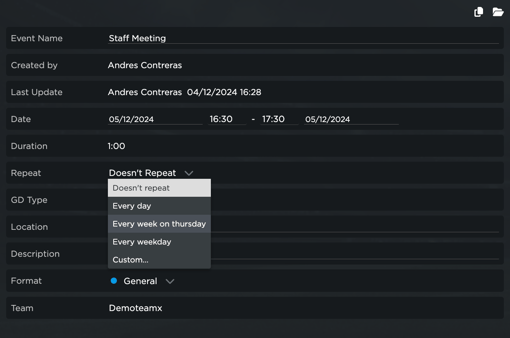
The event recurrences can go as follows:
- Doesn't Repeat
- Every day
- Every week on " " (based on the day you are creating the event)
- Every weekday
- Custom (where you can select a custom recurrence and completely personalize how your events repeat and when they end)
-2.png?width=528&height=303&name=unnamed%20(2)-2.png)
After you have selected the desired recurrence, you will have to save and automatically all of the events will be created in your calendar. Keep in mind that the more events the system has to create, the more time it will take to finish loading.
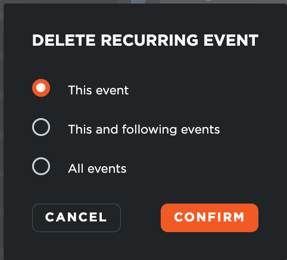
All of the events (future and past) and be edited or deleted, and the system will ask you if you wish to edit the current, future, or all events.
- [What's New](https://support.iterpro.com/en/guide/whats-new?hsLang=en)
- [Quick Onboarding](https://support.iterpro.com/en/guide/quick-onboarding?hsLang=en)
- [Account set-up and other](https://support.iterpro.com/en/guide/account-set-up-and-other?hsLang=en#main-content)
- [Login & Iterpro overview](https://support.iterpro.com/en/guide/account-set-up-and-other?hsLang=en#login-iterpro-overview)
- [Settings](https://support.iterpro.com/en/guide/account-set-up-and-other?hsLang=en#settings)
- [Create, archive and delete players](https://support.iterpro.com/en/guide/account-set-up-and-other?hsLang=en#create-archive-and-delete-players)
- [Other](https://support.iterpro.com/en/guide/account-set-up-and-other?hsLang=en#other)
- [Manager](https://support.iterpro.com/en/guide/manager?hsLang=en#main-content)
- [Tactics](https://support.iterpro.com/en/guide/manager?hsLang=en#tactics)
- [Planning](https://support.iterpro.com/en/guide/manager?hsLang=en#planning)
- [Videogallery](https://support.iterpro.com/en/guide/manager?hsLang=en#videogallery)
- [Drills](https://support.iterpro.com/en/guide/manager?hsLang=en#drills)
- [Attendances](https://support.iterpro.com/en/guide/manager?hsLang=en#attendances)
- [Performance](https://support.iterpro.com/en/guide/performance?hsLang=en#main-content)
- [Session Analysis](https://support.iterpro.com/en/guide/performance?hsLang=en#session-analysis)
- [Workload Analysis](https://support.iterpro.com/en/guide/performance?hsLang=en#workload-analysis)
- [Assessments](https://support.iterpro.com/en/guide/performance?hsLang=en#assessments)
- [Readiness](https://support.iterpro.com/en/guide/performance?hsLang=en#readiness)
- [Medical](https://support.iterpro.com/en/guide/medical?hsLang=en#main-content)
- [Medical Records](https://support.iterpro.com/en/guide/medical?hsLang=en#medical-records)
- [Infirmary](https://support.iterpro.com/en/guide/medical?hsLang=en#infirmary)
- [Examinations](https://support.iterpro.com/en/guide/medical?hsLang=en#examinations)
- [Medical Statistics](https://support.iterpro.com/en/guide/medical?hsLang=en#medical-statistics)
- [Player](https://support.iterpro.com/en/guide/player?hsLang=en#main-content)
- [My Team](https://support.iterpro.com/en/guide/player?hsLang=en#my-team)
- [Scouting](https://support.iterpro.com/en/guide/player?hsLang=en#scouting)
- [Transfers](https://support.iterpro.com/en/guide/player?hsLang=en#transfers)
- [Administration](https://support.iterpro.com/en/guide/administration?hsLang=en#main-content)
- [Squads](https://support.iterpro.com/en/guide/administration?hsLang=en#squads)
- [Finance Overview](https://support.iterpro.com/en/guide/administration?hsLang=en#finance-overview)
- [Bonus Tracking](https://support.iterpro.com/en/guide/administration?hsLang=en#bonus-tracking)
- [Cash Flow](https://support.iterpro.com/en/guide/administration?hsLang=en#cash-flow)
- [Transactions](https://support.iterpro.com/en/guide/administration?hsLang=en#transactions)
- [Registrations](https://support.iterpro.com/en/guide/administration?hsLang=en#registrations)
- [Mobile apps](https://support.iterpro.com/en/guide/mobile-apps?hsLang=en#main-content)
- [Player App](https://support.iterpro.com/en/guide/mobile-apps?hsLang=en#player-app)
- [Coach App](https://support.iterpro.com/en/guide/mobile-apps?hsLang=en#coach-app)
- [Director App](https://support.iterpro.com/en/guide/mobile-apps?hsLang=en#director-app)
- [Iterpro Login Page](https://app.iterpro.com/auth/login)
- [Contact Support](https://share.hsforms.com/1rE7NvsvuTIWBm7WQ1dhslQ1uo0p)
- [Terms & Conditions](https://www.iubenda.com/terms-and-conditions/53739842)
- [Privacy Policy](https://www.iubenda.com/privacy-policy/53739842)
[](https://iterpro.com/)
Copyright © 2025, Iterpro Support Team