---
title: What are the Advanced analysis within Session Analysis?
description: This article explains that the RPE values submitted from the PlayerApp or manually and displayed in Assessments, are automatically considered in the WL Score calculation. Acute Chronic Ratio EWMA Strain Monotony Training Stress Balance
---
[Skip to content](https://support.iterpro.com/en/guide/how-do-i-display-advance-analysis-in-session-analysis#main-content)
- [English](https://support.iterpro.com/en/guide/how-do-i-display-advance-analysis-in-session-analysis)
- [日本語](https://support.iterpro.com/ja/guide/session-analysis-で高度な分析を表示する方法)
English
Show submenu for translations
[](https://app.iterpro.com/auth/login)
- [Iterpro Login Page](https://app.iterpro.com/auth/login)
- [Contact Support](https://share.hsforms.com/1rE7NvsvuTIWBm7WQ1dhslQ1uo0p)
Open main navigation
Close main navigation
- [Iterpro Login Page](https://app.iterpro.com/auth/login)
- [Contact Support](https://share.hsforms.com/1rE7NvsvuTIWBm7WQ1dhslQ1uo0p)
- - [English](https://support.iterpro.com/en/guide/how-do-i-display-advance-analysis-in-session-analysis)
- [日本語](https://support.iterpro.com/ja/guide/session-analysis-で高度な分析を表示する方法)
English
Show submenu for translations
How can we help you?
- There are no suggestions because the search field is empty.
1. [User Guide](https://support.iterpro.com/en/guide?hsLang=en)
2. [Performance](https://support.iterpro.com/en/guide/performance?hsLang=en)
3. [Session Analysis](https://support.iterpro.com/en/guide/performance?hsLang=en#session-analysis)
# What are the Advanced analysis within Session Analysis?
## This article explains how, when and where advanced analyses are displayed in the Session analysis screens and what they are.
The advanced metrics are:
- ACWL: Ratio between the Acute and the Chronic workload
**Formula**: Acute Load / Chronic Load
- Monotony: Load variation within the week
**Formula**: Acute Load / Standard Deviation of the Acute Load
- Strain: Overall stress produced by the load over the week
**Formula**: Sum Acute Load \* (Acute Load / Std. Dev. of the Acute Load)
- Training Stress Balance: The difference between the chronic workload and the acute workload
**Formula**: EWMA Chronic Load - EWMA Acute Load
- AL/CL EWMA: Ratio between the acute and chronic workload with more weighting on the more recent workload undertaken by the athlete.
**Formulas**:
- PlayerEWMA\_AL = Session Value \* Lambda\_AcuteLoad + (1- Lambda\_Acute Load) \* Value EWMA\_AcuteLoad of previous day
- EWMA\_CL = Session Value \* Lambda\_Chronic Load + (1- Lambda\_Chronic Load) \* Value EWMA\_Chronic Load of previous day
- Lambda\_AL = 0.25
- Lambda\_CL = 0.06896
- EWMA = PlayerEWMA\_AL / PlayerEWMA\_CL
In Session analysis, the user can display such metrics **ONLY for the DEFAULT METRICS** (the ones with the \*), by following the steps below:
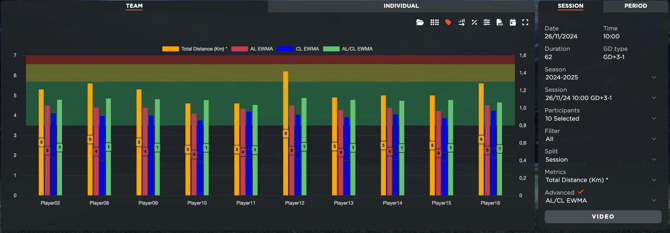
- Access Session Analysis - Session - Team
- Select 1 Default Metric from the Metrics dropdown
- Select the desired Advanced Metric from the dropdown
- The stats will be displayed for all the selected players
Or:
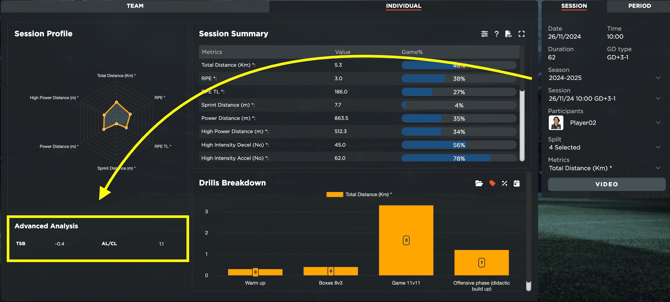
- Access Session Analysis - Session - Individual
- Select 1 Default Metric from the Metrics dropdown
- The stats will be displayed in the box below the radar chart
- [What's New](https://support.iterpro.com/en/guide/whats-new?hsLang=en)
- [Quick Onboarding](https://support.iterpro.com/en/guide/quick-onboarding?hsLang=en)
- [Account set-up and other](https://support.iterpro.com/en/guide/account-set-up-and-other?hsLang=en#main-content)
- [Login & Iterpro overview](https://support.iterpro.com/en/guide/account-set-up-and-other?hsLang=en#login-iterpro-overview)
- [Settings](https://support.iterpro.com/en/guide/account-set-up-and-other?hsLang=en#settings)
- [Create, archive and delete players](https://support.iterpro.com/en/guide/account-set-up-and-other?hsLang=en#create-archive-and-delete-players)
- [Other](https://support.iterpro.com/en/guide/account-set-up-and-other?hsLang=en#other)
- [Manager](https://support.iterpro.com/en/guide/manager?hsLang=en#main-content)
- [Tactics](https://support.iterpro.com/en/guide/manager?hsLang=en#tactics)
- [Planning](https://support.iterpro.com/en/guide/manager?hsLang=en#planning)
- [Videogallery](https://support.iterpro.com/en/guide/manager?hsLang=en#videogallery)
- [Drills](https://support.iterpro.com/en/guide/manager?hsLang=en#drills)
- [Attendances](https://support.iterpro.com/en/guide/manager?hsLang=en#attendances)
- [Performance](https://support.iterpro.com/en/guide/performance?hsLang=en#main-content)
- [Session Analysis](https://support.iterpro.com/en/guide/performance?hsLang=en#session-analysis)
- [Workload Analysis](https://support.iterpro.com/en/guide/performance?hsLang=en#workload-analysis)
- [Assessments](https://support.iterpro.com/en/guide/performance?hsLang=en#assessments)
- [Readiness](https://support.iterpro.com/en/guide/performance?hsLang=en#readiness)
- [Medical](https://support.iterpro.com/en/guide/medical?hsLang=en#main-content)
- [Medical Records](https://support.iterpro.com/en/guide/medical?hsLang=en#medical-records)
- [Infirmary](https://support.iterpro.com/en/guide/medical?hsLang=en#infirmary)
- [Examinations](https://support.iterpro.com/en/guide/medical?hsLang=en#examinations)
- [Medical Statistics](https://support.iterpro.com/en/guide/medical?hsLang=en#medical-statistics)
- [Player](https://support.iterpro.com/en/guide/player?hsLang=en#main-content)
- [My Team](https://support.iterpro.com/en/guide/player?hsLang=en#my-team)
- [Scouting](https://support.iterpro.com/en/guide/player?hsLang=en#scouting)
- [Transfers](https://support.iterpro.com/en/guide/player?hsLang=en#transfers)
- [Administration](https://support.iterpro.com/en/guide/administration?hsLang=en#main-content)
- [Squads](https://support.iterpro.com/en/guide/administration?hsLang=en#squads)
- [Finance Overview](https://support.iterpro.com/en/guide/administration?hsLang=en#finance-overview)
- [Bonus Tracking](https://support.iterpro.com/en/guide/administration?hsLang=en#bonus-tracking)
- [Cash Flow](https://support.iterpro.com/en/guide/administration?hsLang=en#cash-flow)
- [Transactions](https://support.iterpro.com/en/guide/administration?hsLang=en#transactions)
- [Registrations](https://support.iterpro.com/en/guide/administration?hsLang=en#registrations)
- [Mobile apps](https://support.iterpro.com/en/guide/mobile-apps?hsLang=en#main-content)
- [Player App](https://support.iterpro.com/en/guide/mobile-apps?hsLang=en#player-app)
- [Coach App](https://support.iterpro.com/en/guide/mobile-apps?hsLang=en#coach-app)
- [Director App](https://support.iterpro.com/en/guide/mobile-apps?hsLang=en#director-app)
- [Iterpro Login Page](https://app.iterpro.com/auth/login)
- [Contact Support](https://share.hsforms.com/1rE7NvsvuTIWBm7WQ1dhslQ1uo0p)
- [Terms & Conditions](https://www.iubenda.com/terms-and-conditions/53739842)
- [Privacy Policy](https://www.iubenda.com/privacy-policy/53739842)
[](https://iterpro.com/)
Copyright © 2025, Iterpro Support Team