In any sport, athletes face different seasons (which may last 1, 2 or 3 years). That's why, in Iterpro, the ADMIN users can set the seasons for each team. This operation can be done in: Settings - Team - Seasons. While accessing this screen, in the top-right corner, the user can select the team, in the top-left corner can add new seasons and, in the middle of the screen, all the existing seasons are displayed.
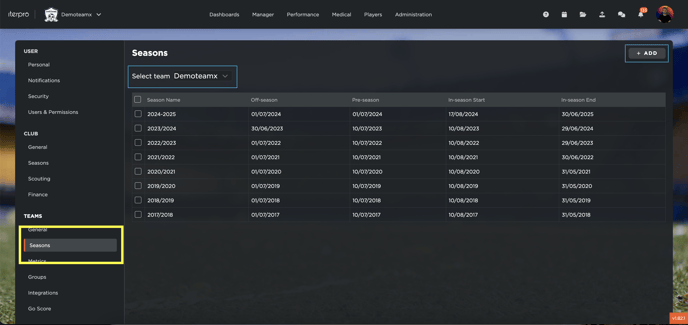
Add new season
By clicking on the "+ ADD" button, the system displays a new box where the user can fill in all the needed information (note that you can copy the data from a previous season to speed up the process):
- Season name: name of the current season,
- Off-season: the date when the off-season period between the past and the current one starts,
- Pre-season: first day of training of the current season (if the user does not know it yet, he/she can add a hypothetical day),
- In-season start: date of the first competition game of the current season (if the user does not know it yet, he/she can add a hypothetical day),
- In-season end: last day of the current season,
- Club season: link the current season with the club's financial season.
Furthermore, 3 tabs are displayed:
- Competitions: where the following fields need to be filled:
- Geographical area: it's a way to filter the competitions in the next field based on the location (e.g.: Italy -> Serie A, England -> Premier League, Europe -> Uefa Champions League),
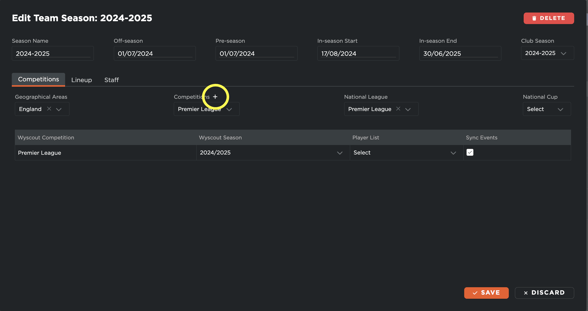
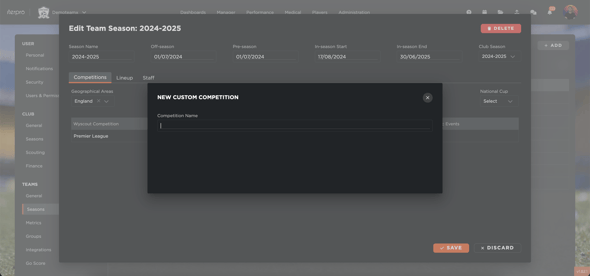
- Competitions: all the competitions for the selected area(s) are displayed. You can select the ones your team will attend during the current season. The user can also create a custom competition (by clicking on the + button), in case the tactical provider does not cover the one he/she needs to select:
-
- National League: select the national league between the selected competitions (not mandatory),
- National Cup: select the national cup between the selected competitions (not mandatory),
- Additional info for each competition selected: in the main tab of the screen, all the selected competitions are displayed. For each one, the user can: link the current season with the provider's one (in case it's not created by the user), set the player list (players from the lineup included in the list for this competition. NOTE THAT IF A PLAYER IS NOT SELECTED FROM THIS MENÙ, THE USER CAN'T SET HIM/HER AS PARTICIPANT FOR THE RELATED GAMES. Of course, the lineup needs to be set first) and sync the events (the system automatically creates the events in the Calendar if the competition is linked with the tactical provider, such as Wyscout).
- Lineup: select the players included in the current season (from the ones already created from Administration - Squads). Note that if you can't find a player, check always first if he/she is archived and, in case, activate him/her. We suggest including any athlete the team tracks or monitors for the current season, even if he/she does only a few trainings or only individuals. The user will be able to archive him/her when will not be with the team anymore.
- Staff: the same procedure needs to be done for the staff members.
Edit an already existing season
Whenever the user needs to edit the info about a season already created, he/she can just click on the desired raw and change the data:
Delete a season
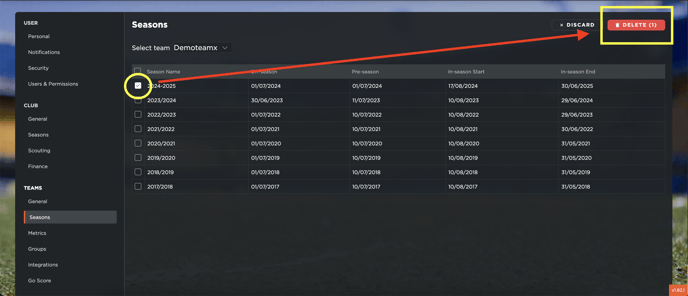
Whenever the user needs to delete a season, can just select it from the checkbox and click on the DELETE button in the top right corner. Note that such button is displayed ONLY when at least one season is selected: