---
title: How do I track all of my club's costs and subscription records?
description: This article explains how to manually track and analyze the whole club's inflows and outflows. This function displays all the individual values included inside the player's, staff member's, and agent's transaction tab in squads.
---
[Skip to content](https://support.iterpro.com/en/guide/how-do-i-track-all-of-my-clubs-costs-and-subscriptions-records#main-content)
- [English](https://support.iterpro.com/en/guide/how-do-i-track-all-of-my-clubs-costs-and-subscriptions-records)
- [Español](https://support.iterpro.com/es/guide/cómo-puedo-hacer-un-seguimiento-de-todos-los-costos-y-suscripciones-de-mi-club)
- [Italiano](https://support.iterpro.com/it/guide/come-posso-tenere-traccia-di-tutti-i-costi-e-abbonamenti-del-mio-club)
- [Nederlands](https://support.iterpro.com/nl/guide/hoe-houd-ik-alle-kosten-en-abonnementsgegevens-van-mijn-club-bij)
- [العربية - مصر](https://support.iterpro.com/ar-eg/guide/كيف-يمكنني-تتبع-جميع-تكاليف-النادي-وسجلات-الاشتراكات)
- [日本語](https://support.iterpro.com/ja/guide/how-do-i-track-all-of-my-clubs-costs-and-subscription-records)
English
Show submenu for translations
[](https://app.iterpro.com/auth/login)
- [Iterpro Login Page](https://app.iterpro.com/auth/login)
- [Contact Support](https://share.hsforms.com/1rE7NvsvuTIWBm7WQ1dhslQ1uo0p)
Open main navigation
Close main navigation
- [Iterpro Login Page](https://app.iterpro.com/auth/login)
- [Contact Support](https://share.hsforms.com/1rE7NvsvuTIWBm7WQ1dhslQ1uo0p)
- - [English](https://support.iterpro.com/en/guide/how-do-i-track-all-of-my-clubs-costs-and-subscriptions-records)
- [Español](https://support.iterpro.com/es/guide/cómo-puedo-hacer-un-seguimiento-de-todos-los-costos-y-suscripciones-de-mi-club)
- [Italiano](https://support.iterpro.com/it/guide/come-posso-tenere-traccia-di-tutti-i-costi-e-abbonamenti-del-mio-club)
- [Nederlands](https://support.iterpro.com/nl/guide/hoe-houd-ik-alle-kosten-en-abonnementsgegevens-van-mijn-club-bij)
- [العربية - مصر](https://support.iterpro.com/ar-eg/guide/كيف-يمكنني-تتبع-جميع-تكاليف-النادي-وسجلات-الاشتراكات)
- [日本語](https://support.iterpro.com/ja/guide/how-do-i-track-all-of-my-clubs-costs-and-subscription-records)
English
Show submenu for translations
How can we help you?
- There are no suggestions because the search field is empty.
1. [User Guide](https://support.iterpro.com/en/guide?hsLang=en)
2. [Administration](https://support.iterpro.com/en/guide/administration?hsLang=en)
3. [Transactions](https://support.iterpro.com/en/guide/administration?hsLang=en#transactions)
# How do I track all of my club's costs and subscription records?
## This article explains how to manually track and analyze the whole club's inflows and outflows. This function displays all the individual values included inside the player's, staff member's, and agent's transaction tab in squads.
Inside the transactions tab, you will be able to create and examine all the costs and subscriptions for your players, staff members, and agents at a club level. In fact, you will be able to see all of the records created for all of the profiles from the teams you have access to.
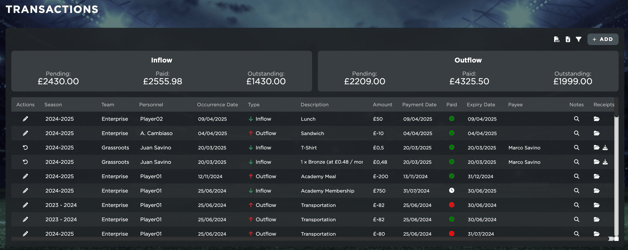
You will be able to simply create a new record by clicking on the 'Add' icon, and filling in the respective details. Alternatively, you can bulk upload records via CSV. For more information about this, you can watch the video in the Transactions section of this [article](https://support.iterpro.com/en/guide/6.2-player-profile?hsLang=en).
- [What's New](https://support.iterpro.com/en/guide/whats-new?hsLang=en)
- [Quick Onboarding](https://support.iterpro.com/en/guide/quick-onboarding?hsLang=en)
- [Account set-up and other](https://support.iterpro.com/en/guide/account-set-up-and-other?hsLang=en#main-content)
- [Login & Iterpro overview](https://support.iterpro.com/en/guide/account-set-up-and-other?hsLang=en#login-iterpro-overview)
- [Settings](https://support.iterpro.com/en/guide/account-set-up-and-other?hsLang=en#settings)
- [Create, archive and delete players](https://support.iterpro.com/en/guide/account-set-up-and-other?hsLang=en#create-archive-and-delete-players)
- [Other](https://support.iterpro.com/en/guide/account-set-up-and-other?hsLang=en#other)
- [Manager](https://support.iterpro.com/en/guide/manager?hsLang=en#main-content)
- [Tactics](https://support.iterpro.com/en/guide/manager?hsLang=en#tactics)
- [Planning](https://support.iterpro.com/en/guide/manager?hsLang=en#planning)
- [Videogallery](https://support.iterpro.com/en/guide/manager?hsLang=en#videogallery)
- [Drills](https://support.iterpro.com/en/guide/manager?hsLang=en#drills)
- [Attendances](https://support.iterpro.com/en/guide/manager?hsLang=en#attendances)
- [Performance](https://support.iterpro.com/en/guide/performance?hsLang=en#main-content)
- [Session Analysis](https://support.iterpro.com/en/guide/performance?hsLang=en#session-analysis)
- [Workload Analysis](https://support.iterpro.com/en/guide/performance?hsLang=en#workload-analysis)
- [Assessments](https://support.iterpro.com/en/guide/performance?hsLang=en#assessments)
- [Readiness](https://support.iterpro.com/en/guide/performance?hsLang=en#readiness)
- [Medical](https://support.iterpro.com/en/guide/medical?hsLang=en#main-content)
- [Medical Records](https://support.iterpro.com/en/guide/medical?hsLang=en#medical-records)
- [Infirmary](https://support.iterpro.com/en/guide/medical?hsLang=en#infirmary)
- [Examinations](https://support.iterpro.com/en/guide/medical?hsLang=en#examinations)
- [Medical Statistics](https://support.iterpro.com/en/guide/medical?hsLang=en#medical-statistics)
- [Player](https://support.iterpro.com/en/guide/player?hsLang=en#main-content)
- [My Team](https://support.iterpro.com/en/guide/player?hsLang=en#my-team)
- [Scouting](https://support.iterpro.com/en/guide/player?hsLang=en#scouting)
- [Transfers](https://support.iterpro.com/en/guide/player?hsLang=en#transfers)
- [Administration](https://support.iterpro.com/en/guide/administration?hsLang=en#main-content)
- [Squads](https://support.iterpro.com/en/guide/administration?hsLang=en#squads)
- [Finance Overview](https://support.iterpro.com/en/guide/administration?hsLang=en#finance-overview)
- [Bonus Tracking](https://support.iterpro.com/en/guide/administration?hsLang=en#bonus-tracking)
- [Cash Flow](https://support.iterpro.com/en/guide/administration?hsLang=en#cash-flow)
- [Transactions](https://support.iterpro.com/en/guide/administration?hsLang=en#transactions)
- [Registrations](https://support.iterpro.com/en/guide/administration?hsLang=en#registrations)
- [Mobile apps](https://support.iterpro.com/en/guide/mobile-apps?hsLang=en#main-content)
- [Player App](https://support.iterpro.com/en/guide/mobile-apps?hsLang=en#player-app)
- [Coach App](https://support.iterpro.com/en/guide/mobile-apps?hsLang=en#coach-app)
- [Director App](https://support.iterpro.com/en/guide/mobile-apps?hsLang=en#director-app)
- [Iterpro Login Page](https://app.iterpro.com/auth/login)
- [Contact Support](https://share.hsforms.com/1rE7NvsvuTIWBm7WQ1dhslQ1uo0p)
- [Terms & Conditions](https://www.iubenda.com/terms-and-conditions/53739842)
- [Privacy Policy](https://www.iubenda.com/privacy-policy/53739842)
[](https://iterpro.com/)
Copyright © 2025, Iterpro Support Team