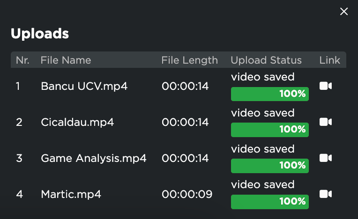
Inside Iterpro's platform, you have the option to upload 3 types of videos:
1. 'Game' videos
2. 'Training' videos
3. 'Other' videos
If you need to upload multiple videos at the same time, the process is the same as you would follow to upload videos individually.
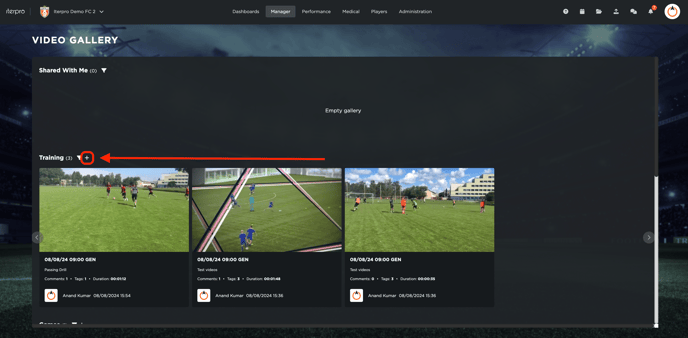
When you are inside the Video Gallery section, you can simply choose to click on the  button next to relevant video type (Game, Training or Other) to start the process.
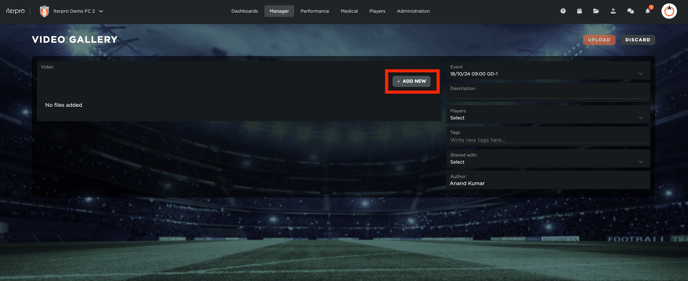
In the subsequent page that opens, you have the option to attach a new video(s) of your choice by clicking on  button. Keep in mind that are no limits on the number of videos or the size of the videos that you choose to upload on Iterpro.
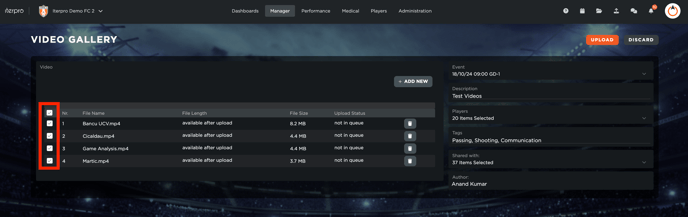
In this step, you can simply select multiple files that you want to upload and follow the same process in uploading them. Keep in mind that you have to check all the video(s) on the available boxes on the left side of each video in order to be able to be upload them.
After you select the necessary video(s) that you want to upload, you have the option to add other information related to the video that you are about to upload. These are information such as:
- Event (Game or Training)
- Description
- Player(s) involved in the video
- Tags (Example: Shooting, Passing, Communication, etc.) *
- Shared with (Players & Staff)
Note: When adding Tags, please ensure to separate your tags with a comma (Example: Shooting, Passing, Communication)
Finally, click on the  button to complete uploading the video(s). Once uploaded, you will receive confirmation messages on the bottom right of the screen that the video(s) have been successfully uploaded.