---
title: How can I get support from Iterpro?
description: Access the User Guide and contact us for support.
---
[Skip to content](https://support.iterpro.com/en/guide/how-to-access-the-user-guide-and-how-to-contact-us-for-support#main-content)
- [English](https://support.iterpro.com/en/guide/how-to-access-the-user-guide-and-how-to-contact-us-for-support)
- [Español](https://support.iterpro.com/es/guide/1.3accederalauserguideycontactasoporte)
- [Italiano](https://support.iterpro.com/it/guide/1.3-come-consultare-la-user-guide-e-contattarci-per-il-supporto)
- [Nederlands](https://support.iterpro.com/nl/guide/1.3-hoe-krijg-je-toegang-tot-de-gebruikershandleiding-en-neem-je-contact-met-ons-op-voor-ondersteuning)
- [العربية - مصر](https://support.iterpro.com/ar-eg/guide/1.3-كيفية-الوصول-إلى-دليل-المستخدم-والتواصل-معنا-للحصول-على-الدعم)
- [日本語](https://support.iterpro.com/ja/guide/1.3-ユーザーガイドへのアクセス方法とサポートへの問い合わせ方法)
English
Show submenu for translations
[](https://app.iterpro.com/auth/login)
- [Iterpro Login Page](https://app.iterpro.com/auth/login)
- [Contact Support](https://share.hsforms.com/1rE7NvsvuTIWBm7WQ1dhslQ1uo0p)
Open main navigation
Close main navigation
- [Iterpro Login Page](https://app.iterpro.com/auth/login)
- [Contact Support](https://share.hsforms.com/1rE7NvsvuTIWBm7WQ1dhslQ1uo0p)
- - [English](https://support.iterpro.com/en/guide/how-to-access-the-user-guide-and-how-to-contact-us-for-support)
- [Español](https://support.iterpro.com/es/guide/1.3accederalauserguideycontactasoporte)
- [Italiano](https://support.iterpro.com/it/guide/1.3-come-consultare-la-user-guide-e-contattarci-per-il-supporto)
- [Nederlands](https://support.iterpro.com/nl/guide/1.3-hoe-krijg-je-toegang-tot-de-gebruikershandleiding-en-neem-je-contact-met-ons-op-voor-ondersteuning)
- [العربية - مصر](https://support.iterpro.com/ar-eg/guide/1.3-كيفية-الوصول-إلى-دليل-المستخدم-والتواصل-معنا-للحصول-على-الدعم)
- [日本語](https://support.iterpro.com/ja/guide/1.3-ユーザーガイドへのアクセス方法とサポートへの問い合わせ方法)
English
Show submenu for translations
How can we help you?
- There are no suggestions because the search field is empty.
1. [User Guide](https://support.iterpro.com/en/guide?hsLang=en)
2. [Account set-up and other](https://support.iterpro.com/en/guide/account-set-up-and-other?hsLang=en)
3. [Login & Iterpro overview](https://support.iterpro.com/en/guide/account-set-up-and-other?hsLang=en#login-iterpro-overview)
# How can I get support from Iterpro?
## This article explains the pillars for a new user who is moving the first steps into Iterpro: access the User Guide, chat with the AI Agent and contact us for support.
When logging into Iterpro for the first time, we always recommend starting by navigating to the **top-right corner of the screen** and clicking on the **question mark icon**. This will redirect you to our **User Guide**, where you can find a variety of **articles, images, and videos** explaining how to use different features of Iterpro.
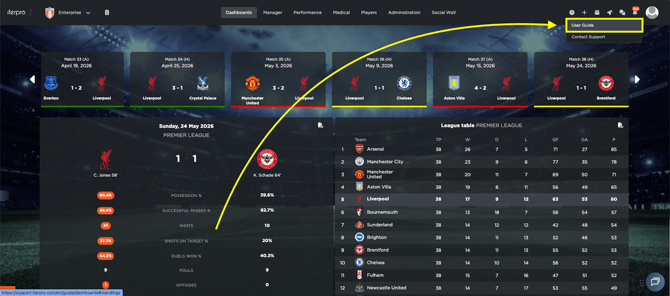
You can find a specific section named **Quick** o**nboarding** where you will find a collection of introductory articles covering the basic functions of Iterpro. The other sections, instead, are structured in a **Q&A format**, making it easy to find answers to common questions and deeply analyze each feature.
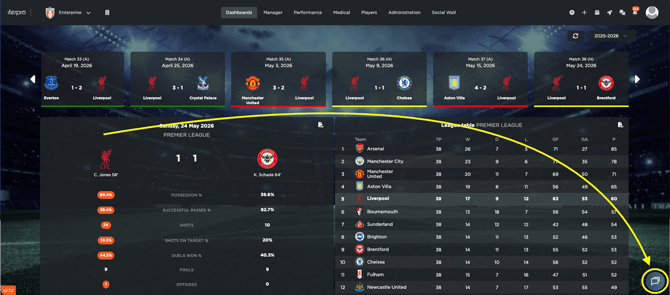
If you need to quickly find an information within the User guide, you can chat directly with the AI Agent by clicking on the chat icon in the buttom-right corner of the screen.
The Customer Agent Chatbot is built into Iterpro to help you get answers fast while you work. You can use it to ask general “how-to” questions, clarify platform features, and get guidance on setup or autonomous onboarding.
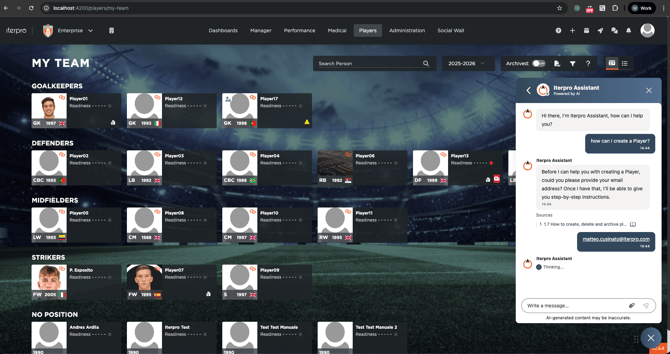
Because it’s directly connected to Iterpro’s **User Guide resources**, the chatbot replies using official documentation and training materials. When it answers, it will **cite and link** the specific articles or videos the information comes from, so you can open the source and explore the topic in more depth.
If you run into an issue, or the chatbot can’t answer your question as expected, you can use the same chat to **open a request with our Customer Support team**. The chatbot will ask you if you want a 'human agent' to follow up, and the request will be passed on to our team, who will get back to you as soon as possible.
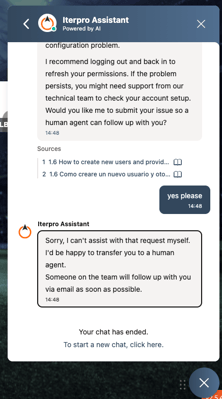
Important to note: the chatbot is designed for **operational assistance** only. Since it is connected to the User Guide, it provides guidance on workflows, best practices, and feature usage, but it **does not access or disclose data from your Iterpro account**. That means it won’t retrieve or analyze your club’s internal information, financial data, player records, or any private content.
If you require further assistance or direct support, you can also reach us by clicking on the **question mark icon** and selecting **"Contact Support."**
This will open a **support form**, where you can enter the following details:
- **Company name**
- **Club name + Team name**
- **Subject of your request**
- **Message describing your question or issue**
To help us assist you more efficiently, we strongly recommend uploading a **screenshot or, even better, a video** illustrating the issue.
Once submitted, our team will respond to you **directly via email**, addressing your request based on the details provided. You are free to submit as many support tickets as needed, and we will ensure a prompt and thorough response to each inquiry.
By following these steps, you can easily navigate the User Guide and contact our support team whenever you need assistance.
- [What's New](https://support.iterpro.com/en/guide/whats-new?hsLang=en)
- [Quick Onboarding](https://support.iterpro.com/en/guide/quick-onboarding?hsLang=en)
- [Account set-up and other](https://support.iterpro.com/en/guide/account-set-up-and-other?hsLang=en#main-content)
- [Login & Iterpro overview](https://support.iterpro.com/en/guide/account-set-up-and-other?hsLang=en#login-iterpro-overview)
- [Settings](https://support.iterpro.com/en/guide/account-set-up-and-other?hsLang=en#settings)
- [Create, archive and delete players](https://support.iterpro.com/en/guide/account-set-up-and-other?hsLang=en#create-archive-and-delete-players)
- [Other](https://support.iterpro.com/en/guide/account-set-up-and-other?hsLang=en#other)
- [Manager](https://support.iterpro.com/en/guide/manager?hsLang=en#main-content)
- [Tactics](https://support.iterpro.com/en/guide/manager?hsLang=en#tactics)
- [Planning](https://support.iterpro.com/en/guide/manager?hsLang=en#planning)
- [Videogallery](https://support.iterpro.com/en/guide/manager?hsLang=en#videogallery)
- [Drills](https://support.iterpro.com/en/guide/manager?hsLang=en#drills)
- [Attendances](https://support.iterpro.com/en/guide/manager?hsLang=en#attendances)
- [Performance](https://support.iterpro.com/en/guide/performance?hsLang=en#main-content)
- [Session Analysis](https://support.iterpro.com/en/guide/performance?hsLang=en#session-analysis)
- [Workload Analysis](https://support.iterpro.com/en/guide/performance?hsLang=en#workload-analysis)
- [Assessments](https://support.iterpro.com/en/guide/performance?hsLang=en#assessments)
- [Readiness](https://support.iterpro.com/en/guide/performance?hsLang=en#readiness)
- [Medical](https://support.iterpro.com/en/guide/medical?hsLang=en#main-content)
- [Medical Records](https://support.iterpro.com/en/guide/medical?hsLang=en#medical-records)
- [Infirmary](https://support.iterpro.com/en/guide/medical?hsLang=en#infirmary)
- [Examinations](https://support.iterpro.com/en/guide/medical?hsLang=en#examinations)
- [Medical Statistics](https://support.iterpro.com/en/guide/medical?hsLang=en#medical-statistics)
- [Player](https://support.iterpro.com/en/guide/player?hsLang=en#main-content)
- [My Team](https://support.iterpro.com/en/guide/player?hsLang=en#my-team)
- [Scouting](https://support.iterpro.com/en/guide/player?hsLang=en#scouting)
- [Transfers](https://support.iterpro.com/en/guide/player?hsLang=en#transfers)
- [Administration](https://support.iterpro.com/en/guide/administration?hsLang=en#main-content)
- [Squads](https://support.iterpro.com/en/guide/administration?hsLang=en#squads)
- [Finance Overview](https://support.iterpro.com/en/guide/administration?hsLang=en#finance-overview)
- [Bonus Tracking](https://support.iterpro.com/en/guide/administration?hsLang=en#bonus-tracking)
- [Cash Flow](https://support.iterpro.com/en/guide/administration?hsLang=en#cash-flow)
- [Transactions](https://support.iterpro.com/en/guide/administration?hsLang=en#transactions)
- [Registrations](https://support.iterpro.com/en/guide/administration?hsLang=en#registrations)
- [Mobile apps](https://support.iterpro.com/en/guide/mobile-apps?hsLang=en#main-content)
- [Player App](https://support.iterpro.com/en/guide/mobile-apps?hsLang=en#player-app)
- [Coach App](https://support.iterpro.com/en/guide/mobile-apps?hsLang=en#coach-app)
- [Director App](https://support.iterpro.com/en/guide/mobile-apps?hsLang=en#director-app)
- [Iterpro Login Page](https://app.iterpro.com/auth/login)
- [Contact Support](https://share.hsforms.com/1rE7NvsvuTIWBm7WQ1dhslQ1uo0p)
- [Terms & Conditions](https://www.iubenda.com/terms-and-conditions/53739842)
- [Privacy Policy](https://www.iubenda.com/privacy-policy/53739842)
[](https://iterpro.com/)
Copyright © 2025, Iterpro Support Team