---
title: 5.3 How to create your scouting player profiles
description: This article showcases how you can create the scouting profiles inside your account. This includes how you can import them manually, in bulk via CSV, and via Wyscout (for football/soccer users)
---
[Skip to content](https://support.iterpro.com/en/guide/how-to-create-your-scouting-plavers-profiles#main-content)
- [English](https://support.iterpro.com/en/guide/how-to-create-your-scouting-plavers-profiles)
- [Español](https://support.iterpro.com/es/guide/5.3-cómo-crear-nuevos-perfiles-de-jugadores)
- [Nederlands](https://support.iterpro.com/nl/guide/5.3-hoe-maak-je-scouting-spelersprofielen-aan)
- [العربية - مصر](https://support.iterpro.com/ar-eg/guide/5.3-كيفية-إنشاء-ملفات-تعريف-اللاعبين-في-الكشافة)
- [日本語](https://support.iterpro.com/ja/guide/5.3-スカウティング選手プロフィールの作成方法)
English
Show submenu for translations
[](https://app.iterpro.com/auth/login)
- [Iterpro Login Page](https://app.iterpro.com/auth/login)
- [Contact Support](https://share.hsforms.com/1rE7NvsvuTIWBm7WQ1dhslQ1uo0p)
Open main navigation
Close main navigation
- [Iterpro Login Page](https://app.iterpro.com/auth/login)
- [Contact Support](https://share.hsforms.com/1rE7NvsvuTIWBm7WQ1dhslQ1uo0p)
- - [English](https://support.iterpro.com/en/guide/how-to-create-your-scouting-plavers-profiles)
- [Español](https://support.iterpro.com/es/guide/5.3-cómo-crear-nuevos-perfiles-de-jugadores)
- [Nederlands](https://support.iterpro.com/nl/guide/5.3-hoe-maak-je-scouting-spelersprofielen-aan)
- [العربية - مصر](https://support.iterpro.com/ar-eg/guide/5.3-كيفية-إنشاء-ملفات-تعريف-اللاعبين-في-الكشافة)
- [日本語](https://support.iterpro.com/ja/guide/5.3-スカウティング選手プロフィールの作成方法)
English
Show submenu for translations
How can we help you?
- There are no suggestions because the search field is empty.
1. [User Guide](https://support.iterpro.com/en/guide?hsLang=en)
2. [Player](https://support.iterpro.com/en/guide/player?hsLang=en)
3. [Scouting](https://support.iterpro.com/en/guide/player?hsLang=en#scouting)
# 5.3 How to create your scouting player profiles
## This article showcases how you can create the scouting profiles inside your account. This includes how you can import them manually and via Wyscout (for football/soccer users)
### ADDING SCOUTING PLAYERS FROM WYSCOUT
- 00.05: accessing the Wyscout database panel
- 00.08: recommendations for Wyscout database accessibility
- 00.12: searching for players or teams through the panel
- 00.29: adding the searched player(s) to your scouting list
### ADDING SCOUTING PLAYERS MANUALLY
- 00.05: accessing the manual player creation panel
- 00.08: adding player's name and surname
- 00.15: explanation of adding player details
- 00.47: saving the changes made
### ADDING SCOUTING PLAYERS BY CSV
- 00.08: bulk upload explanation
- 00.21: filling in the empty CSV file that has been downloaded
- 00.32: recommendation for mandatory fields that need to be filled in
- 00.44: saving the file after it has been filled in
- 00.51: uploading the CSV file with scouting players into the platform
### ***FEATURE DESCRIPTION***
**Adding Scouting Players from Wyscout**
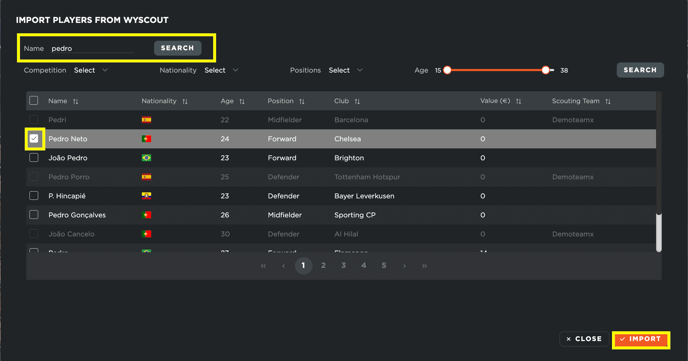
To add a player to your scouting database, you have multiple options. One of them is importing players directly from Wyscout. This feature is available exclusively for football-related teams.
To begin, navigate to the search function within the scouting section. You can find players by either typing their names or applying various filters to narrow down the search results. Once you have set your criteria, click on "Search." The system will then retrieve the players matching your descriptions from the Wyscout database.
After the system has found the players, you can select the ones you want and import them directly into your scouting database with a single click.
**Adding Scouting Players Manually**
If you prefer to add a player manually, the process is simple. You only need to enter the player's first and last name. After confirming, the system will create a new player profile.
Since this player has been added from scratch, no additional details will be included automatically. You can, however, manually input relevant information such as personal details, contract information, general attributes, playing position, and preferred moves. Additionally, you can include the player in potential transfer scenarios and attach a picture for easier identification.
Once you have entered all the necessary information, be sure to click "Save" to ensure your changes are not lost.
**Adding Scouting Players via CSV Upload**
For bulk player uploads, you can add multiple players at once using a CSV file. If you already have a list of players you are monitoring, this method allows for quick and efficient data entry.
Start by downloading an empty CSV template from the platform. This file includes all the necessary columns and predefined fields required for player information. When you open the CSV file, you will see the same column structure as the platform’s scouting database. Fill in the details for each player, ensuring that at least the mandatory fields (First Name, Last Name, and Display Name) are completed. The remaining fields are optional and can be filled based on your requirements.
Once you have entered the necessary information, save and export the file as a CSV document. Then, return to the platform and upload the completed CSV file. The system will process the file and automatically display the newly added players in your scouting database.
- [What's New](https://support.iterpro.com/en/guide/whats-new?hsLang=en)
- [Quick Onboarding](https://support.iterpro.com/en/guide/quick-onboarding?hsLang=en)
- [Account set-up and other](https://support.iterpro.com/en/guide/account-set-up-and-other?hsLang=en#main-content)
- [Login & Iterpro overview](https://support.iterpro.com/en/guide/account-set-up-and-other?hsLang=en#login-iterpro-overview)
- [Settings](https://support.iterpro.com/en/guide/account-set-up-and-other?hsLang=en#settings)
- [Create, archive and delete players](https://support.iterpro.com/en/guide/account-set-up-and-other?hsLang=en#create-archive-and-delete-players)
- [Other](https://support.iterpro.com/en/guide/account-set-up-and-other?hsLang=en#other)
- [Manager](https://support.iterpro.com/en/guide/manager?hsLang=en#main-content)
- [Tactics](https://support.iterpro.com/en/guide/manager?hsLang=en#tactics)
- [Planning](https://support.iterpro.com/en/guide/manager?hsLang=en#planning)
- [Videogallery](https://support.iterpro.com/en/guide/manager?hsLang=en#videogallery)
- [Drills](https://support.iterpro.com/en/guide/manager?hsLang=en#drills)
- [Attendances](https://support.iterpro.com/en/guide/manager?hsLang=en#attendances)
- [Performance](https://support.iterpro.com/en/guide/performance?hsLang=en#main-content)
- [Session Analysis](https://support.iterpro.com/en/guide/performance?hsLang=en#session-analysis)
- [Workload Analysis](https://support.iterpro.com/en/guide/performance?hsLang=en#workload-analysis)
- [Assessments](https://support.iterpro.com/en/guide/performance?hsLang=en#assessments)
- [Readiness](https://support.iterpro.com/en/guide/performance?hsLang=en#readiness)
- [Medical](https://support.iterpro.com/en/guide/medical?hsLang=en#main-content)
- [Medical Records](https://support.iterpro.com/en/guide/medical?hsLang=en#medical-records)
- [Infirmary](https://support.iterpro.com/en/guide/medical?hsLang=en#infirmary)
- [Examinations](https://support.iterpro.com/en/guide/medical?hsLang=en#examinations)
- [Medical Statistics](https://support.iterpro.com/en/guide/medical?hsLang=en#medical-statistics)
- [Player](https://support.iterpro.com/en/guide/player?hsLang=en#main-content)
- [My Team](https://support.iterpro.com/en/guide/player?hsLang=en#my-team)
- [Scouting](https://support.iterpro.com/en/guide/player?hsLang=en#scouting)
- [Transfers](https://support.iterpro.com/en/guide/player?hsLang=en#transfers)
- [Administration](https://support.iterpro.com/en/guide/administration?hsLang=en#main-content)
- [Squads](https://support.iterpro.com/en/guide/administration?hsLang=en#squads)
- [Finance Overview](https://support.iterpro.com/en/guide/administration?hsLang=en#finance-overview)
- [Bonus Tracking](https://support.iterpro.com/en/guide/administration?hsLang=en#bonus-tracking)
- [Cash Flow](https://support.iterpro.com/en/guide/administration?hsLang=en#cash-flow)
- [Transactions](https://support.iterpro.com/en/guide/administration?hsLang=en#transactions)
- [Registrations](https://support.iterpro.com/en/guide/administration?hsLang=en#registrations)
- [Mobile apps](https://support.iterpro.com/en/guide/mobile-apps?hsLang=en#main-content)
- [Player App](https://support.iterpro.com/en/guide/mobile-apps?hsLang=en#player-app)
- [Coach App](https://support.iterpro.com/en/guide/mobile-apps?hsLang=en#coach-app)
- [Director App](https://support.iterpro.com/en/guide/mobile-apps?hsLang=en#director-app)
- [Iterpro Login Page](https://app.iterpro.com/auth/login)
- [Contact Support](https://share.hsforms.com/1rE7NvsvuTIWBm7WQ1dhslQ1uo0p)
- [Terms & Conditions](https://www.iubenda.com/terms-and-conditions/53739842)
- [Privacy Policy](https://www.iubenda.com/privacy-policy/53739842)
[](https://iterpro.com/)
Copyright © 2025, Iterpro Support Team
```json
{
"@context" : "https://schema.org",
"@type" : "VideoObject",
"contentUrl" : "https://stream.mux.com/wHQn9UFrgBUxWyZaJewYeJtC7vVVLIpCWwK7neugx00o/capped-1080p.mp4",
"dateModified" : "2025-02-04T13:53:18.428Z",
"duration" : "PT36S",
"height" : 1080,
"name" : "5.3 How to create your scouting player profiles - part1_ENG",
"thumbnailUrl" : "https://3110425.fs1.hubspotusercontent-na1.net/hubfs/3110425/5.3%20How%20to%20create%20your%20scouting%20player%20profiles%20-%20part1_ENG.mp4/medium.jpg",
"uploadDate" : "2025-02-04T13:53:18.423Z",
"width" : 1920
}
```
```json
{
"@context" : "https://schema.org",
"@type" : "VideoObject",
"contentUrl" : "https://stream.mux.com/U6JS7V47kiJT1gxNjf005zdIZ7ZKBw00RuFRv5hd9y02sk/capped-1080p.mp4",
"dateModified" : "2025-02-04T14:43:02.160Z",
"duration" : "PT51.691S",
"height" : 1080,
"name" : "5.3 How to create your scouting player profiles - part2_ENG",
"thumbnailUrl" : "https://3110425.fs1.hubspotusercontent-na1.net/hubfs/3110425/5.3%20How%20to%20create%20your%20scouting%20player%20profiles%20-%20part2_ENG.mp4/medium.jpg",
"uploadDate" : "2025-02-04T14:43:02.155Z",
"width" : 1920
}
```
```json
{
"@context" : "https://schema.org",
"@type" : "VideoObject",
"contentUrl" : "https://stream.mux.com/u8c802RsuTMdFeWIUomxkKXGoPYkQcM4d4019bI6dC61s/capped-1080p.mp4",
"dateModified" : "2025-02-04T14:43:02.524Z",
"duration" : "PT1M4S",
"height" : 900,
"name" : "5.3 How to create your scouting player profiles - part3_ENG",
"thumbnailUrl" : "https://3110425.fs1.hubspotusercontent-na1.net/hubfs/3110425/5.3%20How%20to%20create%20your%20scouting%20player%20profiles%20-%20part3_ENG.mp4/medium.jpg",
"uploadDate" : "2025-02-04T14:43:02.519Z",
"width" : 1440
}
```