---
title: How do I prepare my games from a tactical perspective and do I analize the games played?
description: Manager Tactics game stats Lineup Analysis Preparation
---
[Skip to content](https://support.iterpro.com/en/guide/how-to-manage-your-team-from-a-tactical-perspective#main-content)
- [English](https://support.iterpro.com/en/guide/how-to-manage-your-team-from-a-tactical-perspective)
- [Español](https://support.iterpro.com/es/guide/2.7-como-gestionar-a-tu-equipo-en-aspectos-tacticos)
- [Italiano](https://support.iterpro.com/it/guide/2.7-come-gestire-la-tua-squadra-da-una-prospettiva-tattica)
- [Nederlands](https://support.iterpro.com/nl/guide/2.7-hoe-beheer-je-je-team-vanuit-een-tactisch-perspectief)
- [العربية - مصر](https://support.iterpro.com/ar-eg/guide/2.7-كيفية-إدارة-فريقك-من-منظور-تكتيكي)
- [日本語](https://support.iterpro.com/ja/guide/2.7-戦術的な観点からチームを管理する方法)
English
Show submenu for translations
[](https://app.iterpro.com/auth/login)
- [Iterpro Login Page](https://app.iterpro.com/auth/login)
- [Contact Support](https://share.hsforms.com/1rE7NvsvuTIWBm7WQ1dhslQ1uo0p)
Open main navigation
Close main navigation
- [Iterpro Login Page](https://app.iterpro.com/auth/login)
- [Contact Support](https://share.hsforms.com/1rE7NvsvuTIWBm7WQ1dhslQ1uo0p)
- - [English](https://support.iterpro.com/en/guide/how-to-manage-your-team-from-a-tactical-perspective)
- [Español](https://support.iterpro.com/es/guide/2.7-como-gestionar-a-tu-equipo-en-aspectos-tacticos)
- [Italiano](https://support.iterpro.com/it/guide/2.7-come-gestire-la-tua-squadra-da-una-prospettiva-tattica)
- [Nederlands](https://support.iterpro.com/nl/guide/2.7-hoe-beheer-je-je-team-vanuit-een-tactisch-perspectief)
- [العربية - مصر](https://support.iterpro.com/ar-eg/guide/2.7-كيفية-إدارة-فريقك-من-منظور-تكتيكي)
- [日本語](https://support.iterpro.com/ja/guide/2.7-戦術的な観点からチームを管理する方法)
English
Show submenu for translations
How can we help you?
- There are no suggestions because the search field is empty.
1. [User Guide](https://support.iterpro.com/en/guide?hsLang=en)
2. [Manager](https://support.iterpro.com/en/guide/manager?hsLang=en)
3. [Tactics](https://support.iterpro.com/en/guide/manager?hsLang=en#tactics)
# How do I prepare my games from a tactical perspective and do I analize the games played?
## This article explains how to manage and analyze the tactics for your team between the games.
### PREPARE AND ANALYSE YOUR MATCHES
- 0.00: introduction
- 0.07: define the number of players on the field and in the bench
- 0.19: prepare your games
- 1.11: analyze your games
### DEFINE YOUR LINEUP FROM THE GAME EVENT
### ***FEATURE DESCRIPTION***
In the **Tactics** section, you can efficiently manage your team from a tactical standpoint.
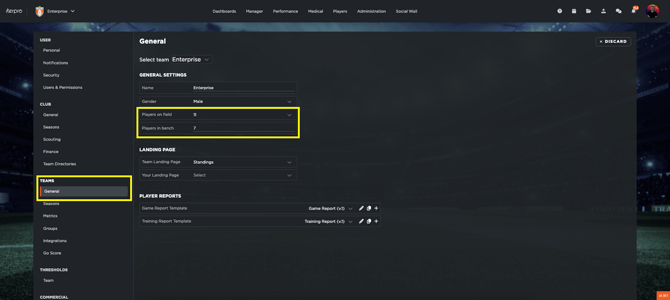
First, go to Settings - Teams - General and define the number of players you want to have in the pitch and on the bench for the selected team.
**Preparation Section**
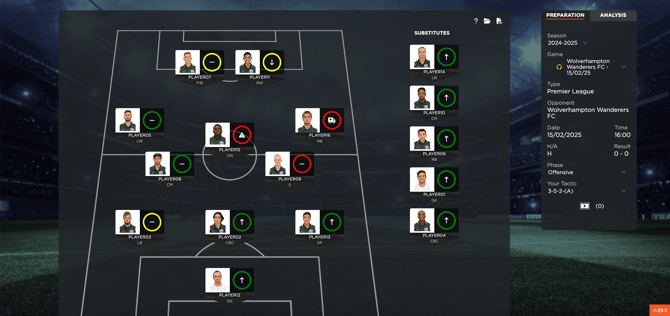
In this area, you will find all the matches that have been created in the **Planning** module. If your system is integrated with Wyscout via API, the matches will be automatically imported.
For each game, you can:
- Set your **starting lineup** based on your tactical approach, both offensively and defensively.
- Adjust player positions by selecting and dragging their names.
- View each player’s **readiness and health status**, which is based on data from the **medical and performance departments**. If no status indicators are displayed, it means that these details have not been updated.
**Analysis Section**
In this section, you can analyze performance data imported from third-party providers like Wyscout (via API) or CSV files.
First of all, remember to define your Active **Team tactical metrics** and **Individual tactical metrics** moving to Settings - Teams- Metrics. This will allow you to display the data you need during your analysis. Remember to follow the guidelines provided in this article (https://support.iterpro.com/en/guide/why-i-cant-save-my-active-metrics-section-in-settings).
Here, you will be able to:
- View the **active metrics** configured for your profile, including thresholds (if set).
- Compare data from the **last 10 matches**.
- Customize the displayed metrics according to your needs.
- Conduct **team-level** or **individual player** analysis.
This section provides valuable insights to assess performance trends and optimize tactical decisions.
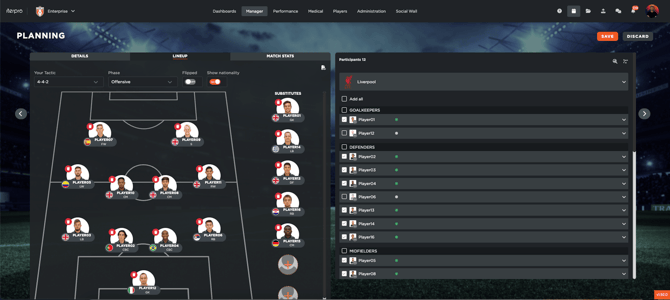
**Edit the lineup from Manager - Planning - Game events - Lineup**
1. Go to **Manager** → **Planning**, and click on **Game Events**.
2. Within each game event, you’ll find a section called **"Lineup"**.
Here, you can (once you clicked on EDIT):
- **Select your tactical setup**, choosing formations for both offensive and defensive phases.
- **Toggle the display of player nationalities**, depending on whether or not you want them shown on the lineup screen.
- **Flip the lineup**, switching the team's orientation on the field.
- Make changes to the starting lineup.
Once you've edited and confirmed your lineup:
- The changes will be automatically reflected in the **Tactics** section.
- The updated lineup will also be **synchronized across all mobile apps**, ensuring consistency for players and staff.
- [What's New](https://support.iterpro.com/en/guide/whats-new?hsLang=en)
- [Quick Onboarding](https://support.iterpro.com/en/guide/quick-onboarding?hsLang=en)
- [Account set-up and other](https://support.iterpro.com/en/guide/account-set-up-and-other?hsLang=en#main-content)
- [Login & Iterpro overview](https://support.iterpro.com/en/guide/account-set-up-and-other?hsLang=en#login-iterpro-overview)
- [Settings](https://support.iterpro.com/en/guide/account-set-up-and-other?hsLang=en#settings)
- [Create, archive and delete players](https://support.iterpro.com/en/guide/account-set-up-and-other?hsLang=en#create-archive-and-delete-players)
- [Other](https://support.iterpro.com/en/guide/account-set-up-and-other?hsLang=en#other)
- [Manager](https://support.iterpro.com/en/guide/manager?hsLang=en#main-content)
- [Tactics](https://support.iterpro.com/en/guide/manager?hsLang=en#tactics)
- [Planning](https://support.iterpro.com/en/guide/manager?hsLang=en#planning)
- [Videogallery](https://support.iterpro.com/en/guide/manager?hsLang=en#videogallery)
- [Drills](https://support.iterpro.com/en/guide/manager?hsLang=en#drills)
- [Attendances](https://support.iterpro.com/en/guide/manager?hsLang=en#attendances)
- [Performance](https://support.iterpro.com/en/guide/performance?hsLang=en#main-content)
- [Session Analysis](https://support.iterpro.com/en/guide/performance?hsLang=en#session-analysis)
- [Workload Analysis](https://support.iterpro.com/en/guide/performance?hsLang=en#workload-analysis)
- [Assessments](https://support.iterpro.com/en/guide/performance?hsLang=en#assessments)
- [Readiness](https://support.iterpro.com/en/guide/performance?hsLang=en#readiness)
- [Medical](https://support.iterpro.com/en/guide/medical?hsLang=en#main-content)
- [Medical Records](https://support.iterpro.com/en/guide/medical?hsLang=en#medical-records)
- [Infirmary](https://support.iterpro.com/en/guide/medical?hsLang=en#infirmary)
- [Examinations](https://support.iterpro.com/en/guide/medical?hsLang=en#examinations)
- [Medical Statistics](https://support.iterpro.com/en/guide/medical?hsLang=en#medical-statistics)
- [Player](https://support.iterpro.com/en/guide/player?hsLang=en#main-content)
- [My Team](https://support.iterpro.com/en/guide/player?hsLang=en#my-team)
- [Scouting](https://support.iterpro.com/en/guide/player?hsLang=en#scouting)
- [Transfers](https://support.iterpro.com/en/guide/player?hsLang=en#transfers)
- [Administration](https://support.iterpro.com/en/guide/administration?hsLang=en#main-content)
- [Squads](https://support.iterpro.com/en/guide/administration?hsLang=en#squads)
- [Finance Overview](https://support.iterpro.com/en/guide/administration?hsLang=en#finance-overview)
- [Bonus Tracking](https://support.iterpro.com/en/guide/administration?hsLang=en#bonus-tracking)
- [Cash Flow](https://support.iterpro.com/en/guide/administration?hsLang=en#cash-flow)
- [Transactions](https://support.iterpro.com/en/guide/administration?hsLang=en#transactions)
- [Registrations](https://support.iterpro.com/en/guide/administration?hsLang=en#registrations)
- [Mobile apps](https://support.iterpro.com/en/guide/mobile-apps?hsLang=en#main-content)
- [Player App](https://support.iterpro.com/en/guide/mobile-apps?hsLang=en#player-app)
- [Coach App](https://support.iterpro.com/en/guide/mobile-apps?hsLang=en#coach-app)
- [Director App](https://support.iterpro.com/en/guide/mobile-apps?hsLang=en#director-app)
- [Iterpro Login Page](https://app.iterpro.com/auth/login)
- [Contact Support](https://share.hsforms.com/1rE7NvsvuTIWBm7WQ1dhslQ1uo0p)
- [Terms & Conditions](https://www.iubenda.com/terms-and-conditions/53739842)
- [Privacy Policy](https://www.iubenda.com/privacy-policy/53739842)
[](https://iterpro.com/)
Copyright © 2025, Iterpro Support Team