---
title: How do I recalculate the GPS sessions imported?
description: Learn how to manually recalculate sessions in Iterpro to ensure updated thresholds and default metrics are accurately reflected in Session Analysis and Workload Analysis.
---
[Skip to content](https://support.iterpro.com/en/guide/how-to-recalculate-the-sessions-so-the-user-can-display-new-tresholds-or-new-default-metrics#main-content)
- [English](https://support.iterpro.com/en/guide/how-to-recalculate-the-sessions-so-the-user-can-display-new-tresholds-or-new-default-metrics)
- [Español](https://support.iterpro.com/es/guide/cómo-recalcular-las-sesiones-para-mostrar-nuevos-umbrales-o-métricas-predeterminadas)
- [Italiano](https://support.iterpro.com/it/guide/come-posso-ricalcolare-le-sessioni-per-visualizzare-nuove-soglie-o-nuove-metriche-di-default)
- [Nederlands](https://support.iterpro.com/nl/guide/hoe-sessies-opnieuw-berekenen-om-nieuwe-drempelwaarden-of-standaardstatistieken-weer-te-geven)
- [العربية - مصر](https://support.iterpro.com/ar-eg/guide/كيفية-إعادة-حساب-الجلسات-لعرض-العتبات-الجديدة-أو-المقاييس-الافتراضية)
- [日本語](https://support.iterpro.com/ja/guide/セッションを再計算して新しいしきい値やデフォルト指標を表示する方法)
English
Show submenu for translations
[](https://app.iterpro.com/auth/login)
- [Iterpro Login Page](https://app.iterpro.com/auth/login)
- [Contact Support](https://share.hsforms.com/1rE7NvsvuTIWBm7WQ1dhslQ1uo0p)
Open main navigation
Close main navigation
- [Iterpro Login Page](https://app.iterpro.com/auth/login)
- [Contact Support](https://share.hsforms.com/1rE7NvsvuTIWBm7WQ1dhslQ1uo0p)
- - [English](https://support.iterpro.com/en/guide/how-to-recalculate-the-sessions-so-the-user-can-display-new-tresholds-or-new-default-metrics)
- [Español](https://support.iterpro.com/es/guide/cómo-recalcular-las-sesiones-para-mostrar-nuevos-umbrales-o-métricas-predeterminadas)
- [Italiano](https://support.iterpro.com/it/guide/come-posso-ricalcolare-le-sessioni-per-visualizzare-nuove-soglie-o-nuove-metriche-di-default)
- [Nederlands](https://support.iterpro.com/nl/guide/hoe-sessies-opnieuw-berekenen-om-nieuwe-drempelwaarden-of-standaardstatistieken-weer-te-geven)
- [العربية - مصر](https://support.iterpro.com/ar-eg/guide/كيفية-إعادة-حساب-الجلسات-لعرض-العتبات-الجديدة-أو-المقاييس-الافتراضية)
- [日本語](https://support.iterpro.com/ja/guide/セッションを再計算して新しいしきい値やデフォルト指標を表示する方法)
English
Show submenu for translations
How can we help you?
- There are no suggestions because the search field is empty.
1. [User Guide](https://support.iterpro.com/en/guide?hsLang=en)
2. [Performance](https://support.iterpro.com/en/guide/performance?hsLang=en)
3. [Session Analysis](https://support.iterpro.com/en/guide/performance?hsLang=en#session-analysis)
# How do I recalculate the GPS sessions imported?
## Learn how to manually recalculate sessions in Iterpro to ensure updated thresholds and default metrics are accurately reflected in Session Analysis and Workload Analysis.
When a user saves new thresholds in *Players \> My Team \> Thresholds* or sets new default metrics in *Settings \> Team \> Integrations*, the system does not automatically recalculate previously uploaded training and game sessions. As a result, without manual recalculation, users may encounter empty or incorrect values in Session Analysis and Workload Analysis.
To recalculate sessions, follow these steps:
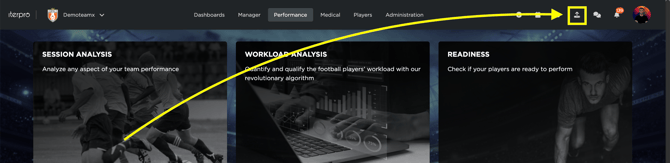
- **Click on the Import Data Icon:** Located in the top-right corner of the screen.
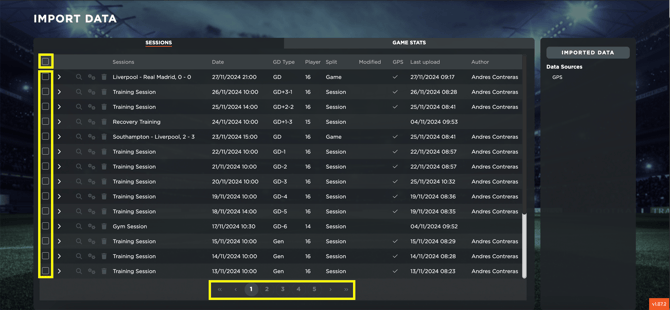
- **Select the Sessions to Recalculate:** Choose the sessions you wish to update. Note that using the "Select All" option will only select sessions displayed on the current page. To select all uploaded sessions, repeat this process page by page after recalculating the data.
- **Click on the "Recalculate the Default Metrics" Icon:** This will initiate the recalculation process for the selected sessions.
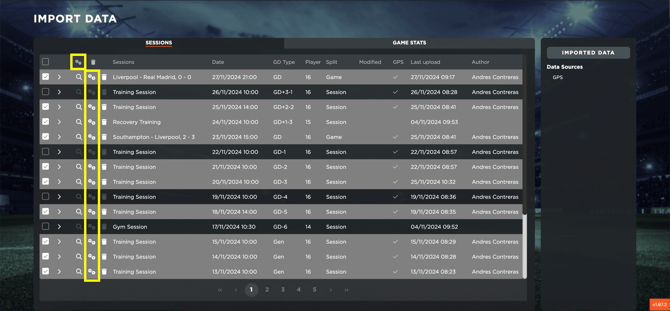
Once this operation is complete, the default metrics and thresholds for the selected sessions will be recalculated, ensuring that the statistics in Session Analysis and Workload Analysis are updated accordingly.
- [What's New](https://support.iterpro.com/en/guide/whats-new?hsLang=en)
- [Quick Onboarding](https://support.iterpro.com/en/guide/quick-onboarding?hsLang=en)
- [Account set-up and other](https://support.iterpro.com/en/guide/account-set-up-and-other?hsLang=en#main-content)
- [Login & Iterpro overview](https://support.iterpro.com/en/guide/account-set-up-and-other?hsLang=en#login-iterpro-overview)
- [Settings](https://support.iterpro.com/en/guide/account-set-up-and-other?hsLang=en#settings)
- [Create, archive and delete players](https://support.iterpro.com/en/guide/account-set-up-and-other?hsLang=en#create-archive-and-delete-players)
- [Other](https://support.iterpro.com/en/guide/account-set-up-and-other?hsLang=en#other)
- [Manager](https://support.iterpro.com/en/guide/manager?hsLang=en#main-content)
- [Tactics](https://support.iterpro.com/en/guide/manager?hsLang=en#tactics)
- [Planning](https://support.iterpro.com/en/guide/manager?hsLang=en#planning)
- [Videogallery](https://support.iterpro.com/en/guide/manager?hsLang=en#videogallery)
- [Drills](https://support.iterpro.com/en/guide/manager?hsLang=en#drills)
- [Attendances](https://support.iterpro.com/en/guide/manager?hsLang=en#attendances)
- [Performance](https://support.iterpro.com/en/guide/performance?hsLang=en#main-content)
- [Session Analysis](https://support.iterpro.com/en/guide/performance?hsLang=en#session-analysis)
- [Workload Analysis](https://support.iterpro.com/en/guide/performance?hsLang=en#workload-analysis)
- [Assessments](https://support.iterpro.com/en/guide/performance?hsLang=en#assessments)
- [Readiness](https://support.iterpro.com/en/guide/performance?hsLang=en#readiness)
- [Medical](https://support.iterpro.com/en/guide/medical?hsLang=en#main-content)
- [Medical Records](https://support.iterpro.com/en/guide/medical?hsLang=en#medical-records)
- [Infirmary](https://support.iterpro.com/en/guide/medical?hsLang=en#infirmary)
- [Examinations](https://support.iterpro.com/en/guide/medical?hsLang=en#examinations)
- [Medical Statistics](https://support.iterpro.com/en/guide/medical?hsLang=en#medical-statistics)
- [Player](https://support.iterpro.com/en/guide/player?hsLang=en#main-content)
- [My Team](https://support.iterpro.com/en/guide/player?hsLang=en#my-team)
- [Scouting](https://support.iterpro.com/en/guide/player?hsLang=en#scouting)
- [Transfers](https://support.iterpro.com/en/guide/player?hsLang=en#transfers)
- [Administration](https://support.iterpro.com/en/guide/administration?hsLang=en#main-content)
- [Squads](https://support.iterpro.com/en/guide/administration?hsLang=en#squads)
- [Finance Overview](https://support.iterpro.com/en/guide/administration?hsLang=en#finance-overview)
- [Bonus Tracking](https://support.iterpro.com/en/guide/administration?hsLang=en#bonus-tracking)
- [Cash Flow](https://support.iterpro.com/en/guide/administration?hsLang=en#cash-flow)
- [Transactions](https://support.iterpro.com/en/guide/administration?hsLang=en#transactions)
- [Registrations](https://support.iterpro.com/en/guide/administration?hsLang=en#registrations)
- [Mobile apps](https://support.iterpro.com/en/guide/mobile-apps?hsLang=en#main-content)
- [Player App](https://support.iterpro.com/en/guide/mobile-apps?hsLang=en#player-app)
- [Coach App](https://support.iterpro.com/en/guide/mobile-apps?hsLang=en#coach-app)
- [Director App](https://support.iterpro.com/en/guide/mobile-apps?hsLang=en#director-app)
- [Iterpro Login Page](https://app.iterpro.com/auth/login)
- [Contact Support](https://share.hsforms.com/1rE7NvsvuTIWBm7WQ1dhslQ1uo0p)
- [Terms & Conditions](https://www.iubenda.com/terms-and-conditions/53739842)
- [Privacy Policy](https://www.iubenda.com/privacy-policy/53739842)
[](https://iterpro.com/)
Copyright © 2025, Iterpro Support Team