
Preferences - Apply the same Metrics to one or more users and/or teams
In the Preferences section, specifically under Metrics, we've introduced a new feature that enables you to easily share your saved preferences with other WebApp users or across different teams (if you are part of multiple teams in your club).
With this enhancement, you can effortlessly replicate your preferred metrics settings, such as GPS, Tactical, Drills, and more, and apply them automatically to all your WebApp users or the various teams you are associated with. This can be done in bulk by selecting "Apply All" or individually for each section.
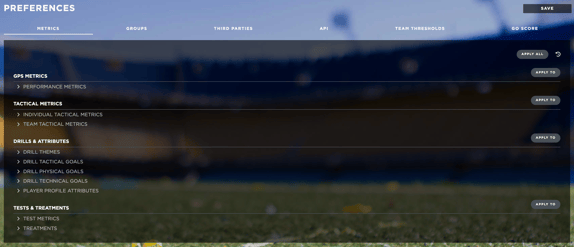
Additionally, all the actions you take in this regard will be documented in a Changelog. This Changelog allows you to keep track of the changes made, including details on which metrics were shared with whom, providing you with a clear history of your preferences and settings modifications.

Club Settings - Copy previous season’s lineup
You now have the option to duplicate your current season's lineup when setting up a new one. This feature streamlines the process of creating a new season, eliminating the need for manual player insertion.
When creating a new season on Club Settings > Squads, a confirmation message will appear asking if you wish to copy the current season’s lineup or if you wish to create it from scratch.

Pressing on Copy will create the new season with all of the already existing players. Your new season will then be generated with all the players you had in the previous one. It's a game-changer for a faster and more efficient season setup.
New Welcome Email for WebApp
The new logic for sending/receiving the Welcome Email for new users will be composed of a Temporary Access Token which will allow you to access the platform and directly set your desired password from there. This token will be active for 24 hours, after that time a new Welcome Email must be sent to the user. There will no longer be a temporary password sent to you by email.

The same logic will be applied for the reset password in the scenario that you forget it. You will have to click on ‘Lost Password’ on the login page, insert the relevant information, and finally you will receive an email with a temporary access to allow you to change the password.
New Welcome Email for PlayerApp users
We have made a big change to the logic on how to generate the credentials for the Player App of your team’s players. The redesign of the UI will allow you to more easily select the players that are currently actively using the App, who has changed their password, as well as the date when the last login was made. As before, the selected players are the ones that have access to the PlayerApp. If a player is not selected, he/she is not able to access the app

A new Welcome email is sent to the player’s email, and he/she will now be able to set the password directly from the phone. Note that for all the players that have already access to the app, nothing changes (old password and credentials are still valid). That logic is applied only when new credentials need to be generated.
The same logic will be applied for the reset password in the scenario that you forget it. You will have to click on ‘Lost Password’ on the login page, insert the relevant information, and finally you will receive an email with a temporary access to allow you to change the password.
Planning - Edit event title for treatments
We have now added the possibility to edit the event title for medical treatments which appear on the Planning calendar. You will have to follow the usual procedure of opening the desired event and editing the information inside accordingly.

Any modification made will then be visible in the Planning Calendar as well as in the Medical Calendar.
Squads - New option for player’s origin
We also added the possibility to select within your player’s origin in Administration > Squads > Details the options of them being Communitary or Non-Communitary.

This will allow you to keep track on the Dashboard of the number of players for each different category given all the regulations each country imposes for the player’s origin.
