
We are thrilled to announce ‘Iterpro’ v.1.82.0, the newest evolution of our cutting-edge business intelligence solution. Building on our commitment to excellence, this release brings significant enhancements, particularly in the visual design of our navigation bar and settings menu, making it more intuitive and user-friendly. These improvements are designed to enhance your experience and make navigating through the system smoother and more efficient.
‘Iterpro’ 1.82 aims to empower football clubs to extract actionable insights with unprecedented efficiency and precision. Experience the future of data-driven decision-making and elevate your business intelligence strategy with ‘Iterpro’ 1.82.
Impacted Areas
- New Navigation Menu
- New Settings Menu
- Notifications - Work Load Score Goal
- Chat - View all the staff/players from multiple teams to create chats
- PDF & CSV Export Improvements (Field View PDF, WL Analysis CSV)
New Features
New Navigation Menu
We’re excited to introduce a sleek new design for our platform’s navigation bar! We have unified the Home and Administration menus to streamline your experience. Now, you can access all areas of the system through a single, intuitive navigation menu, making it easier and more efficient to manage your tasks. Enjoy the simplicity and improved usability of our updated interface.

Additionally, users can now navigate through the platform using interactive dropdown menus for each 'Department' of the club. The structure of the modules inside each department remains the same, with a few key updates:
- Dashboards now include Standings and Administration Dashboard.
- Manager includes Tactics, Video Gallery, Drills, Planning, and Attendances.
- Performance includes Session Analysis, Workload Analysis, Readiness, Assessments, and Test Analysis.
- Medical includes Medical Records, Infirmary, Medical Statistics, Examinations, and Test Analysis.
- Players will now feature My Team, Compare Players, Scouting, and the Transfers Section.
- Administration is now composed of Squads, Finance Overview, Bonus, Cash Flow, and Transactions (previously called Cost Notes & Subscriptions).
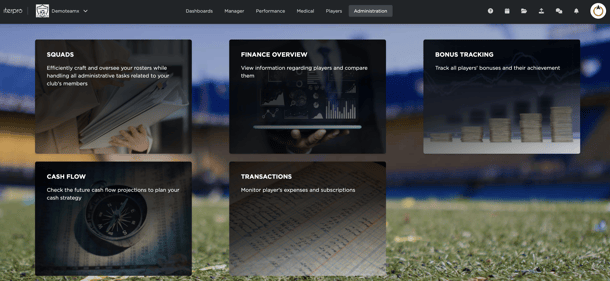
Moreover, the navigation bar now features quick redirect icons for the User Guide, Contact Support, Planning Calendar, the File Repository, and the Import Data sections alongside the pre-existing Chat and Notification icons. These changes make the menu dropdown cleaner and more intuitive, providing an enhanced user experience.
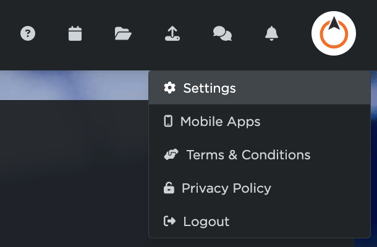
Enjoy the new look, the streamlined navigation and improved access to all your essential tools!
New Settings Menu
We’re excited to introduce a sleek new design for our settings menu, accessible through the updated navigation bar. We’ve unified the User Profile, Club Settings, and Preferences into a single section to facilitate and simplify all your setup processes. This consolidation ensures a more efficient and user-friendly experience, making it easier to manage your settings in one convenient location.
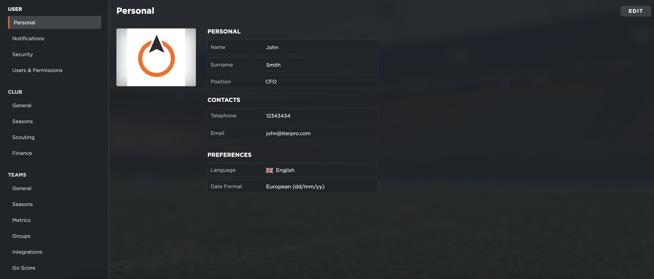
You will find the same tabs from previous versions in a restructured way, in fact, you will find them in the following order:
- User (previously User Profile) maintains the same sections (Personal, Notification, Security, and Users & Permissions). Here you will be able to set all the personal details about your account.
- Club (previously Club Settings - Club) maintains the same sections (General, Club Seasons, Scouting, and Finance). I this section, only accessible to admin users, you will be able to set up all the details regarding your club.
- Team is a newly created section that merges Club Settings - Squad with Preferences. This section will allow you to set up all the details regarding the teams in your club (General and Seasons) as well as set up all the Metrics, Groups, Integrations (Third Party and API), and Go Score values.
- Thresholds is also a newly created section that will allow you to set up your Team Thresholds.
*It is important to note that our User Guide has been updated with detailed explanations and videos of each singular section, to allow you to better understand all the new functionalities and changes in this initial transitioning process.
Path:
Menu / Settings
Notifications - Work Load Score Goal
Additionally to the redesign and restructure of the settings section, we have also implemented a functional change in the system’s notifications. In fact in the Advanced notifications, you will now find the World Load Score notification.
This will allow you to keep track of the objectives set for your sessions and whether your players are:
- Above the set target during the training sessions.
- In Target during the training sessions.
- Below the set target during the training sessions.

PDF & CSV Export Improvements
We are pleased to announce exciting enhancements to our reporting capabilities in our new version, specifically in regards to Work Load Analysis and to Scouting Recommendations.
CSV Report of Period Workload Analysis: This upgraded report now includes all individual and team workload values, offering a more detailed and comprehensive overview. With these additional data points, you can conduct deeper analysis, identify patterns, and make more informed decisions to optimize player performance and team strategy.

PDF Report of Scouting Field View: Our Scouting Field View report has undergone a complete visual redesign, making it more intuitive and visually engaging. The new layout enhances readability and ensures that critical scouting information is easily accessible and understandable. This revamped report will help you present scouting data more effectively to your team and stakeholders.

These enhancements will significantly improve your experience with Iterpro and provide you with the tools you need to gain deeper insights into player workload and scouting performance.
Paths:
- Performance / Work Load Analysis / CSV Export Icon
- Players / Scouting / Field View / PDF Export Icon
In the video below you can take a quick look at all the changes made on this sprint: