
Iterpro's Latest Updates
Dear Iterpro Users,
We are thrilled to announce the release of Iterpro v1.88! This latest update brings a host of new features and enhancements designed to streamline your workflows and provide even greater control and insights into your club management. Here’s what’s new:
Introducing Iterpro v1.88
This release adds several powerful features to the platform, enhancing team management, event scheduling, and reporting capabilities across multiple areas.
Impacted Areas
- Player Profile Management: New PDF export feature for easy sharing of player information.
- Web & Mobile Calendar: New recurring events functionality to streamline scheduling.
New Features
PDF Export for Player Profiles
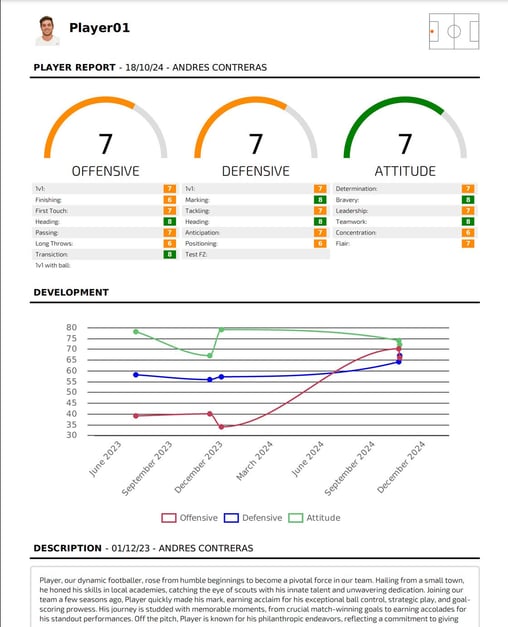
You can now easily generate and download a complete PDF report of any player's profile directly from the "My Team" section. This feature is located on the Overview screen, where a PDF icon in the top-right corner allows you to download the full report. This makes sharing critical information with staff or stakeholders simple and efficient, eliminating the need for manual compilation of data. The report includes an overview, player attributes, game stats, fitness metrics, robustness data, and more—providing a comprehensive look at a player’s profile.
Recurring Events for Calendar
Key Features
- Recurrence Options: Select from predefined recurrence options (daily, weekly, bi-weekly, monthly) or customize to fit your schedule.
- Customization: Specify the frequency, interval, specific days of the week, and end criteria (e.g., never, on a specific date, or after a certain number of occurrences).
- Edit/Delete Options: Easily manage recurring events by editing or deleting individual occurrences or entire series, with prompts for confirmation to avoid accidental changes.
- User Interface: The recurrence options are seamlessly integrated into the event creation form, with dropdown menus for easy selection and validation to ensure logical patterns.
The recurring events feature is especially useful for clubs to manage their schedules efficiently and save time. Here are some key scenarios where it can be applied:
-
Training Sessions:
- Schedule daily or weekly training sessions for specific teams or individual players.
- Automate the calendar so it includes sessions at consistent intervals, reducing the chance of errors or overlaps.
-
Match Preparation:
- Set up recurring pre-match meetings, tactical briefings, or warm-up sessions ahead of games.
- Ensure all stakeholders are aware of these events without needing constant manual updates.
-
Fitness Assessments:
- Organize periodic fitness tests or injury rehabilitation reviews for players on a recurring schedule.
- Keep the medical and coaching staff in sync about upcoming evaluations.
-
Staff Meetings:
- Plan weekly coaching staff or department meetings to ensure smooth operations and communications.
- Easily adjust recurring events when there are changes in plans.
-
Academy or Youth Teams:
- Schedule regular training, workshops, or assessments for academy players, providing a structured development environment.
This new functionality helps you keep everyone on track without repetitive manual inputs, ensuring better coordination and efficiency.
-2.png?width=582&height=334&name=unnamed%20(1)-2.png)
-2.png?width=582&height=334&name=unnamed%20(2)-2.png)
In the video below you can take a quick look to all the changes made: