
Iterpro's Latest Updates
Dear Iterpro Users,
We are excited to introduce Iterpro v1.91.0, the latest evolution of our sports intelligence platform. This update brings a range of powerful new features designed to enhance your team management, training planning, and overall efficiency.
This release focuses on providing greater flexibility in team setups, streamlining assessment processes, and offering more comprehensive tools for training organization. Embrace these advancements to further optimize your workflows and gain deeper insights within Iterpro.
Sincerely,
The Iterpro Team
Impacted Areas
- Web - Planning: Training Event
- Coach App - Game Event
- Web - Assessments and Examinations
- Web - Drills
- Web - Settings
New Features
Flexible Lineup Options
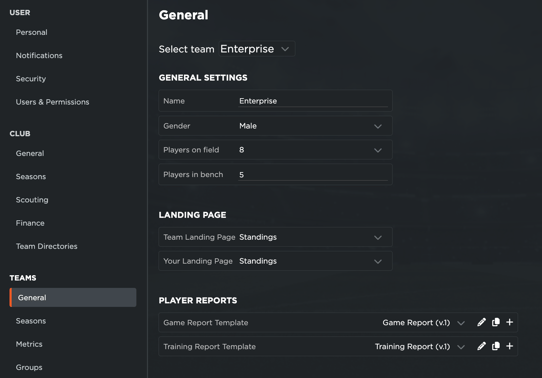
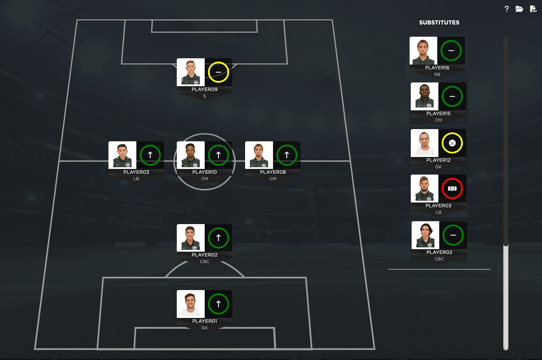
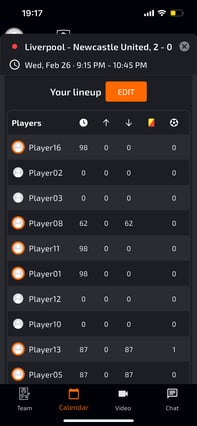
You now have the ability to customize your team lineups based on the number of players, with options for 6, 7, 8, or 9 players. With Flexible lineups, you can adapt to different age groups (smaller sides for younger, skill focus for older) and player availability. This maximizes ball touches, decision-making, and engagement, while allowing tactical flexibility and consistent role understanding across team sizes. Features added:
- Configurable Player Count: Select the desired number of players (6, 7, 8, or 9) for your lineups through Tactics.
- Dynamic Formation Display: Different lineup formations will be available based on the selected number of players, allowing for strategic flexibility.
- Coach App Alignment: The lineup configurations will be seamlessly reflected as well as editable in the Coach App.
-
Consistent Roles and Positions: The existing roles and positions from the 11v11 setup will remain unchanged.
Enhanced Assessment Management with Bulk Upload
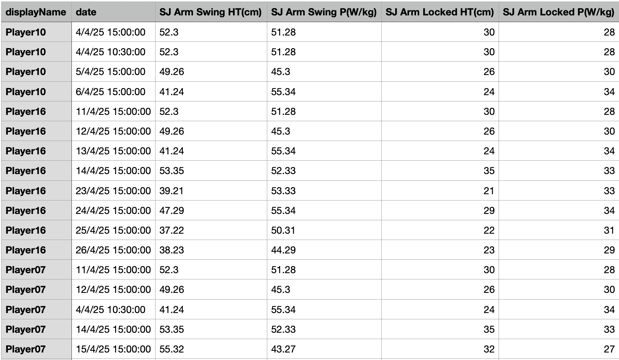
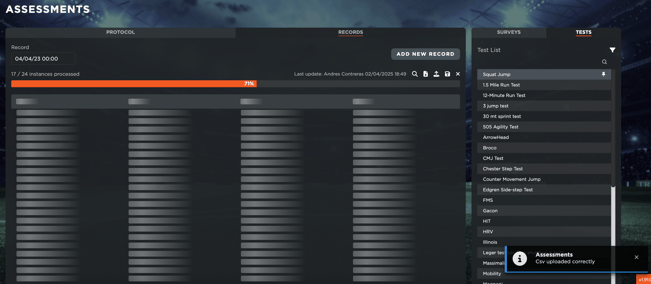
We've introduced a bulk upload feature to simplify the process of adding assessments and examinations. Bulk upload saves significant time by adding numerous assessment records simultaneously, eliminating manual entry for each player and date. This way of data entry allows for quick population of the system, including valuable historical assessment data in one go. Coaches can efficiently build a comprehensive player performance history for better analysis and development tracking.
Feature added:
- Streamlined CSV Import: You can now upload a single CSV file containing all assessment records for every player across all dates. The import icon has been moved to the top of the section for easier access.
New Training Plan Panel
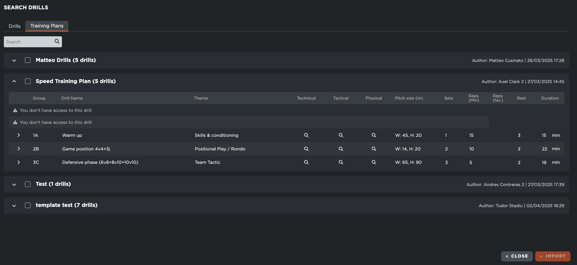
A dedicated "Training Plan" panel has been added to provide a centralized space for organizing and managing your training sessions. The "Training Plan" panel centralizes session organization within the event, eliminating the need to navigate away. Coaches can now efficiently plan training and strategize with staff, accessing all drill details (goals, description, coaching points) instantly. This integrated approach streamlines workflow and facilitates collaborative session design with all necessary elements readily available. Find the new panel under the Overview and Participants sections.
Added features:
- Efficient Drill Search: A new search bar allows you to quickly filter and locate specific drills.
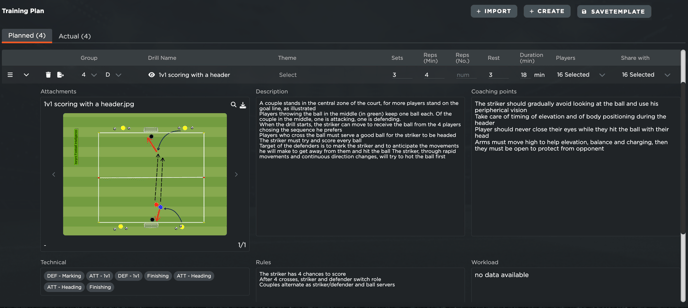
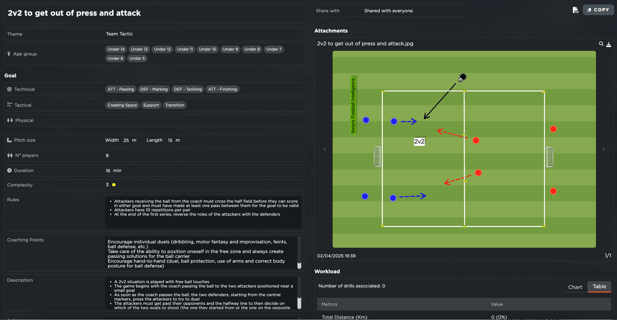
- Integrated Drill Model: The drill details are now presented in a more organized and visually appealing manner. The drill information is now divided into three equal columns for better readability.
- First Column: Features a carousel for drill images and displays Tactical, Physical, and Technical Goals.
- Second Column: Includes Description and Rules sections
- Third Column: Contains Coaching Points
Action Buttons for Training Plans
New action buttons have been added to the Training Plan panel for quick access to key functions.
- Add Record: This button (renamed from "Add Drill") allows you to add both existing drills or training templates to your plan. It opens a view similar to the drill filtering section with two tabs: Drills and Training Plans.
- Create Drill: Clicking this button opens the Drill Editor, allowing you to draw and save new drills that are automatically added to your training plan.
- Save as Template: This option opens a modal where you can name and save your current training plan as a template for future use.
Editable player report and game event statistics in the Coach App
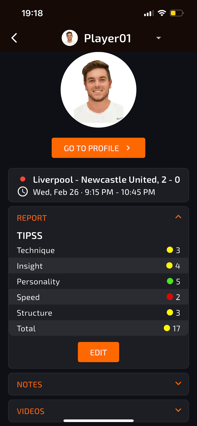
Coaches on the pitch can now use the Coach App to create and edit player reports, update game stats (time, goals), and manage opponent info directly from their phones. This eliminates the need for web app access during games, enabling real-time data capture and immediate performance tracking. For any game, you can:
- Create and edit detailed player reports: Including performance analysis, notes, and document uploads.
- Manage match statistics: Easily update player time, goals scored, and other key metrics.
- Maintain opponent information: Add and modify crucial details about opposing teams.
Enhanced Security with Multi-Factor Authentication (MFA) Options
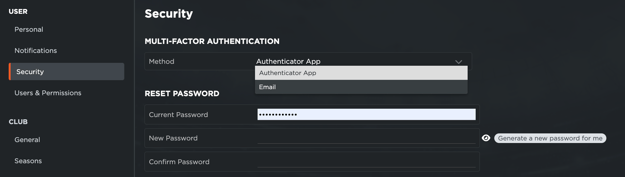
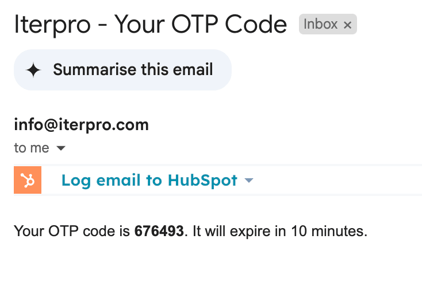
We've added flexibility to our security measures by allowing you to choose your preferred method for multi-factor authentication in order to access the platform. You can now select between Email-based One-Time Passwords (OTP) or Google Authenticator for an extra layer of security. This can be found in Settings > Personal > Security.
Standard Soccer Drill Library Integration
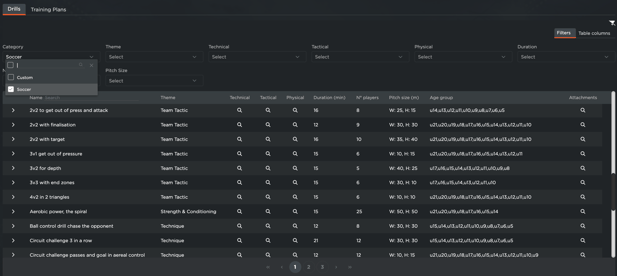
We've integrated a standard list of soccer drills directly into the library to provide you with a valuable resource. This integration provides default, expert-curated soccer drills directly within the platform, offering immediate content for coaches to consult. These standard drills, provided by Iterpro, ensure users have a foundational resource ready for use. While uneditable for consistency, they can be duplicated and customized to fit specific training needs.
- Pre-Populated Drill List: A comprehensive list of soccer drills is now available within the Drills section.
- Static Drills: These standard drills are read-only, meaning you cannot edit them, upload additional attachments, share them individually, or create new canvases based on them. This ensures the integrity of the standard library.
- Duplication Allowed: You can duplicate any static drill. The duplicated version will be associated with your club and become a customizable drill.
In the video below, you can take a quick look at all the changes made: