
Iterpro's Latest Updates
Dear Iterpro Users,
We’re thrilled to announce the release of Iterpro v1.96.0 — the latest step forward in the evolution of our sports intelligence platform. This update introduces a series of powerful new features aimed at improving user and team management, enhancing the overall experience across both the Web platform and mobile apps, and streamlining your daily operations.
With this release, you'll benefit from greater flexibility in managing your teams and users, along with key visual and functional improvements designed to make your workflow smoother and more efficient — no matter where you access Iterpro.
We’re confident these enhancements will help you work smarter, stay better connected, and unlock even deeper insights across the platform.
The Iterpro Team
Impacted Areas
- New Club View
- Manager - Planning
- Manager - Drills
- Players - My Team
- Settings - Users & Permissions
- Mobile Apps
New Features
Introducing Club View: A New Perspective for Admin Users
With the upcoming Iterpro update, we’re excited to introduce Club View, a brand-new section designed exclusively for Admin users. This new feature provides a centralized overview of all the teams within your club, offering a clear and structured snapshot of your entire organization.
Within the Club View, Admin users will be able to see essential details for each team at a glance — including the team name, associated directories, assigned users, registered players, and seasonal information. This layout is designed to give you greater visibility and control across your club, simplifying your management tasks and improving overall coordination.
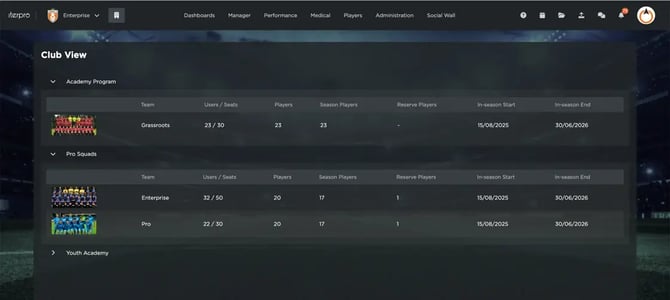
In addition to this, we’re also adding the ability to set team pictures directly within the Team General Settings. Once uploaded, these images will appear inside the Club View, allowing for easy team identification and a more personalized experience.
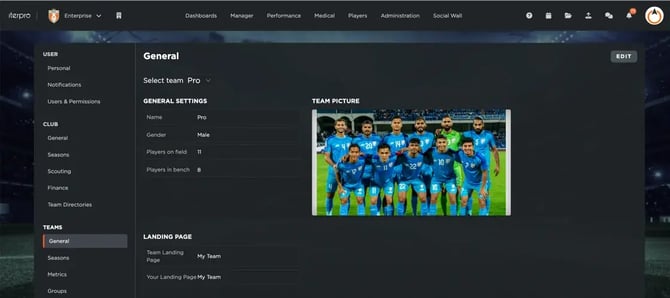
This new feature is part of our commitment to continuously improve the way clubs manage their internal structure in Iterpro. Club View gives you the tools to stay organized, monitor team activity, and ensure everything is aligned under one clear and easy-to-use interface.
Planning Calendar Enhancements: More Visibility and Flexibility
With the upcoming Iterpro update, we’re introducing a set of improvements to the Planning calendar to give you greater control and visibility over your club’s activities.
First, in connection with the new Club View, users will now be able to visualize the calendar based on the daily events scheduled by the different clubs within their account (provided they have the necessary permissions). This means you can easily switch between clubs and get a clear overview of all planned activities across your organization, streamlining collaboration and improving coordination.
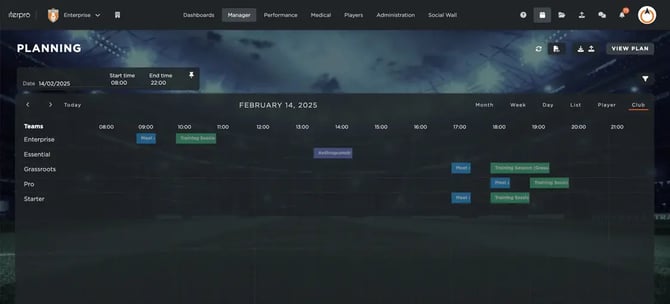
Secondly, we’re adding a much-requested feature: the ability to export the calendar in CSV format. With this new functionality, you’ll be able to generate custom calendar files by selecting the specific period of time, teams, and types of events you want to include. Once configured, the export will be automatically downloaded from the system.
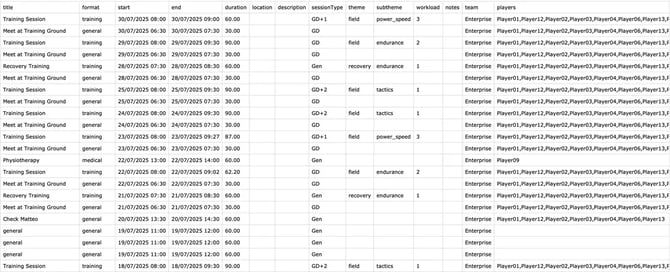
The exported CSV files will contain the same detailed information you’ve entered into the system—such as event titles, dates, times, and participant lists—making it easy to review, share, or integrate your calendar data into external tools.
Introducing Bulk Sharing for Drills
We’re excited to introduce a new feature in the latest Iterpro update: Bulk Sharing for drills and exercises created in the Manager – Drills section.
With this new functionality, sharing your drills with other users in your account has never been easier or faster. Inside the table view of your Drills library, you will now be able to multiselect multiple drills at once. As soon as you do, a Bulk Share icon will appear, allowing you to choose the users you want to share the selected drills with.
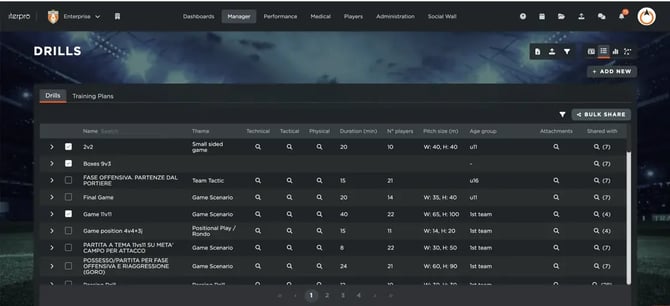
This improvement is designed to streamline your workflow, especially when working with large numbers of drills. Instead of repeating the same operation for each drill individually, you can now share multiple drills in just a few clicks—saving you time and effort, and ensuring that all staff members have quick access to the resources they need.
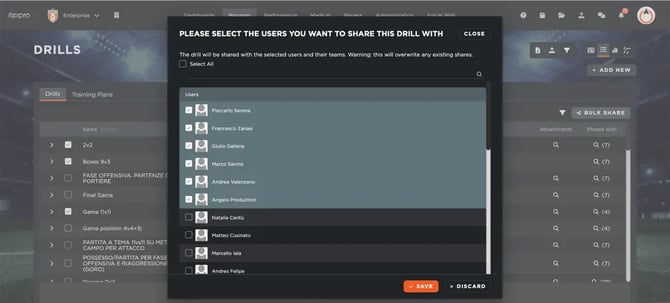
Whether you're preparing for a training cycle, updating your team’s drill collection, or collaborating with other coaches, the Bulk Share feature will make your drill management more efficient and collaborative.
Player Passport Enhancements: New ‘Report’ Tab & Improved Navigation
With the release of our new Iterpro version, we’re introducing a couple of enhancements to the Player Passports section in My Team to make your player monitoring and evaluation process even more effective.
First, the current Player Reports tab will be renamed to Profile. Don’t worry—none of the content inside this tab is changing. This update is simply a name adjustment to better reflect its purpose and make room for a new, dedicated space for reports.
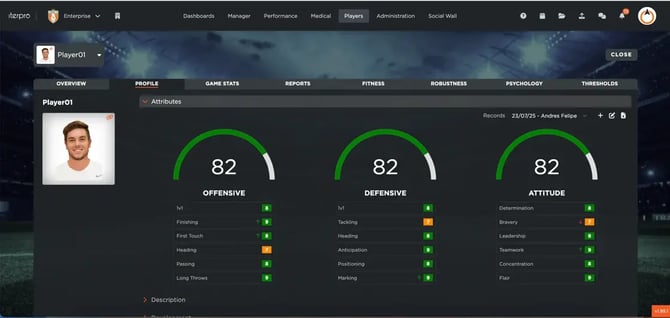
The exciting addition is the brand-new Report tab. This section is designed to help you analyze and visualize all Training and Game reports completed for each player within their respective planning events. Inside this tab, you will find all relevant records and results, along with the name of the staff member who submitted the evaluation.
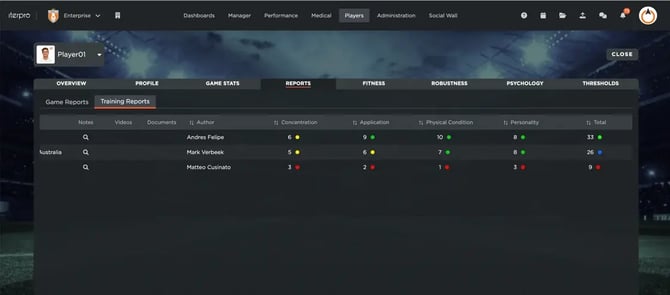
To make things even more practical, each report listed in this new tab includes a direct link to the specific training session or game in which the evaluation was created. This makes reviewing and cross-referencing past reports faster and more efficient than ever.
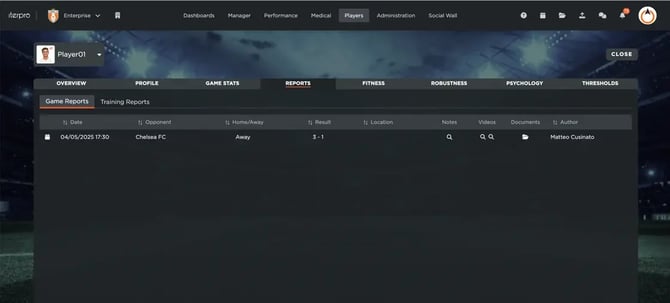
These updates are part of our ongoing effort to provide a clearer structure and more powerful tools for player development analysis. We hope this enhancement improves the way you access and use key performance data within Iterpro.
Improved User Management
With the release of our latest version, Iterpro introduces a more intuitive and efficient way for Admin users to manage and analyze all active users within their account.
This new feature allows Admins to export a CSV file containing a complete overview of all active users.
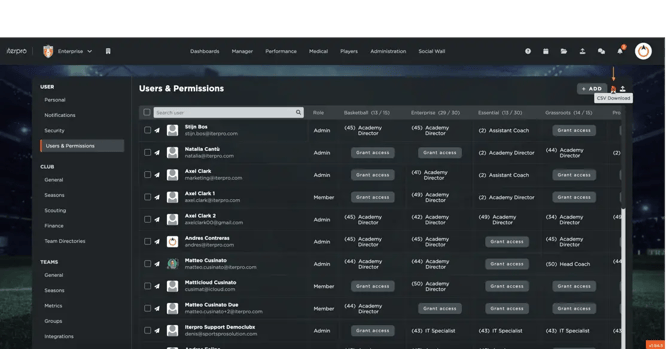
The export includes key information such as name, email address, accessible teams, confirmation status (indicating whether the user has successfully set their password), and last login details (including both date and time). This provides a clear and up-to-date snapshot of who is active on the platform and how they are engaging with it.

The new layout and functionality make it easier to monitor user activity, track access levels across different teams, and ensure that all members are properly set up and using the platform as expected. Whether you’re auditing access, following up on inactive users, or simply keeping internal records updated, this feature is designed to support your day-to-day operations.
By enabling detailed user tracking and easier data export, Admins can now maintain better oversight of their account, keep accurate records, and ensure that all users are aligned with the team’s workflow. This marks another step forward in giving clubs and organizations full control over their Iterpro environment.
Mobile App Improvements: A Smoother Experience Across All User Profiles
With the release of our new Iterpro version, we’re bringing a series of UX improvements to our mobile apps — the Director App, Player App, and Coach App — designed to make your experience smoother, clearer, and more user-friendly.
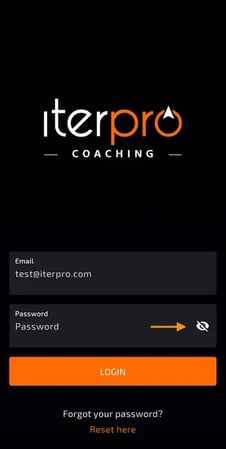
First, we’ve added the ability to preview your password during login on all three apps. This small but impactful change makes the login process more comfortable and reduces the chances of login errors, especially when using complex passwords.
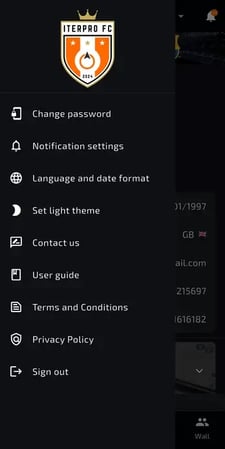
Additionally, we’ve aligned the side menu layout across all mobile apps. You’ll now find the Settings and other preferences organized in a consistent way, no matter which app you use. This makes navigation simpler and more intuitive for everyone — whether you're a coach adjusting notifications, a director reviewing permissions, or a player updating profile details.
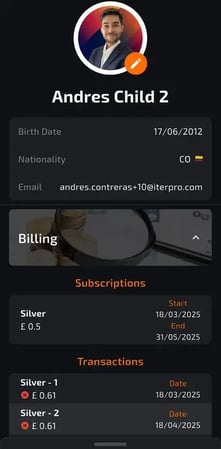
A major update comes specifically for the Player App: we’ve introduced a brand-new Billing section. This feature allows players — and parents when applicable — to view all subscriptions and transactions related to the player’s registration directly from the app. It’s a more transparent and accessible way to keep track of payment details and billing history.
These updates are part of our ongoing commitment to improving your mobile experience and making Iterpro a powerful, easy-to-use tool for all team members — on and off the field.
Enhancements
We have also implemented several enhancements to improve your experience:
- We have made several minor User Experience improvements to make navigating through the platform easier for you.
- We have optimized the overall platform and conducted bug fixes across different software sections.