
Iterpro's Latest Updates
Dear Iterpro Users,
We’re excited to announce the release of Iterpro v2.2.0 — the next big step in the evolution of our sports intelligence platform. This update brings new features designed to simplify player and team management, enhance your experience across both the Web platform and mobile apps, and make your daily work even more efficient.
With this release, you can now create players and staff members more intuitively and in fewer steps, saving time and streamlining your setup process. We’ve also made it easier to share team chats and training plans with the right users, improving communication and collaboration across your organization.
In addition, this version includes several visual and functional improvements that give you access to more resources while keeping your workflow smoother, faster, and more intuitive — wherever you use Iterpro.
We’re confident these updates will help you work smarter, stay connected, and unlock even greater insights across the platform.
The Iterpro Team
Impacted Areas
- Drills - Training Plan
- Chatting Tool
- Administration - Squads
- Player's Profile (My Team and Scouting)
- Mobile Apps
New Features
🏋️ Training Plans Enhancements
We’re excited to introduce a series of powerful improvements to Training Plans that will make organizing, managing, and sharing them easier than ever. With this latest update, you’ll now be able to handle your training content in a more flexible and intuitive way — saving time and ensuring everyone has quick access to what they need.
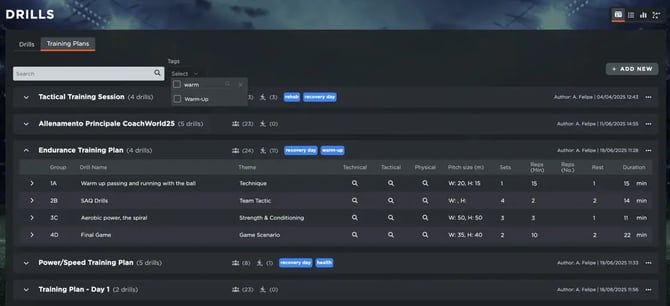
You can now bulk share training plans with multiple users at once, streamlining communication and guaranteeing that all relevant staff and players can access the right information effortlessly. In addition, each training plan can now be tagged with custom labels, allowing you to filter and organize plans based on your specific needs — whether by category, focus area, or time period.
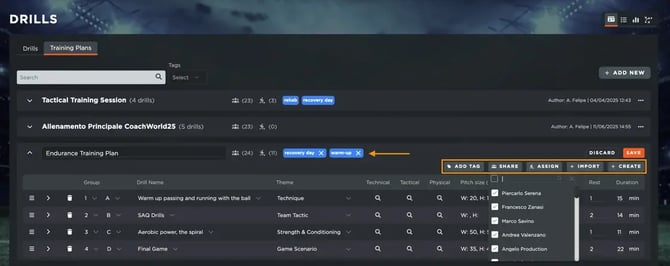
These enhancements are designed to simplify your workflow, improve collaboration across departments, and give you a clearer overview of your training library. Managing and sharing training content has never been easier, helping your team stay aligned and focused on what truly matters — performance.
💬 New Team Chats
We’re introducing a new and convenient feature: default team group chats. This enhancement is designed to make team communication smoother, more organized, and fully automated.
From now on, when a new team is created, a group chat will automatically be generated for that team. For teams that already have an existing chat, Admins can simply assign it as the “Team Chat”, ensuring all players and staff members are correctly linked to the main communication channel.
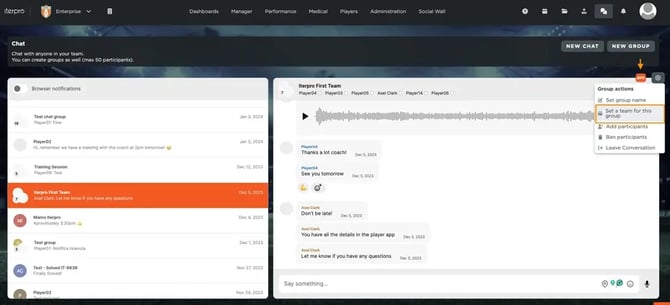
This new functionality ensures that any new players added to a team will automatically be included in the group chat, keeping everyone up to date with important details, announcements, and requirements. No more manual setup or missed messages — your communication channels will always stay aligned with your team structure.
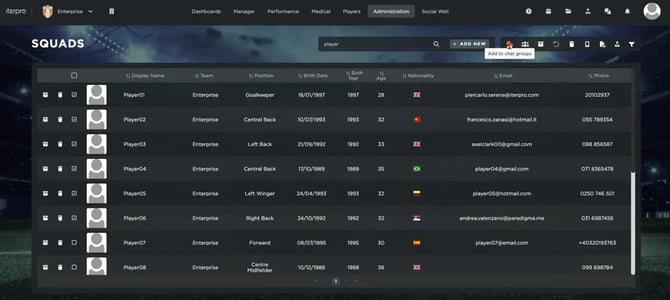
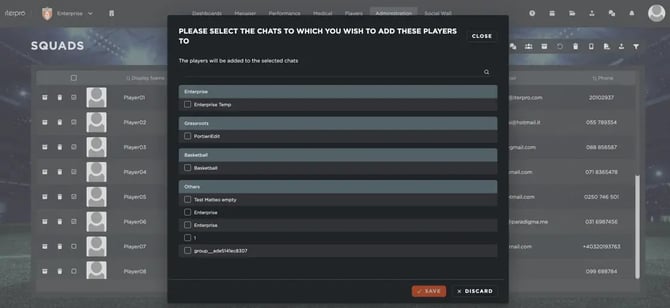
This improvement aims to strengthen collaboration and ensure that every player and staff member stays informed and connected at all times.
👥 User Creation Upgrade
We’re excited to introduce a simpler and more intuitive way to create player, staff, and agent profiles in Iterpro. While the overall flow remains the same, this enhancement streamlines the process and gives you more control right from the start.
You can now add essential personal details and set permissions—such as access to the Player App and team chats—directly during the profile creation phase. This eliminates the need for multiple steps or returning later to complete setup, helping you save time and ensure all profiles are configured correctly from the beginning.
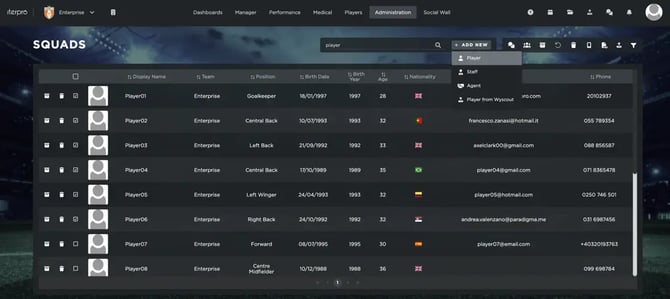
This improvement also ties directly into the team chat feature, allowing you to seamlessly manage communication access as you create new users, as well as bulk share players to a group chat.
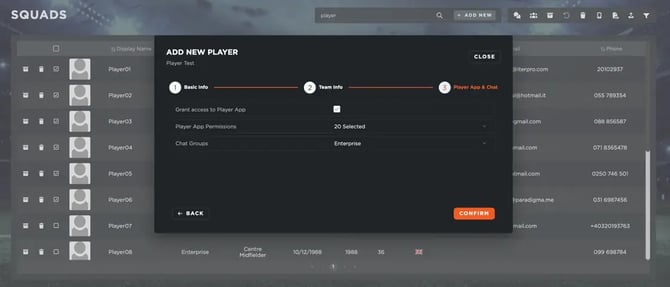
With this update, managing your organization’s people has never been easier—keeping all essential details, permissions, and communication channels perfectly aligned within Iterpro.
📁 Player Profile - File Repository
We’re excited to announce a new feature in Iterpro that allows you to attach general files directly to player profiles, whether the players are from My Team or Scouting.
Within the Details section of each player’s passport, you will now find a general file repository where you can upload and organize any type of documentation related to the player. This could include contracts, medical records, scouting reports, or any other relevant files.
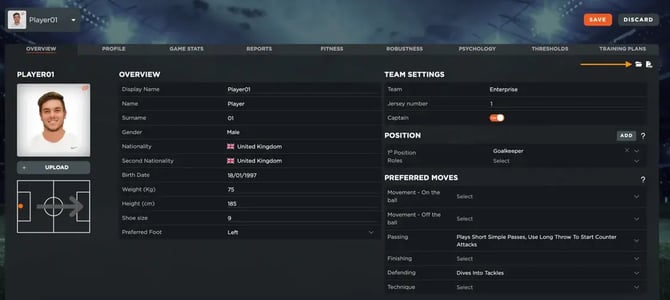
In addition, you’ll have full control over who can access each file. When uploading a document, you can decide which users or teams should have visibility, ensuring sensitive information is shared only with the right people.
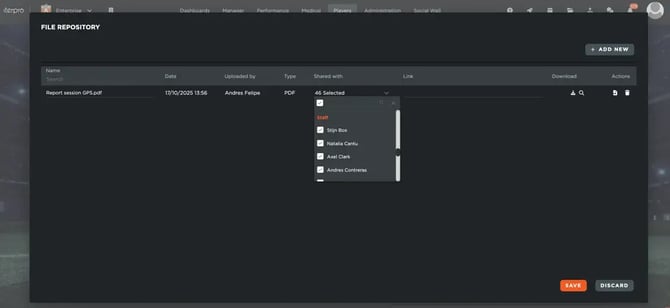
This enhancement is designed to centralize player documentation, simplify information management, and make your workflow more efficient. Whether you’re managing your current squad or scouting potential talents, having all relevant files in one easily accessible place will save time and improve collaboration across your organization.
📱 Mobile Apps Improvements
With the release of Iterpro v2.2.0, we’ve introduced a series of enhancements across the Director, Coach, and Player Apps, designed to make your experience smoother, clearer, and more intuitive.
First, all three apps now feature a restyled event display, offering a cleaner and more organized view of your calendar. This new design makes it easier to review and analyze upcoming sessions, matches, and activities at a glance — helping you stay on top of your schedule with greater clarity.
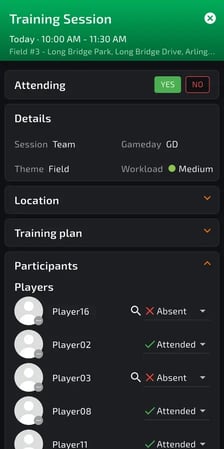
For players specifically, we’ve redesigned how Wellness and RPE surveys are displayed and completed within the Player App, making the process more intuitive and accessible. Each survey now includes a dedicated button in addition to the existing notification.
-
For Wellness, players will find a new button within the Readiness section, along with a clear red marker showing whether the survey has been completed. They can also submit responses for any past missed dates directly from there.
-
For RPE, the new answer button is available inside each specific event the player has been invited to, sitting alongside the usual notification for easy access.
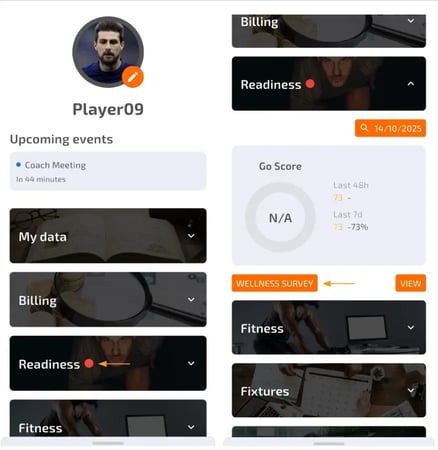
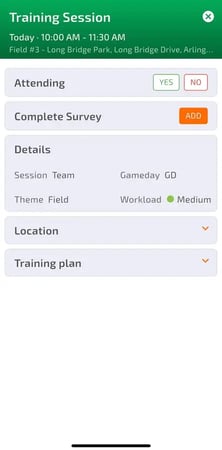
These improvements are aimed at simplifying how players interact with their daily routines and how staff members manage communication across the platform. Together, they bring a more seamless, modern, and user-friendly experience to the Iterpro mobile ecosystem.
Enhancements
We have also implemented several enhancements to improve your experience:
- We have made several minor User Experience improvements to make navigating through the platform easier for you.
- We have optimized the overall platform and conducted bug fixes across different software sections.