---
title: Iterpro Software Update 2.9 (23/06/2026)
description: Discover the potential of ‘Iterpro’ version 2.9 and elevate your business intelligence strategy to new heights.
---
[Skip to content](https://support.iterpro.com/en/guide/iterpro-software-update-1.92-14/04/2025-0-1-0-0-0-0-0-0-0-0-0-0-0#main-content)
English
Show submenu for translations
[](https://app.iterpro.com/auth/login)
- [Iterpro Login Page](https://app.iterpro.com/auth/login)
- [Contact Support](https://share.hsforms.com/1rE7NvsvuTIWBm7WQ1dhslQ1uo0p)
Open main navigation
Close main navigation
- [Iterpro Login Page](https://app.iterpro.com/auth/login)
- [Contact Support](https://share.hsforms.com/1rE7NvsvuTIWBm7WQ1dhslQ1uo0p)
- English
Show submenu for translations
How can we help you?
- There are no suggestions because the search field is empty.
1. [User Guide](https://support.iterpro.com/en/guide?hsLang=en)
2. [What's New](https://support.iterpro.com/en/guide/whats-new?hsLang=en)
# Iterpro Software Update 2.9 (23/06/2026)
## Discover the potential of ‘Iterpro’ version 2.9 and elevate your business intelligence strategy to new heights.
### Iterpro's Latest Updates
*Dear Iterpro Users,*
*We’re happy to share that the latest 2.9.0 version of Iterpro is now available, bringing new updates designed to make your daily workflows more flexible, connected, and easier to manage across the platform.*
*This release introduces a new user permission structure, giving clubs more control over access and visibility across different areas of the system. We’ve also added new Attribute definitions to help unify club parameters and player metrics, ensuring greater consistency in how player information is tracked and analysed.*
*In addition, this version includes new Individual Development Plan (IDP) logic, allowing staff to apply specific development focuses directly to training sessions. The Video Editor has also been enhanced with live tagging, making analysis workflows faster and more dynamic.*
*Finally, users can now customise the tabs visible within player profiles, creating a more tailored and user-friendly experience based on each club’s needs.*
*Alongside these highlights, the release includes additional improvements and fixes to ensure a smoother, more reliable experience across Iterpro.*
*We hope you enjoy the new version and wish you a great week.*
***The Iterpro Team***
### Impacted Areas
1\. Settings - Users & Permissions
2\. Settings - Club - Attribute Definitions
3\. Manager - Planning - Training Session Focus (Individual Development Plans)
4\. Manager - Video Editor - Live tagging from Coach App
5\. Players - My Team - Player Profile tabs
6\. Director App - Scouting
### New Features
### 🔐 Improved User Permissions!
With this release, we’ve improved the user permission structure inside Iterpro, making it more organised, categorised, and easier to manage across your organisation.
Users can now be assigned to one of three main access levels. **Club Admins** will have full access and control over the entire club environment, aligned with the current Admin permission logic.
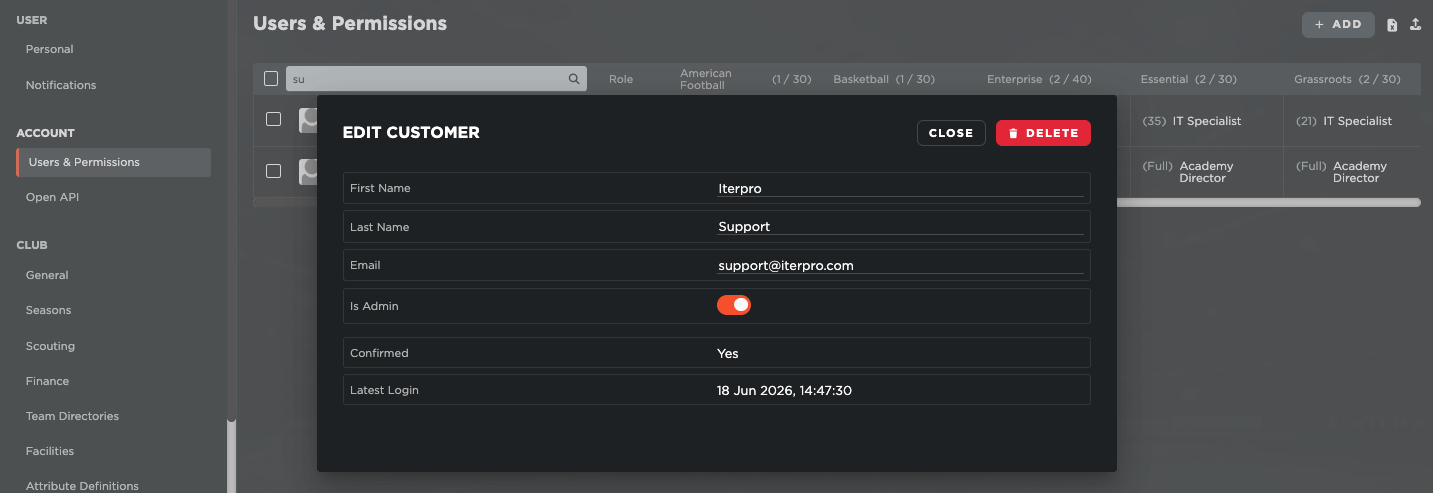
Team Admins will have access and control over everything within the specific teams they are assigned to, without having visibility or control over the full organisation. Club Members will continue to work as regular users, with access limited to the specific sections and functionalities enabled for them.
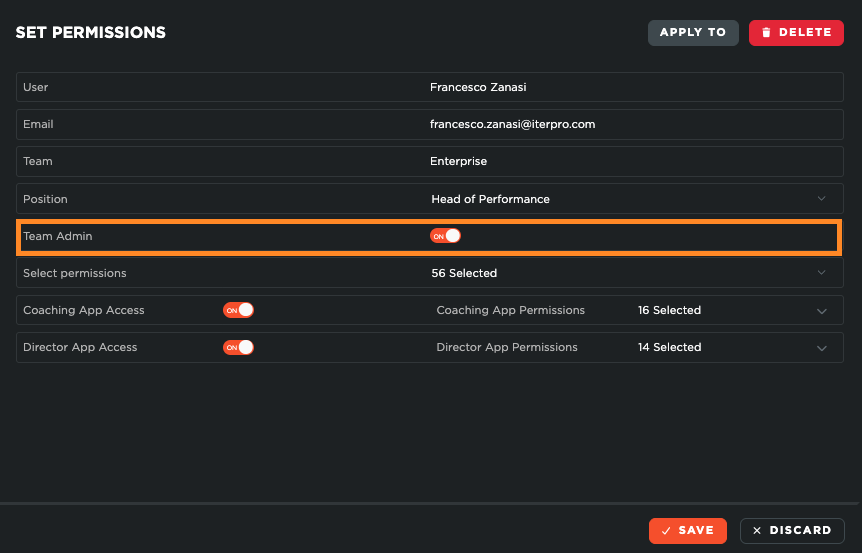
In addition to these new user categories, we’ve also introduced a more granular permission system for each user. This means Club Admins can now customise user access in greater detail, deciding exactly which areas, sections, and actions each user should be able to access within the platform.
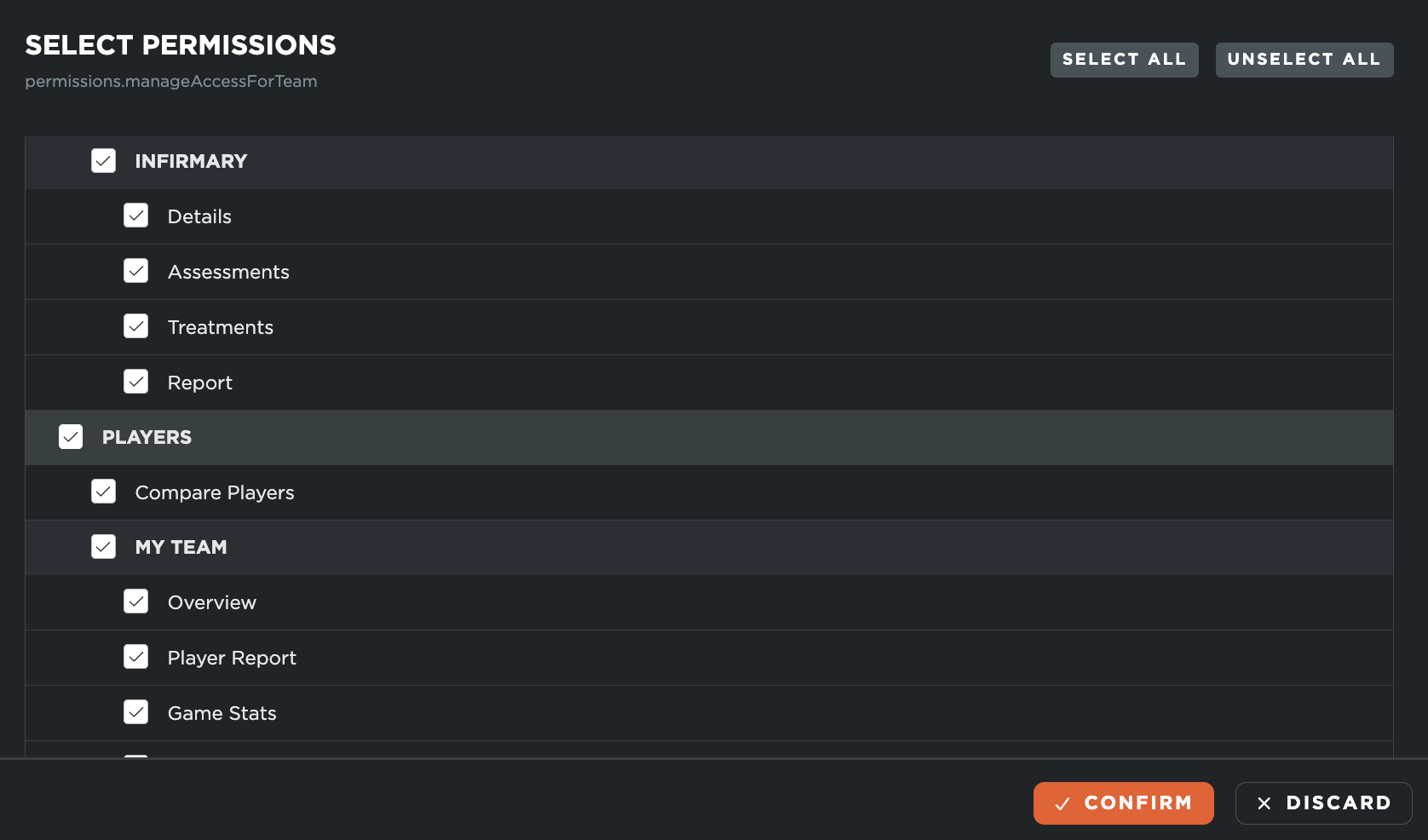
Overall, this update gives clubs more flexibility and control when managing staff access, helping ensure each user has the right level of visibility and responsibility based on their role. The result is a clearer, safer, and more scalable permission structure that better supports the needs of different departments, teams, and organisational setups.
### ⚙️ Player Attribute Definition
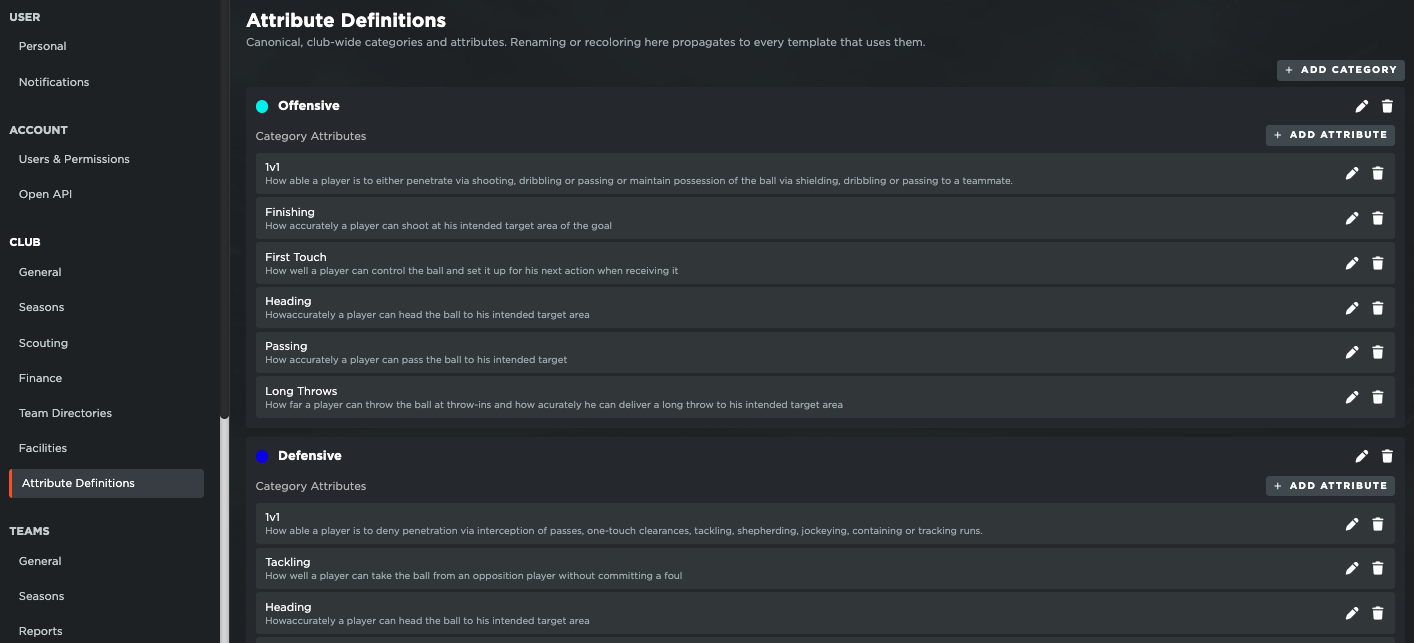
With this release, we’ve introduced the globalisation of **Player Attribute Metrics**, helping clubs create a more consistent and unified approach to player development analysis.
Previously, each team within an organisation had its own static attribute metrics, even when those metrics were the same or very similar across other teams. This made it harder to compare data across squads and analyse player development from a club-wide perspective.
To improve this, we have standardised **Club Attributes**, allowing clubs to create and define their own attribute metrics at organisation level. Admin users can now set the key attributes, categories, and definitions that should be used across the club, ensuring everyone works from the same shared structure.
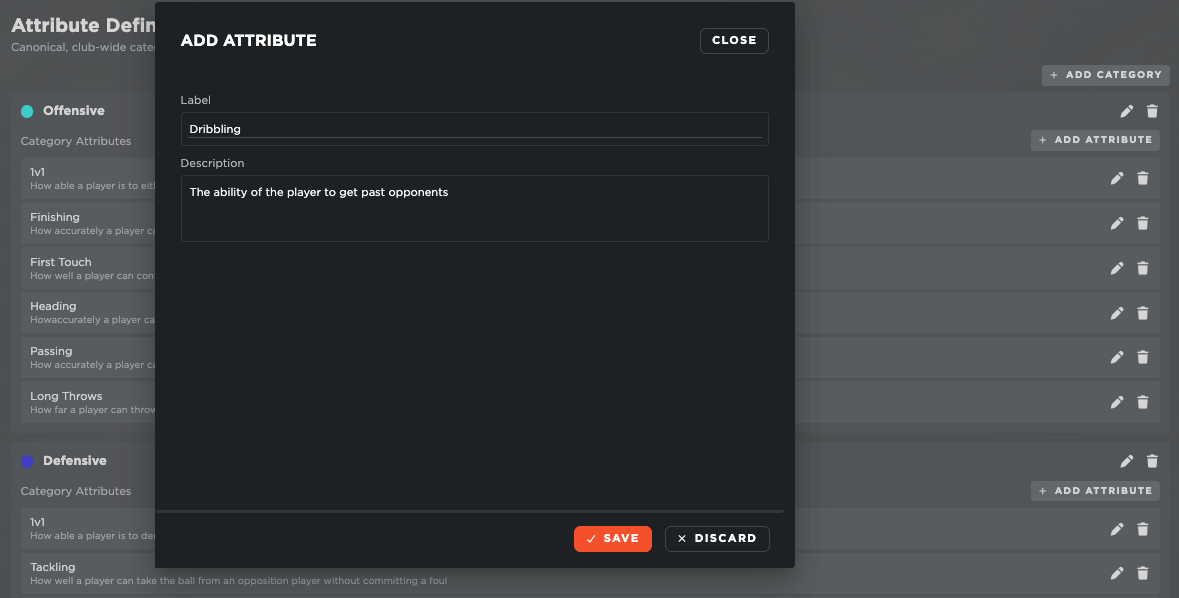
These Club Attributes are directly connected to the Player Attribute templates. Each team can still customise its own templates based on its specific needs, but the values collected will now be linked back to the same club-level metrics. This allows reports and records from different teams to be analysed together under one consistent framework.
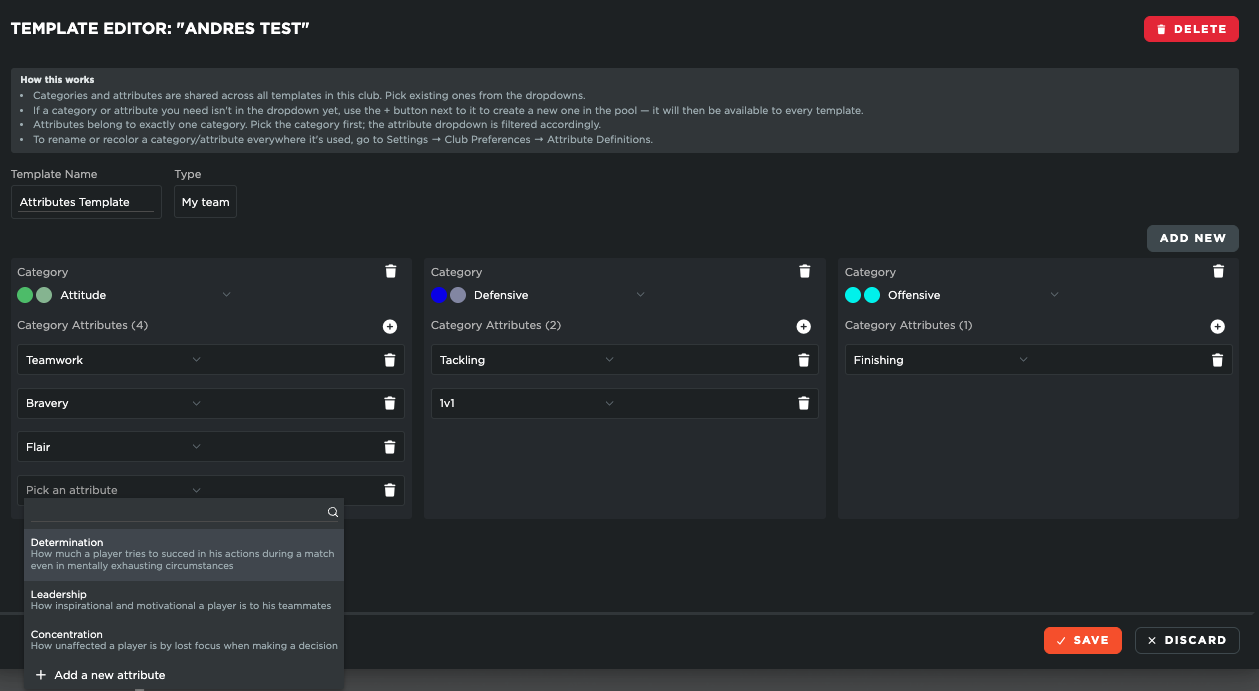
Overall, this update gives clubs more control, consistency, and visibility when tracking player development, making it easier to compare progress across teams and build a clearer long-term picture of each player’s growth.
### 📝 Training Reports: New Session Focus (Individual Development Plan)
With this release, we’ve introduced a new **Training Session Focus** functionality, designed to support each player’s **Individual Development Plan (IDP)** directly within daily training workflows.
This feature works in two steps and is connected to the Club Attribute definitions previously described. First, the club must define and create its Attribute Metrics at organisation level.

Once these attributes are in place and the IDP functionality has been enabled, coaches will be able to access them directly within Training Sessions → Player Reports.
From there, coaches can select one or more specific session focuses for each player, based on the attributes they want to develop or monitor during that training session. This allows staff to connect daily work on the pitch with each player’s long-term development objectives.
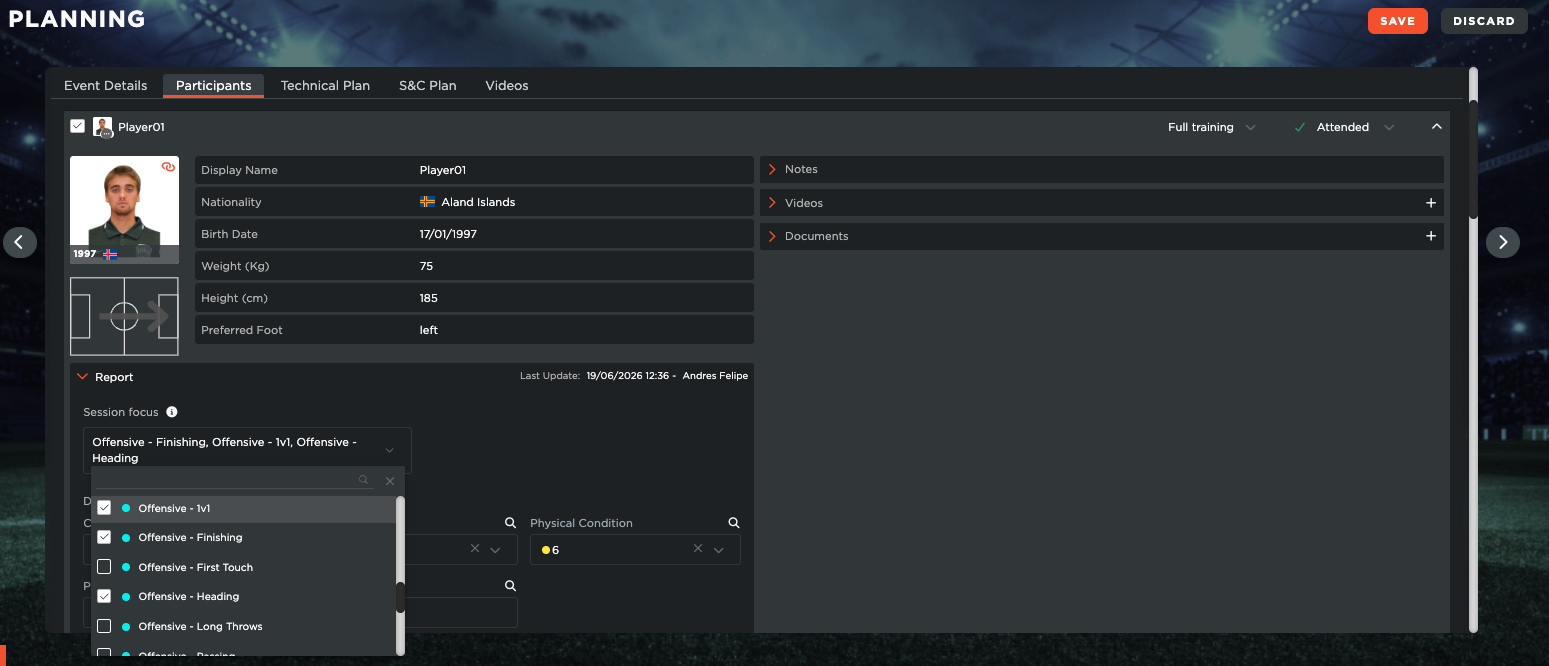
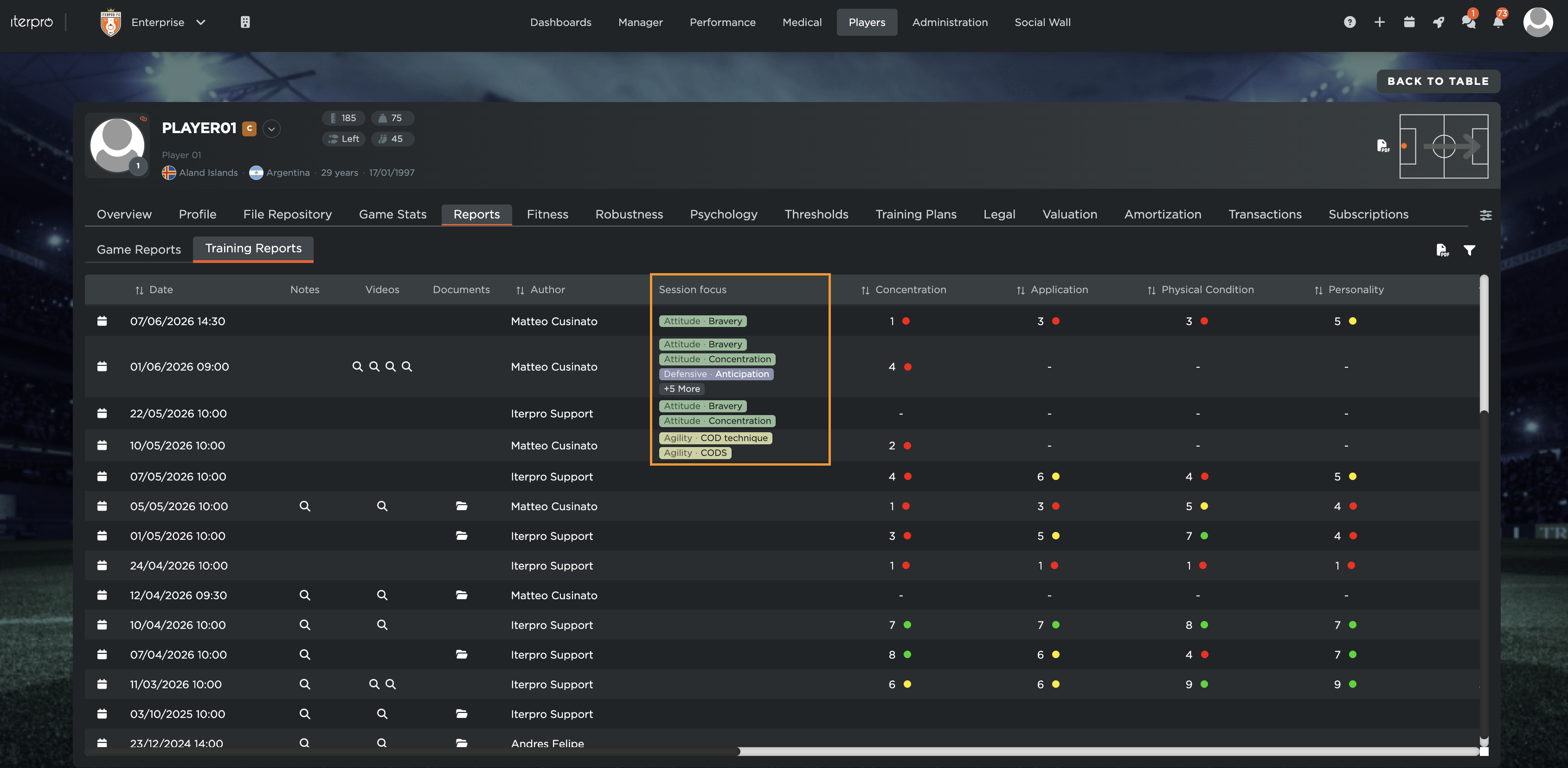
The selected focuses are then visible both at team level within the same training session and inside **My Team → Reports**, where coaches can track all the focuses and IDPs assigned to each player over time.
Finally, these options are also available directly from the Iterpro Coach App, allowing coaches to add IDPs to their training reports, as well as beig able to visualize their player's overview.
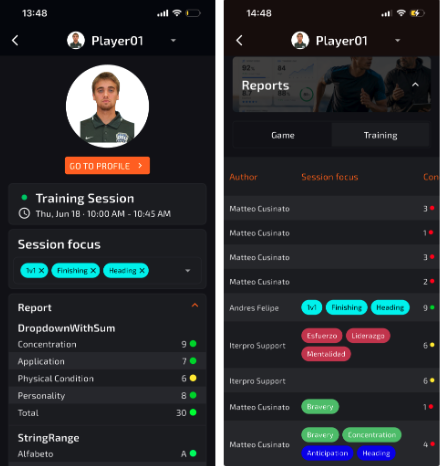
Overall, this update helps clubs bring player development closer to the training process, making it easier to plan, monitor, and review individual growth through a clear and structured workflow.
### 🤳 Video Editor: Live Tagging Available!
With this release, we’ve added a new **Live Tagging** functionality to the Video Editor module, giving analysts a faster and more flexible way to capture key moments during games.
Analysts will now be able to live tag matches directly from the **Coach App**, allowing them to record important game events in real time from their mobile device. This means all relevant tags can be created and stored while the game is happening, giving analysts access to a practical tagging tool directly in their pocket.
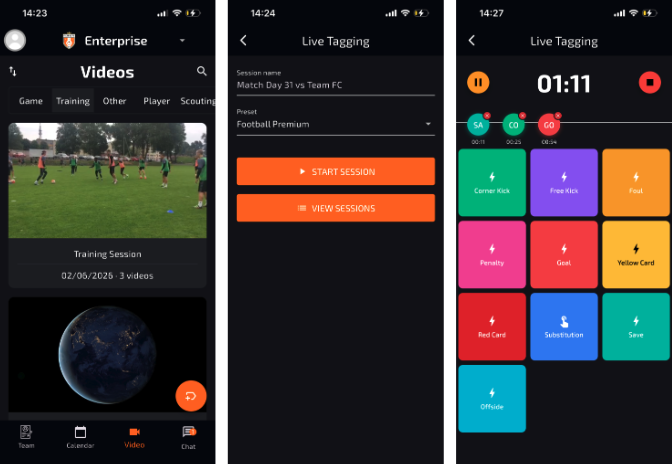
Once the game is finished, these tags can be imported through the **Web platform** and used inside the Video Editor workflow. This allows analysts to bring the information collected during the match directly into the video editing process, making it easier to organise clips, identify key moments, and build analysis content more efficiently.
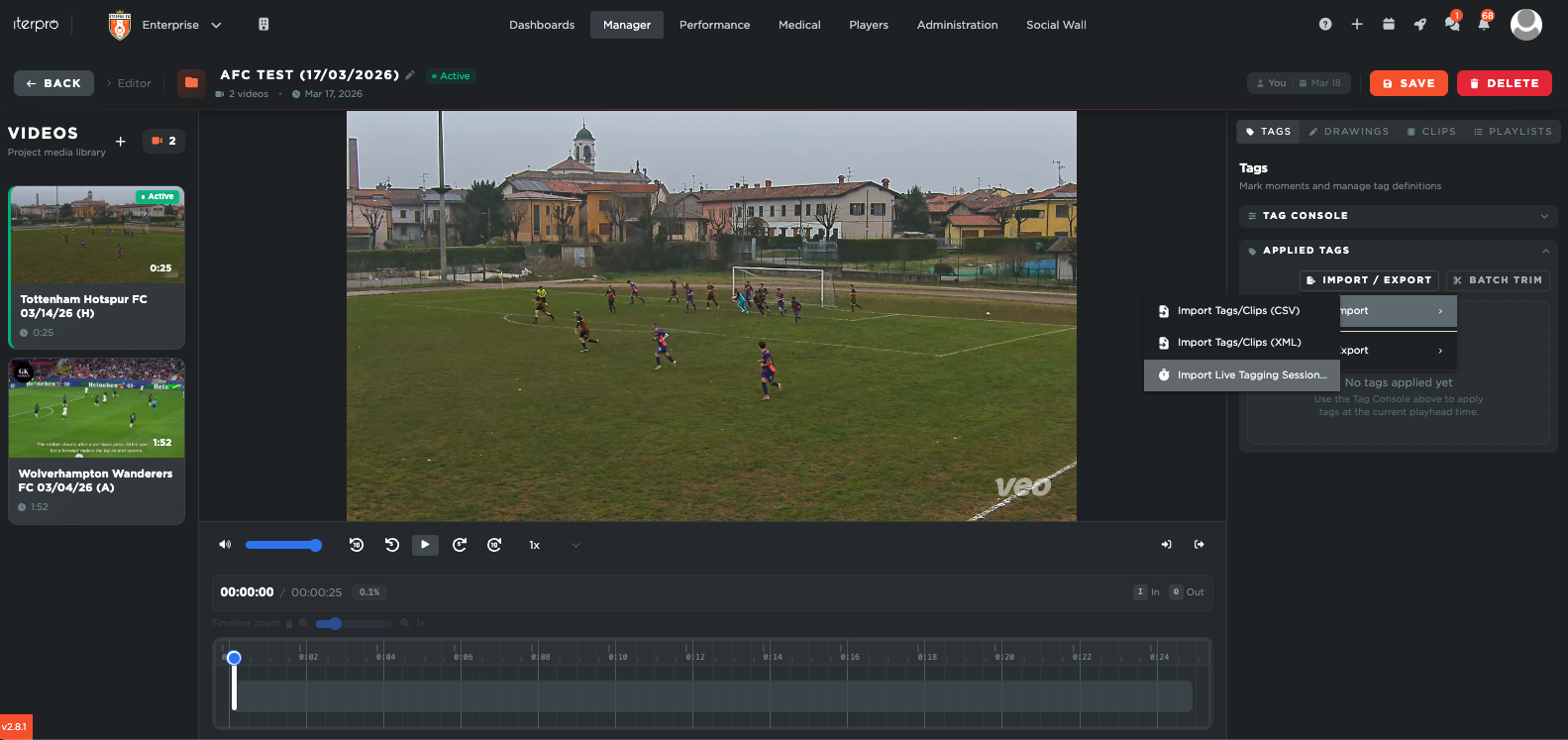
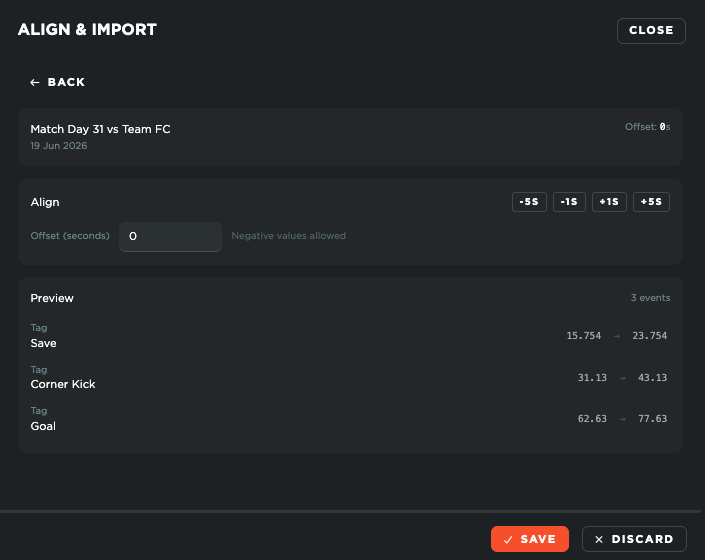
Overall, this update helps connect live match observation with post-game video analysis, reducing manual work and making the entire tagging and editing process smoother, faster, and more integrated within Iterpro.
### 👤 Player Profile: User-based tabs
With this release, users will be able to customise the view of their team player profiles, making it easier to focus on the information that is most relevant to their role and daily workflows.
Inside player profiles across **My Team**, **Scouting**, **Transfers**, and **Squads**, each user can now decide which tabs they want to display. This means users can activate or hide specific tabs based on the areas they interact with most, creating a cleaner and more personalised profile view.
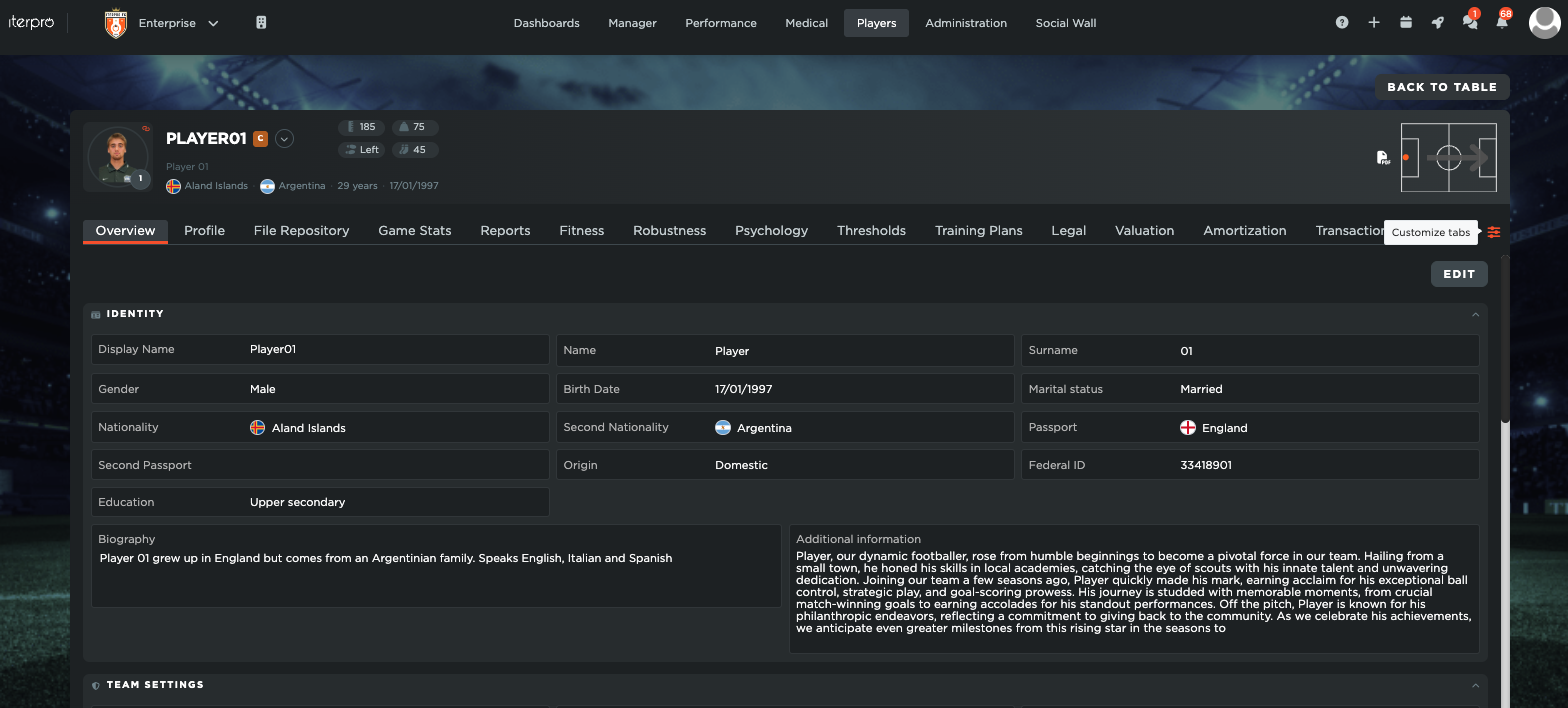
It’s important to note that users will only be able to customise tabs for the areas they already have permission to access. Any section that is not included in their permissions will remain unavailable and will not appear as an option in the customisation panel.
If a user hides a tab and later wants to bring it back, the view can be easily reset or updated directly from the same area.
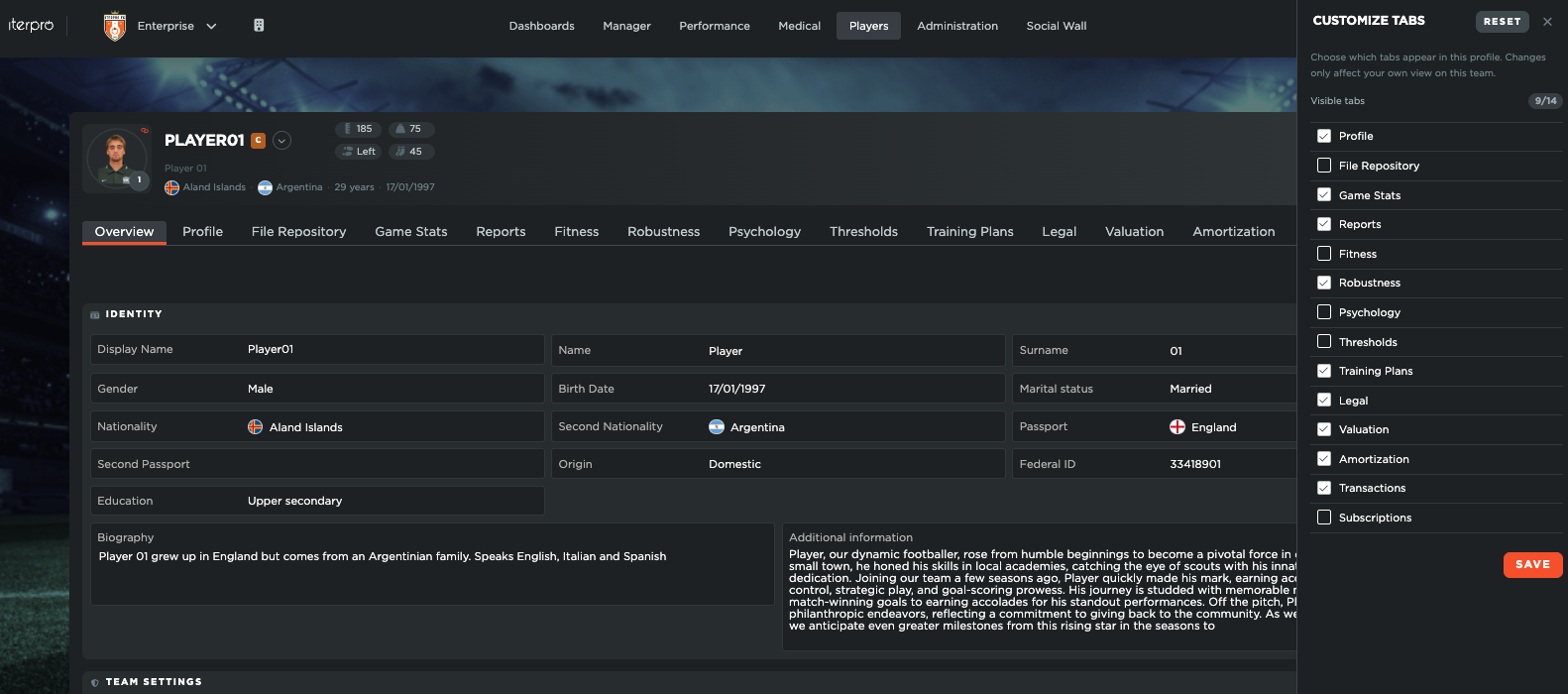
Overall, this improvement gives each user more control over their profile experience, helping them navigate player information faster and work with a layout that better fits their needs.
### 📱 Director App: Scouting Games and Reports!
With this release, scouts will be able to manage their **Scouting Game Calendar** and complete **Game Reports** for scouted players directly from the **Director App**.
Building on the scouting features already available on mobile, we’ve added the possibility to visualise all assigned scouting games inside the app’s calendar. This gives scouts a clearer overview of their schedule and allows them to access the relevant match information directly from their phone.
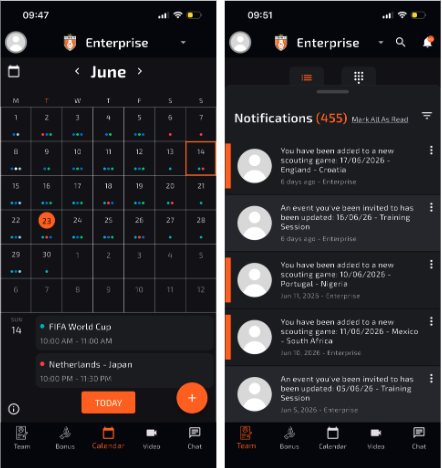
Inside each scouting event, scouts will be able to review the key event details and, most importantly, create or update their game reports from the same place. They can select the players already assigned to the scouting game, or add new players directly from the app when needed.
Once the players are selected, scouts can proceed with completing the report in the same structured way they currently do on the Web platform.
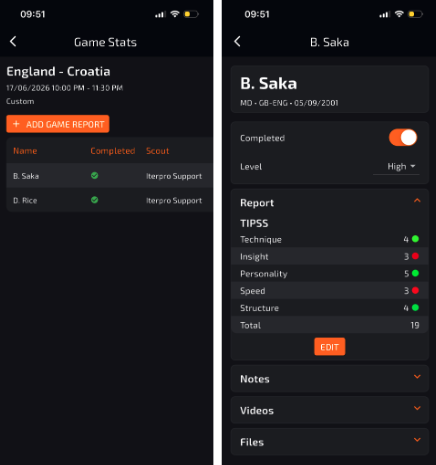
This update helps make the scouting workflow more flexible and accessible, allowing scouts to collect, update, and manage key information while attending games, without needing to rely on the Web platform.
#### **Enhancements**
We have also implemented several enhancements to improve your experience:
- We have made several minor User Experience improvements to make setup and navigation through the platform and mobile applications easier for you.
- We have optimized the overall platform and conducted bug fixes across different software sections.
This is an email to inform you that Iterpro's software updates will be released on **Monday, 18th of June, 2026 (20:00 CEST).**
In order to take advantage of the new features, please ensure to [clean your browser's cache](https://support.iterpro.com/en/guide/how-do-i-clean-the-cache-to-avoid-issues?hsLang=en) and refresh the page before logging in.
- [What's New](https://support.iterpro.com/en/guide/whats-new?hsLang=en)
- [Quick Onboarding](https://support.iterpro.com/en/guide/quick-onboarding?hsLang=en)
- [Account set-up and other](https://support.iterpro.com/en/guide/account-set-up-and-other?hsLang=en#main-content)
- [Login & Iterpro overview](https://support.iterpro.com/en/guide/account-set-up-and-other?hsLang=en#login-iterpro-overview)
- [Settings](https://support.iterpro.com/en/guide/account-set-up-and-other?hsLang=en#settings)
- [Create, archive and delete players](https://support.iterpro.com/en/guide/account-set-up-and-other?hsLang=en#create-archive-and-delete-players)
- [Other](https://support.iterpro.com/en/guide/account-set-up-and-other?hsLang=en#other)
- [Manager](https://support.iterpro.com/en/guide/manager?hsLang=en#main-content)
- [Tactics](https://support.iterpro.com/en/guide/manager?hsLang=en#tactics)
- [Planning](https://support.iterpro.com/en/guide/manager?hsLang=en#planning)
- [Videogallery](https://support.iterpro.com/en/guide/manager?hsLang=en#videogallery)
- [Drills](https://support.iterpro.com/en/guide/manager?hsLang=en#drills)
- [Attendances](https://support.iterpro.com/en/guide/manager?hsLang=en#attendances)
- [Performance](https://support.iterpro.com/en/guide/performance?hsLang=en#main-content)
- [Session Analysis](https://support.iterpro.com/en/guide/performance?hsLang=en#session-analysis)
- [Workload Analysis](https://support.iterpro.com/en/guide/performance?hsLang=en#workload-analysis)
- [Assessments](https://support.iterpro.com/en/guide/performance?hsLang=en#assessments)
- [Readiness](https://support.iterpro.com/en/guide/performance?hsLang=en#readiness)
- [Medical](https://support.iterpro.com/en/guide/medical?hsLang=en#main-content)
- [Medical Records](https://support.iterpro.com/en/guide/medical?hsLang=en#medical-records)
- [Infirmary](https://support.iterpro.com/en/guide/medical?hsLang=en#infirmary)
- [Examinations](https://support.iterpro.com/en/guide/medical?hsLang=en#examinations)
- [Medical Statistics](https://support.iterpro.com/en/guide/medical?hsLang=en#medical-statistics)
- [Player](https://support.iterpro.com/en/guide/player?hsLang=en#main-content)
- [My Team](https://support.iterpro.com/en/guide/player?hsLang=en#my-team)
- [Scouting](https://support.iterpro.com/en/guide/player?hsLang=en#scouting)
- [Transfers](https://support.iterpro.com/en/guide/player?hsLang=en#transfers)
- [Administration](https://support.iterpro.com/en/guide/administration?hsLang=en#main-content)
- [Squads](https://support.iterpro.com/en/guide/administration?hsLang=en#squads)
- [Finance Overview](https://support.iterpro.com/en/guide/administration?hsLang=en#finance-overview)
- [Bonus Tracking](https://support.iterpro.com/en/guide/administration?hsLang=en#bonus-tracking)
- [Cash Flow](https://support.iterpro.com/en/guide/administration?hsLang=en#cash-flow)
- [Transactions](https://support.iterpro.com/en/guide/administration?hsLang=en#transactions)
- [Registrations](https://support.iterpro.com/en/guide/administration?hsLang=en#registrations)
- [Mobile apps](https://support.iterpro.com/en/guide/mobile-apps?hsLang=en#main-content)
- [Player App](https://support.iterpro.com/en/guide/mobile-apps?hsLang=en#player-app)
- [Coach App](https://support.iterpro.com/en/guide/mobile-apps?hsLang=en#coach-app)
- [Director App](https://support.iterpro.com/en/guide/mobile-apps?hsLang=en#director-app)
- [Iterpro Login Page](https://app.iterpro.com/auth/login)
- [Contact Support](https://share.hsforms.com/1rE7NvsvuTIWBm7WQ1dhslQ1uo0p)
- [Terms & Conditions](https://www.iubenda.com/terms-and-conditions/53739842)
- [Privacy Policy](https://www.iubenda.com/privacy-policy/53739842)
[](https://iterpro.com/)
Copyright © 2025, Iterpro Support Team