---
title: Iterpro Software Update 2.10 (07/07/2026)
description: Discover the potential of ‘Iterpro’ version 2.10 and elevate your business intelligence strategy to new heights.
---
[Skip to content](https://support.iterpro.com/en/guide/iterpro-software-update-1.92-14/04/2025-0-1-0-0-0-0-0-0-0-0-0-0-0-0#main-content)
English
Show submenu for translations
[](https://app.iterpro.com/auth/login)
- [Iterpro Login Page](https://app.iterpro.com/auth/login)
- [Contact Support](https://share.hsforms.com/1rE7NvsvuTIWBm7WQ1dhslQ1uo0p)
Open main navigation
Close main navigation
- [Iterpro Login Page](https://app.iterpro.com/auth/login)
- [Contact Support](https://share.hsforms.com/1rE7NvsvuTIWBm7WQ1dhslQ1uo0p)
- English
Show submenu for translations
How can we help you?
- There are no suggestions because the search field is empty.
1. [User Guide](https://support.iterpro.com/en/guide?hsLang=en)
2. [What's New](https://support.iterpro.com/en/guide/whats-new?hsLang=en)
# Iterpro Software Update 2.10 (07/07/2026)
## Discover the potential of ‘Iterpro’ version 2.10 and elevate your business intelligence strategy to new heights.
### Iterpro's Latest Updates
*Dear Iterpro Users,*
*We’re happy to share that Iterpro v2.10.0 is now available, bringing new improvements across Performance, Medical, Player Profiles, Scouting, and Transfers.*
*This release includes GD% visibility inside Session Analysis tables, easier access to Injury History within Medical Records, the possibility to edit closed/healed injuries, new Planning and Notes tabs in My Team player profiles, Player Game Stats visibility in Scouting and Transfers profiles, and the option to send scouting players directly to My Team.*
*Alongside these updates, v2.10.0 also includes additional fixes and general improvements to ensure a smoother and more reliable experience across the platform.*
*We hope you enjoy the new version and wish you a great week.*
***The Iterpro Team***
### Impacted Areas
1. Performance - Session Analysis - GD %
2\. Medical - Medical Records - Injury History
3\. Medical - Medical Records - Edit closed injuries
4\. Players - My Team - Planning and Notes
5\. Players - Scouting/Transfers - Player Game Stats
6\. Players - Scouting - Send to My Team
### New Features
### 📊 Session Analysis - GD%
With this new release, Performance users will have a much clearer and faster way to review **GD% (Game Day Percentage)** calculations within their sessions.
Until now, GD% values were not available directly inside the data tables, meaning users had to calculate them manually when comparing session workloads against match day references. This update removes that extra step by displaying GD% directly in the **Session Analysis → Team** data table.
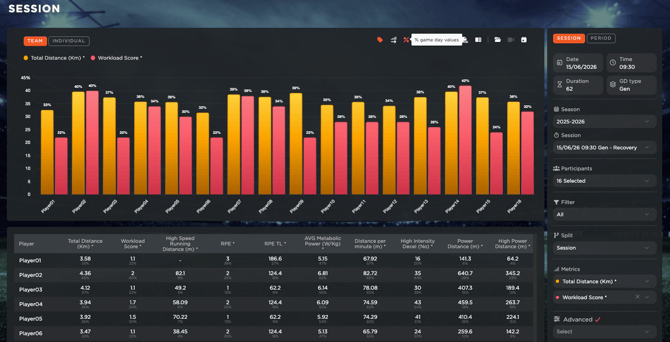
A dedicated **GD% column** will now be available, allowing staff to immediately understand how each session compares in relation to game day. This makes workload analysis quicker, more consistent, and easier to interpret—especially when reviewing training intensity, player exposure, and session demands across the team.
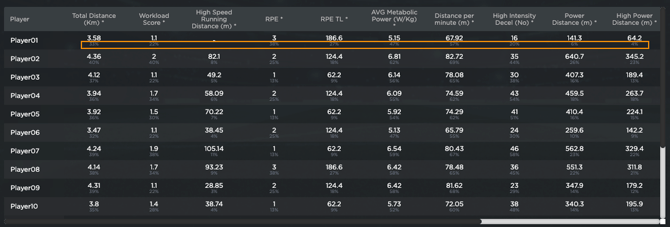
Overall, this improvement gives Performance staff better visibility over workload context and supports faster, more informed decision-making directly within the Session Analysis workflow.
### 🏥 Player Injury History - New Data Panel
With this new release, medical staff will have faster and easier access to a player’s **Injury History** directly from **Medical Records**.
Previously, when users wanted to review past injuries from a player’s medical history, the system redirected them to the **Infirmary** area. While the information was available, this added an extra step and interrupted the medical workflow.
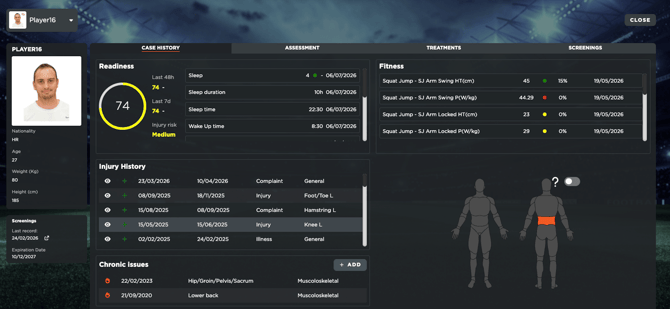
To improve this experience, we have introduced a new panel that opens the full injury details directly inside **Medical Records**. This means medical staff can now review relevant past injury information immediately, without leaving the page they are working on.
The new panel provides a smoother and more efficient way to access historical data, helping staff quickly check previous injuries, understand the player’s medical background, and make more informed decisions during daily evaluations or follow-up processes.
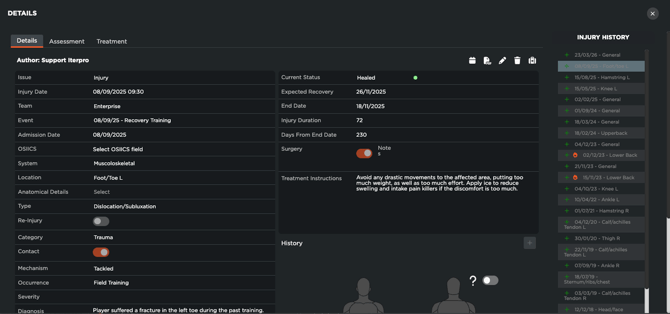
Overall, this update simplifies navigation, reduces unnecessary redirects, and makes Medical Records a more complete and practical area for reviewing each player’s health information.
### 🩹 Edit 'Healed'/Closed Injuries
With this new release, medical staff will now be able to **edit closed or healed injuries**, giving them more flexibility when updates or corrections are needed after an injury has already been completed.
Until now, once an injury was closed, it became read-only and could no longer be modified. With this update, users can access and edit previously saved injury information either from **Medical Records → Injury History** or directly from **Infirmary → Past Injuries**.
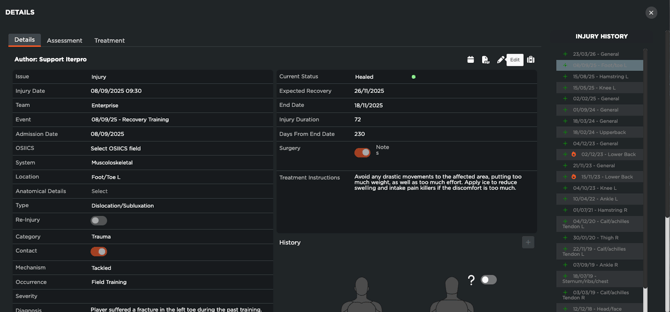
From these areas, medical staff will be able to update all relevant injury details, helping ensure that historical records remain accurate and complete over time. The only fields that will remain locked are the **Injury Type** (Injury, Complaint, or Illness) and the **number of days spent in each recovery stage**, preserving the integrity of key recovery data.
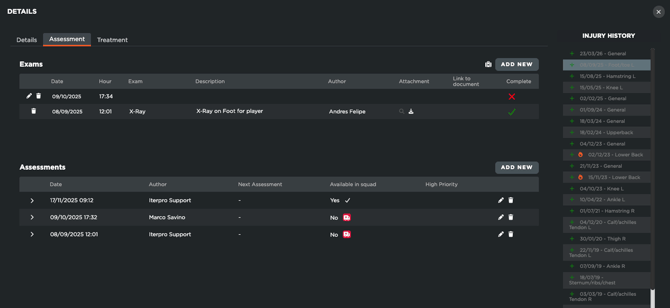
Overall, this improvement makes injury management more practical and reliable, allowing staff to correct or refine closed records, assessments, and treatments when necessary while maintaining control over the core information used for medical tracking and reporting.
### 👤 My Team - New Planning and Notes tab
With this new release, users will have improved management possibilities for team players directly inside **My Team** player profiles.
Two new areas have been added to the player profile: **Planning** and **Notes**.
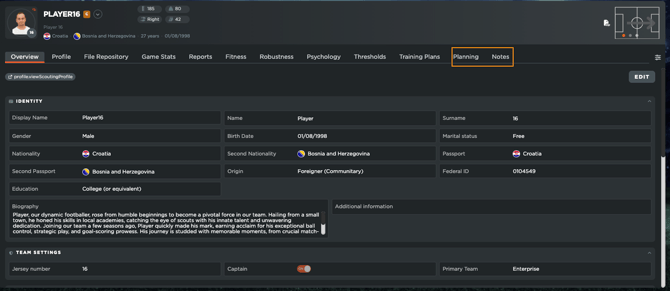
The new Planning tab gives staff a clear view of the events linked to a specific player, making it easier to track their individual schedule directly from their profile.
Users will also be able to create events for that player from the same section, helping standardise the planning calendar and support more accurate monitoring of each player’s daily and weekly workload.
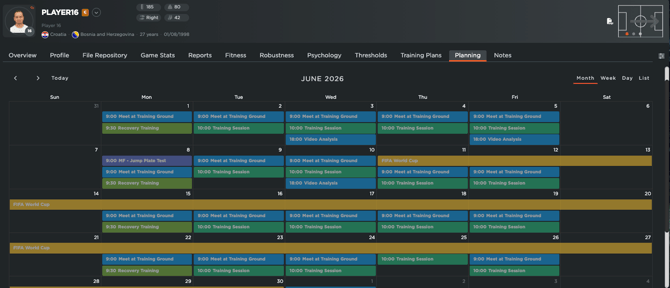
In addition, My Team profiles will now include a dedicated **Notes** tab. This area is designed to support internal communication between staff members, allowing users to add general comments, notes, and discussion threads related to the player. These notes can be used to share observations, follow-ups, or any relevant context that should remain visible to the staff working with that player.
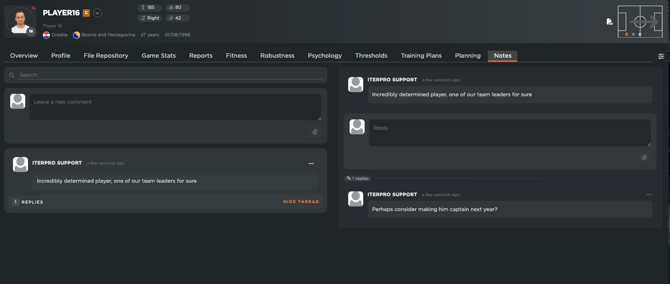
Overall, these updates make the player profile a more complete working area, helping staff centralise planning, communication, and player-specific information in one place.
### 📈 Scouting & Transfers - Game Stats
With this new release, users will be able to access **Game Stats** directly inside the profiles of **Scouting** and **Transfer** players, providing additional context when evaluating potential targets or monitoring player performance.
A new **Game Stats** tab will be available within these player profiles, displaying relevant seasonal statistics and data such as minutes played, goals, cards, and other key match-related information. This gives scouting and recruitment teams a clearer overview of each player’s activity and performance trends without needing to leave the profile.
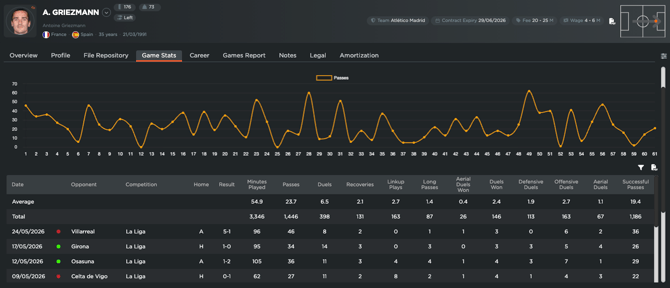
This functionality is directly connected to **Wyscout**, thanks to our partnership with them. For this reason, Game Stats will only be available for players who have been correctly imported or mapped with a Wyscout profile. If a player has not been linked to Wyscout, the related data points will not appear inside the Game Stats section.
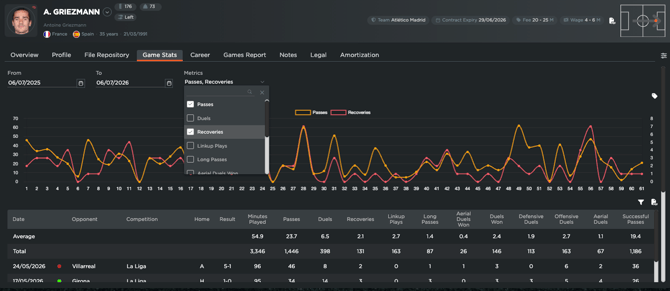
Overall, this update helps bring more performance context into the scouting and transfer workflow, supporting faster and more informed player evaluations.
### 🔁 Scouting Players - Direct send to my team
With this new release, Scouting users will be able to send players directly from their scouting database into a team lineup, creating a smoother and more efficient workflow.
Inside a player profile in **Scouting**, users will now find a new action button that allows them to move the player directly into a selected **team and season** within their Iterpro account. This avoids the need to pass the player through the **Transfers** module, which may not be available in every package, and helps clubs manage their scouting-to-squad workflow more directly.
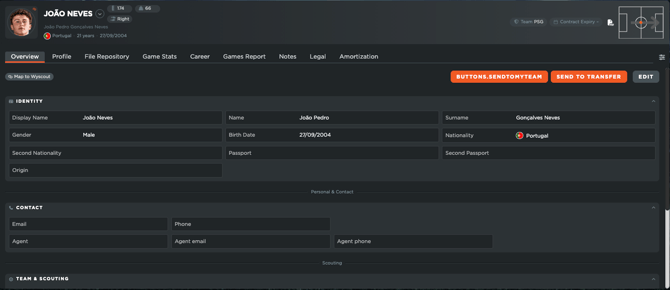
When the player is sent to a team lineup, all personal details from the scouting profile will be transferred, ensuring the new player profile is created with the key information already available. However, any attribute evaluations or game evaluations completed during the scouting process will remain stored inside the player’s archived scouting profile.
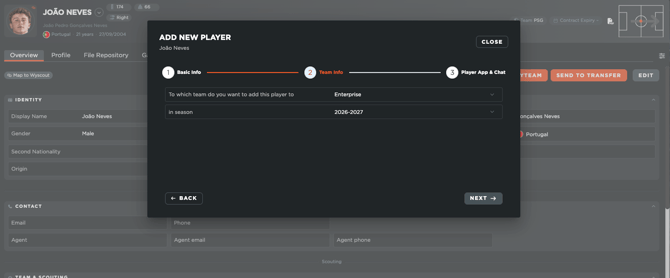
Overall, this update simplifies the process of turning scouted players into active team players, reducing extra steps and helping staff move from identification to squad management more efficiently.
#### **Enhancements**
We have also implemented several enhancements to improve your experience:
- We have made several minor User Experience improvements to make setup and navigation through the platform and mobile applications easier for you.
- We have optimized the overall platform and conducted bug fixes across different software sections.
This is an email to inform you that Iterpro's software updates will be released on **Tuesday, 7th of July, 2026 (20:00 CEST).**
In order to take advantage of the new features, please ensure to [clean your browser's cache](https://support.iterpro.com/en/guide/how-do-i-clean-the-cache-to-avoid-issues?hsLang=en) and refresh the page before logging in.
- [What's New](https://support.iterpro.com/en/guide/whats-new?hsLang=en)
- [Quick Onboarding](https://support.iterpro.com/en/guide/quick-onboarding?hsLang=en)
- [Account set-up and other](https://support.iterpro.com/en/guide/account-set-up-and-other?hsLang=en#main-content)
- [Login & Iterpro overview](https://support.iterpro.com/en/guide/account-set-up-and-other?hsLang=en#login-iterpro-overview)
- [Settings](https://support.iterpro.com/en/guide/account-set-up-and-other?hsLang=en#settings)
- [Create, archive and delete players](https://support.iterpro.com/en/guide/account-set-up-and-other?hsLang=en#create-archive-and-delete-players)
- [Other](https://support.iterpro.com/en/guide/account-set-up-and-other?hsLang=en#other)
- [Manager](https://support.iterpro.com/en/guide/manager?hsLang=en#main-content)
- [Tactics](https://support.iterpro.com/en/guide/manager?hsLang=en#tactics)
- [Planning](https://support.iterpro.com/en/guide/manager?hsLang=en#planning)
- [Videogallery](https://support.iterpro.com/en/guide/manager?hsLang=en#videogallery)
- [Drills](https://support.iterpro.com/en/guide/manager?hsLang=en#drills)
- [Attendances](https://support.iterpro.com/en/guide/manager?hsLang=en#attendances)
- [Performance](https://support.iterpro.com/en/guide/performance?hsLang=en#main-content)
- [Session Analysis](https://support.iterpro.com/en/guide/performance?hsLang=en#session-analysis)
- [Workload Analysis](https://support.iterpro.com/en/guide/performance?hsLang=en#workload-analysis)
- [Assessments](https://support.iterpro.com/en/guide/performance?hsLang=en#assessments)
- [Readiness](https://support.iterpro.com/en/guide/performance?hsLang=en#readiness)
- [Medical](https://support.iterpro.com/en/guide/medical?hsLang=en#main-content)
- [Medical Records](https://support.iterpro.com/en/guide/medical?hsLang=en#medical-records)
- [Infirmary](https://support.iterpro.com/en/guide/medical?hsLang=en#infirmary)
- [Examinations](https://support.iterpro.com/en/guide/medical?hsLang=en#examinations)
- [Medical Statistics](https://support.iterpro.com/en/guide/medical?hsLang=en#medical-statistics)
- [Player](https://support.iterpro.com/en/guide/player?hsLang=en#main-content)
- [My Team](https://support.iterpro.com/en/guide/player?hsLang=en#my-team)
- [Scouting](https://support.iterpro.com/en/guide/player?hsLang=en#scouting)
- [Transfers](https://support.iterpro.com/en/guide/player?hsLang=en#transfers)
- [Administration](https://support.iterpro.com/en/guide/administration?hsLang=en#main-content)
- [Squads](https://support.iterpro.com/en/guide/administration?hsLang=en#squads)
- [Finance Overview](https://support.iterpro.com/en/guide/administration?hsLang=en#finance-overview)
- [Bonus Tracking](https://support.iterpro.com/en/guide/administration?hsLang=en#bonus-tracking)
- [Cash Flow](https://support.iterpro.com/en/guide/administration?hsLang=en#cash-flow)
- [Transactions](https://support.iterpro.com/en/guide/administration?hsLang=en#transactions)
- [Registrations](https://support.iterpro.com/en/guide/administration?hsLang=en#registrations)
- [Mobile apps](https://support.iterpro.com/en/guide/mobile-apps?hsLang=en#main-content)
- [Player App](https://support.iterpro.com/en/guide/mobile-apps?hsLang=en#player-app)
- [Coach App](https://support.iterpro.com/en/guide/mobile-apps?hsLang=en#coach-app)
- [Director App](https://support.iterpro.com/en/guide/mobile-apps?hsLang=en#director-app)
- [Iterpro Login Page](https://app.iterpro.com/auth/login)
- [Contact Support](https://share.hsforms.com/1rE7NvsvuTIWBm7WQ1dhslQ1uo0p)
- [Terms & Conditions](https://www.iubenda.com/terms-and-conditions/53739842)
- [Privacy Policy](https://www.iubenda.com/privacy-policy/53739842)
[](https://iterpro.com/)
Copyright © 2025, Iterpro Support Team