Skip to content
English
  • There are no suggestions because the search field is empty.

Iterpro Software Update 2.12 (14/09/2026)

Discover the potential of ‘Iterpro’ version 2.12 and elevate your business intelligence strategy to new heights.

Iterpro's Latest Updates

Dear Iterpro Users,
 
We’re happy to share that Iterpro v2.12.0 will be released in the upcoming weeks, bringing new improvements designed to make the platform more modern, efficient, and easier to use.
 
This release includes visual and functionality enhancements across key areas of the system, including Planning session dashboards, Medical treatments, table visualisation, and scouting workflows on both Web and mobile. These updates are aimed at supporting your daily operations by making data easier to visualise, communication smoother, and analysis more accessible.
 
Alongside these highlights, v2.12.0 also includes additional fixes and general improvements to ensure a smoother and more reliable experience across the platform.
 
We hope you enjoy the new version and wish you a great weekend.
 
The Iterpro Team


Impacted Areas


 1. Manager - Planning - Session Dashboard
2. Players - My Team - Player Session Dashboard
3. Players - Scouting - Scouting Games Table
4. Director App - Scouting - Scouting Games Table
5. Players - Scouting - Video Gallery
6. Players - Scouting - Game Observation Recommendation
7. Medical - Medical Records - Treatments List
7. Medical - Medical Records - Medical Events UI
8. Iterpro Tables - Total and Average included


New Features

🆕 Planning Sessions Dashboard
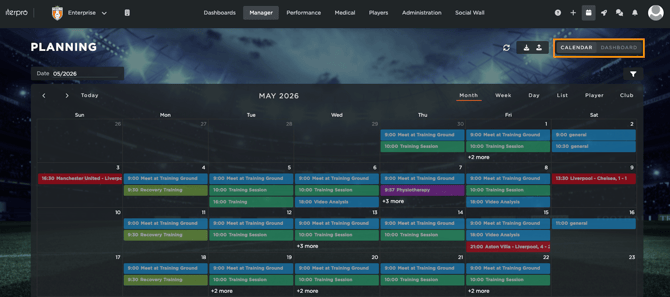
With this new release, we’re introducing a new Planning Session Dashboard, designed to give staff a clearer and more complete view of workload directly inside Iterpro.
 
This dashboard will be available as a new tab within the Planning section, allowing you to change between Calendar and Dashboard.
 
Screenshot 2026-09-08 at 12.44.56

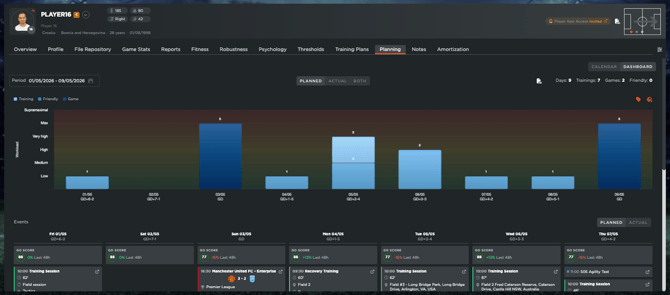
Once inside, you will see a workload graph at the top with event cards below. This allows users to review planned and actual workload in one place, while also keeping the related events visible and easy to inspect without losing context.
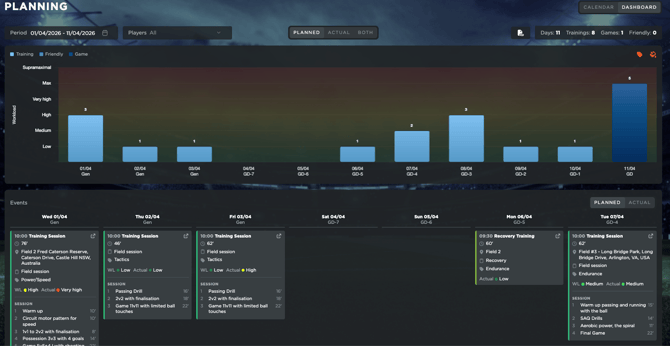
 
Screenshot 2026-09-08 at 12.45.50
 
The same dashboard will also be available inside My Team → Players → [Player Profile] → Planning, where it will be scoped to the individual player.
 
In this player-specific view, staff will be able to analyse workload alongside additional daily information such as GoScore data, medical events, assessment records, and treatments, creating a more complete timeline of the player’s activity and health status.
 
Screenshot 2026-09-08 at 12.47.29
 
Until now, analysing planned versus actual workload often required exporting data and using external tools. With this update, staff can complete this process directly within Iterpro, reducing manual work and improving the way workload information is visualised and interpreted.
 
Both the team and player dashboard views will also support PDF export, allowing users to generate structured reports quickly and share them when needed.
 
Screenshot 2026-09-08 at 12.47.29
 
Overall, this feature helps staff better connect planning, execution, and player health in one unified view.


🎯 Scouting Games Table

With this new release, we’ve improved the Scouting Recap area to give users a clearer overview of both scouting activity and assigned games.
 
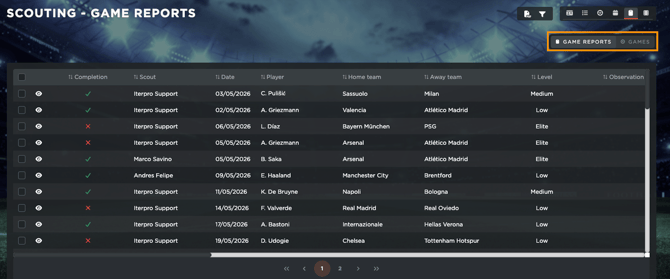
Until now, the Recap tab only displayed Game Reports. This meant that if a game was assigned to a scout but no report had been completed yet, the game would not appear in the list, sometimes making upcoming or unreported games look like missing data.
 
To solve this, the Recap tab now includes two views, switchable from the top right: Game Reports, which remains unchanged, and Games, which is the new view. 
 
Screenshot 2026-09-08 at 12.56.52
 
The Games view lists the scouting games themselves, including key details such as date, match, competition, location, assigned scout, and the number of reports filed. Each game can also be expanded to review the reports connected to it.
 
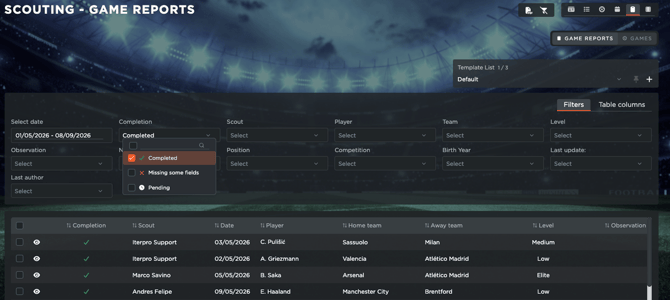
Additionally, this table is subject to deep filtering possibilities, allowing you to create the custom reports you desire to visualize.
 
Screenshot 2026-09-08 at 13.00.55
 
This table follows the user’s scouting permissions: admin users can access the full games list, while regular scouts will only see the games and information assigned to them.
 
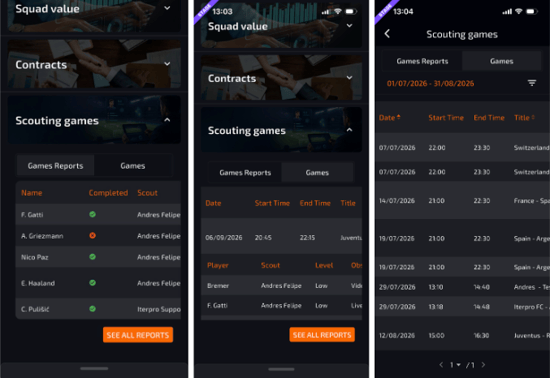
Lastly, the same structure will also be available inside the Iterpro Director App, where scouting users can access it from the Scouting Games tab and visualize both the Game Reports and Games tables.
 
Screenshot 2026-09-08 at 13.06.31
 
Overall, this update provides a more complete and transparent view of scouting operations, helping clubs better track scheduled, assigned, and completed scouting activities.


🎥 Scouting - General Improvements

With this release, we’ve added new improvements to the Scouting Module, focused on making video access and game observation workflows clearer for scouting departments.
 
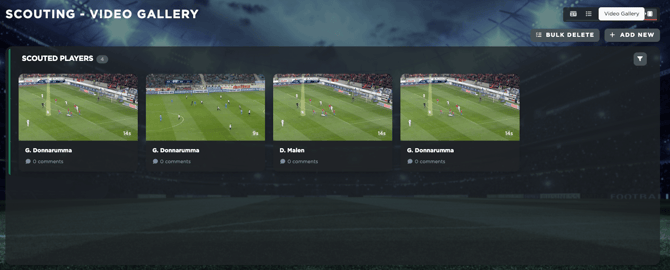
First, the Video Gallery is now available directly inside the Scouting Module as a dedicated new section. This allows scouting users to access relevant scouting videos from within the same area where they manage players, games, and reports. The gallery will show only content related to the scouting category, helping keep video material organised and connected to the scouting workflow.
 
Screenshot 2026-09-08 at 13.12.45
 
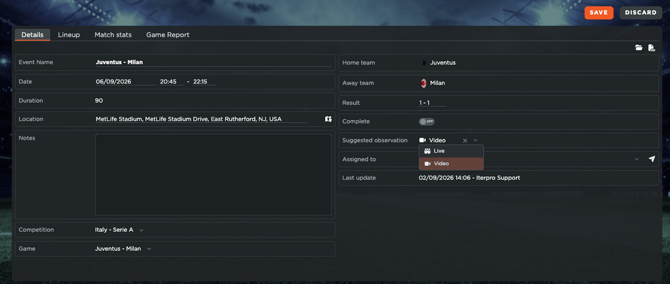
We’ve also introduced a new Suggested Observation field inside the scouting event Details tab. Scouting admins can use this field to indicate how assigned scouts are expected to observe the game: Live at the stadium, Video after the match, or leave it empty if there is no preference.
 
For non-admin scouting users, this field will be visible as read-only. When a scout creates a report for that event, their own Observation field will automatically start from the suggested value, while still allowing them to change it if they ended up watching the game differently.
 
Screenshot 2026-09-08 at 13.14.35
 
Overall, these updates help bring scouting video, game planning, and report creation closer together, giving scouting departments a more organised and connected workflow from preparation to final evaluation.


🔎 Medical Treatments - Team Dynamic Table

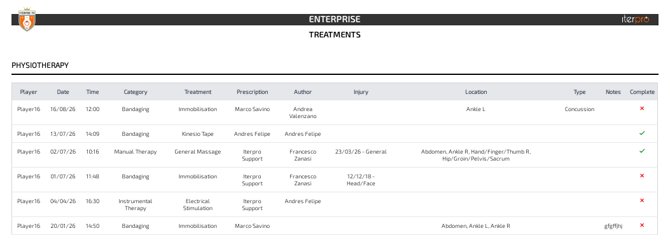
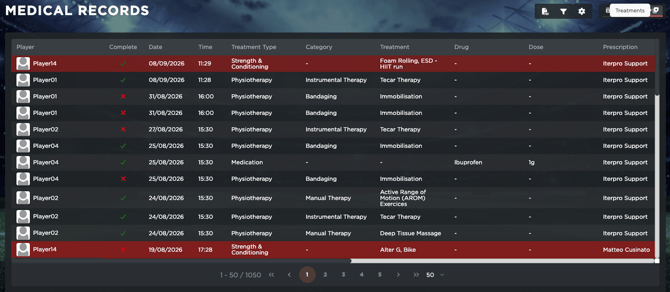
With this release, we’ve added a new team-wide Treatment List inside Medical Records, giving medical staff a complete overview of all treatments created across the squad.

This new table replicates the current single-player Treatments table, but expands it to a team-level view. From here, users can quickly review all recorded treatments, including Physiotherapy, S&C Exercises, and Medications, without needing to open each player profile individually.
Screenshot 2026-09-08 at 13.23.27

To make the table easier to scan, an additional player column has been included, displaying each player’s photo and full name next to the treatment information. This helps staff immediately identify who each treatment refers to while keeping the layout consistent with the existing Treatment UI.
 
Screenshot 2026-09-08 at 13.24.29
 
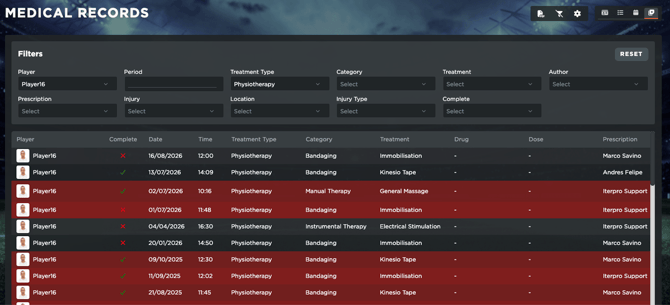
The new table is also especially useful for filtering and reporting. Users can filter treatments by custom periods of time, treatment types, players, and other relevant criteria, enabling them to create more dynamic reports based on the information they need (which can also be exported in PDF or CSV).
 
Screenshot 2026-09-08 at 13.25.53
Overall, this update gives medical staff a faster and clearer way to monitor treatments across the entire team.


🏥 Medical Event UI Improvement

With this release, we’ve improved the Medical Event experience to make key information easier to access without losing context.

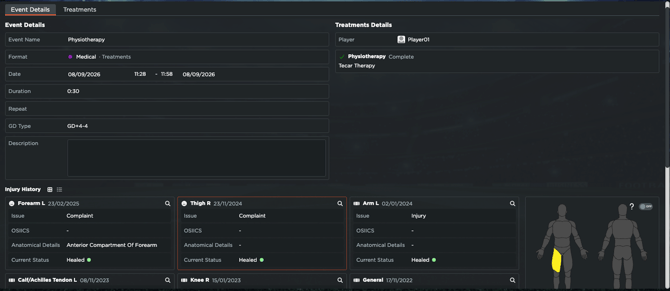
Until now, users had to move between different tabs to review event details, player assignment, treatments, or injury history. With the new layout, medical events will now use a single-tab view, allowing staff to see all relevant information in one place.
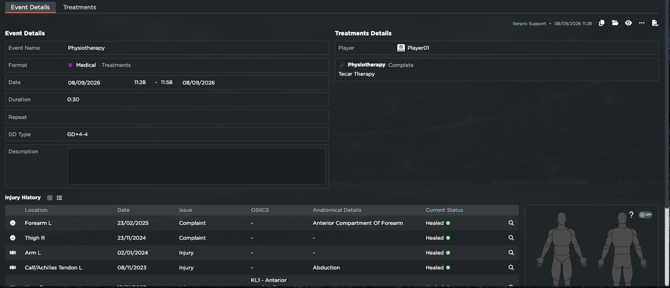
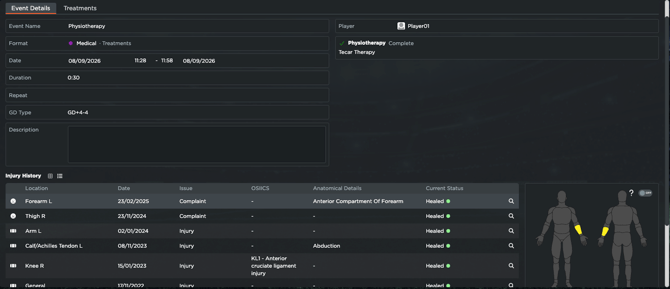
Screenshot 2026-09-08 at 13.31.48

The left side of the page will display the main event details, while the right panel will show the assigned player information, any related injury, and either the Exam or Treatments section, depending on the event type. The section label will also clearly indicate whether the event refers to an exam or treatments.
 
For both event types, the third section will show the player’s Injury History, now including all injuries, not only active ones. Active injuries will be highlighted in red for clearer visibility. The body chart will also display active injuries, and hovering over an injury row will highlight the corresponding area on the chart.
 
Screenshot 2026-09-08 at 13.32.49
 
In addition, users will now have access to a new injury card view, available alongside the existing table view, providing a more visual and flexible way to review medical information.
 
Screenshot 2026-09-08 at 13.34.29
 
Overall, this update creates a more focused and efficient medical workflow, helping staff review event details, player information, treatments, and injury history in one clear and connected view.


🧮 Total & Average calculation inside tables

With this release, we’ve added new Total and Average summary rows to several statistics tables across Iterpro, giving users immediate feedback on the data available inside the system.

These rows are now displayed at the top of the relevant tables, clearly separated from the player rows with a dedicated icon. This allows staff to quickly review team-level values without needing to calculate them manually.
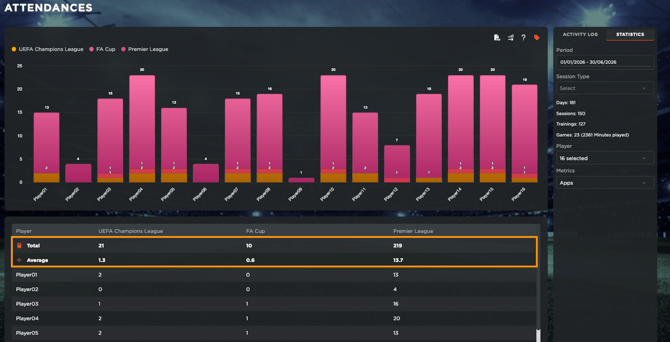
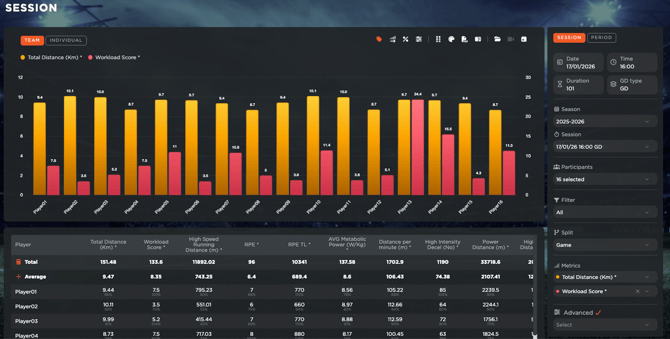
Screenshot 2026-09-08 at 13.39.39

The update applies to several areas, including Medical Statistics, Attendances → Statistics, Financial Analysis, Workload Analysis → Player Comparison, Test Analysis, and Session Analysis views.
 
Where relevant, both Total and Average values are shown, especially for physical-load, attendance, financial, and medical data. In areas where totals would not provide meaningful information, such as Test Analysis or certain trend views, only the Average is displayed.
 
Screenshot 2026-09-08 at 13.48.37
 
The calculations also respect existing table logic, including metric switches, sorting, and grouped rows, ensuring values remain accurate and are not counted twice.
 
These summary rows are also included in CSV and PDF exports for the supported areas, making reports more complete and easier to share.
 
Overall, this improvement helps users analyse data faster, reduce manual work, and gain clearer team-level insights directly from the tables.


Enhancements

We have also implemented several enhancements to improve your experience:

  • We have made several minor User Experience improvements to make setup and navigation through the platform and mobile applications easier for you.
  • We have optimized the overall platform and conducted bug fixes across different software sections.


This is an email to inform you that Iterpro's software updates will be released on Tuesday, 15th of August, 2026 (20:00 CEST).
 
In order to take advantage of the new features, please ensure to clean your browser's cache and refresh the page before logging in.