---
title: Manager, how to create events, plan sessions, and import videos.
description: Manager, how to create events and import videos.
---
[Skip to content](https://support.iterpro.com/en/guide/manager-how-to-create-events-and-import-videos#main-content)
English
Show submenu for translations
[](https://app.iterpro.com/auth/login)
- [Iterpro Login Page](https://app.iterpro.com/auth/login)
- [Contact Support](https://share.hsforms.com/1rE7NvsvuTIWBm7WQ1dhslQ1uo0p)
Open main navigation
Close main navigation
- [Iterpro Login Page](https://app.iterpro.com/auth/login)
- [Contact Support](https://share.hsforms.com/1rE7NvsvuTIWBm7WQ1dhslQ1uo0p)
- English
Show submenu for translations
How can we help you?
- There are no suggestions because the search field is empty.
1. [User Guide](https://support.iterpro.com/en/guide?hsLang=en)
2. [Quick Onboarding](https://support.iterpro.com/en/guide/quick-onboarding?hsLang=en)
# Manager, how to create events, plan sessions, and import videos.
## This article quickly summarize how to create events, and in particular training sessions. Furthermore, it described how to plan the technical part and the S&C part.
### ***FEATURES DESCRIPTION***
#### Creating and Planning a Training Event
You can create a training event in two ways:
- Click **Create Event** for quick access.
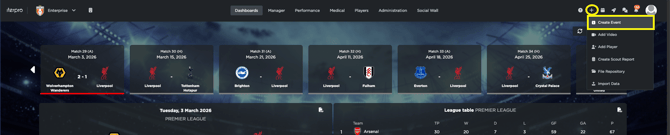
- Go to **Manager → Planning**, open the calendar, and select a day to schedule the event on that date.
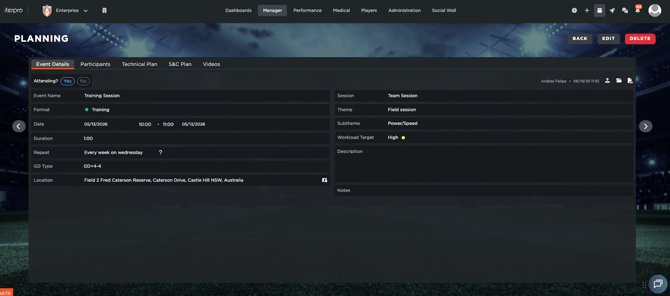
When creating the event, choose the **event format,** from Trainings, Games, General, Medical, and so forth. Once inside, then complete the **General Information** section, including the date, time, and any session details your organization requires.
#### Add Participants
Next, open the **Participants** tab and select who will attend. This will allow you to select between the active seasonal players and staff inside your team.
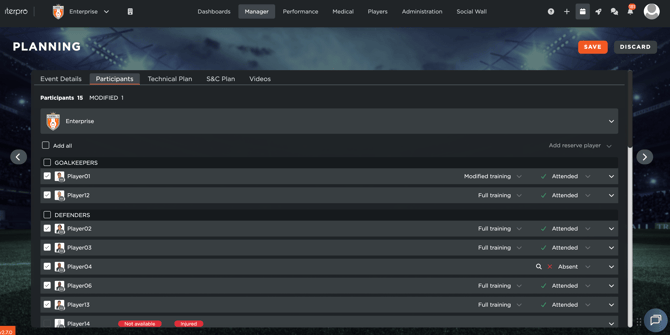
This step is essential: once participants are set, they automatically start to generate attendance statistics, as well as receive an invitation in their mobile calendar within the relevant app.
#### Build the Session Plan
After confirming participants, if you have selected a training session, you will be able to plan the session by adding exercises directly available from your Drills database (Technical and/or S&C):
- In the **Technical** tab, add technical or tactical drills. Click **Import** to choose drills from your library. If a drill doesn’t exist, you can create it directly from the same screen.
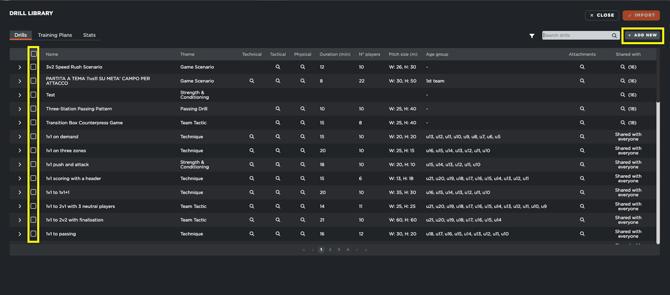
- For each drill, set key parameters such as **sets**, **repetitions**, and **rest time**. You can also choose which players are involved and assign the staff member responsible for presenting the drill in the mobile app.
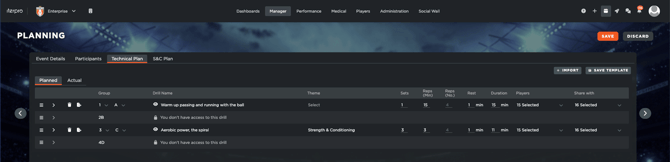
The **Strength & Conditioning (S&C)** section follows the same workflow, but focuses on physical conditioning exercises and related tracking.
#### Use Training Plans
Both **Technical** and **S&C** support predefined **Training Plans**. Selecting a plan automatically adds a full group of exercises to the session, saving time and keeping planning consistent across recurring sessions.
To create a new one, simply click on Add and select all the singular exercises that compose the plan. You can add all the relevant sets, reps, etc.. as needed, and they will all be stored inside your team for the future.
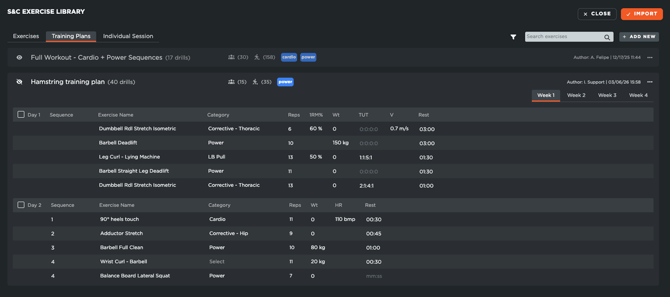
All training plans can also be tagged and assigned to players, allowing you to customize development and filtering of the information.
#### Add Videos to Events
Within an event, you can also attach a **video** and link it to that specific session. This makes it easy to share clips, references, or instructions with the relevant players and staff, all in the same place.
For this, simply click on Add new, and select the specific file (s) from your device that your wish to upload. Keep in mind that there is no restriction on size or volume of videos you can upload into the platform.
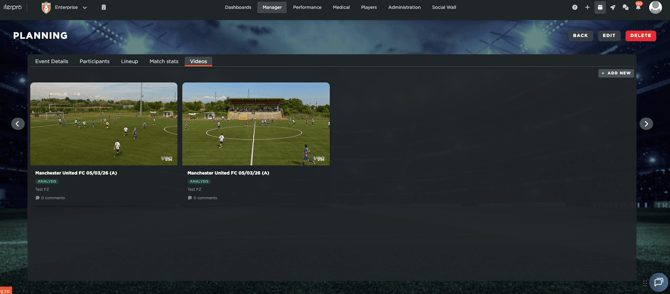
After you have added all the relevant details for the video, make sure to select the players and staff you wish to share this with, as otherwise they won't be able to access the video (Only people who have files shared will have access to them).
#### Access Everything on Mobile
Once events and participants are set, all shared content—including schedules, exercises, and attached media—becomes available on mobile through the **Player App**, **Coach App**, and **Director App**, so users can stay updated and connected from anywhere.
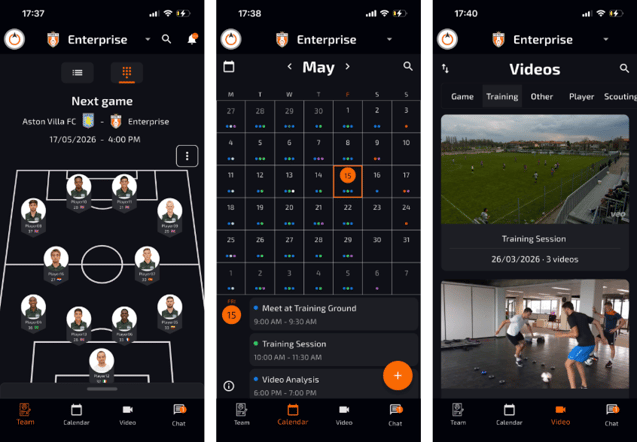
It's very important to keep in mind that only the users who have been added as participants, or that have a file/video shared with them, will be able to access it through their mobile. Only the ADMIN users will have access to all information at all times.
- [What's New](https://support.iterpro.com/en/guide/whats-new?hsLang=en)
- [Quick Onboarding](https://support.iterpro.com/en/guide/quick-onboarding?hsLang=en)
- [Account set-up and other](https://support.iterpro.com/en/guide/account-set-up-and-other?hsLang=en#main-content)
- [Login & Iterpro overview](https://support.iterpro.com/en/guide/account-set-up-and-other?hsLang=en#login-iterpro-overview)
- [Settings](https://support.iterpro.com/en/guide/account-set-up-and-other?hsLang=en#settings)
- [Create, archive and delete players](https://support.iterpro.com/en/guide/account-set-up-and-other?hsLang=en#create-archive-and-delete-players)
- [Other](https://support.iterpro.com/en/guide/account-set-up-and-other?hsLang=en#other)
- [Manager](https://support.iterpro.com/en/guide/manager?hsLang=en#main-content)
- [Tactics](https://support.iterpro.com/en/guide/manager?hsLang=en#tactics)
- [Planning](https://support.iterpro.com/en/guide/manager?hsLang=en#planning)
- [Videogallery](https://support.iterpro.com/en/guide/manager?hsLang=en#videogallery)
- [Drills](https://support.iterpro.com/en/guide/manager?hsLang=en#drills)
- [Attendances](https://support.iterpro.com/en/guide/manager?hsLang=en#attendances)
- [Performance](https://support.iterpro.com/en/guide/performance?hsLang=en#main-content)
- [Session Analysis](https://support.iterpro.com/en/guide/performance?hsLang=en#session-analysis)
- [Workload Analysis](https://support.iterpro.com/en/guide/performance?hsLang=en#workload-analysis)
- [Assessments](https://support.iterpro.com/en/guide/performance?hsLang=en#assessments)
- [Readiness](https://support.iterpro.com/en/guide/performance?hsLang=en#readiness)
- [Medical](https://support.iterpro.com/en/guide/medical?hsLang=en#main-content)
- [Medical Records](https://support.iterpro.com/en/guide/medical?hsLang=en#medical-records)
- [Infirmary](https://support.iterpro.com/en/guide/medical?hsLang=en#infirmary)
- [Examinations](https://support.iterpro.com/en/guide/medical?hsLang=en#examinations)
- [Medical Statistics](https://support.iterpro.com/en/guide/medical?hsLang=en#medical-statistics)
- [Player](https://support.iterpro.com/en/guide/player?hsLang=en#main-content)
- [My Team](https://support.iterpro.com/en/guide/player?hsLang=en#my-team)
- [Scouting](https://support.iterpro.com/en/guide/player?hsLang=en#scouting)
- [Transfers](https://support.iterpro.com/en/guide/player?hsLang=en#transfers)
- [Administration](https://support.iterpro.com/en/guide/administration?hsLang=en#main-content)
- [Squads](https://support.iterpro.com/en/guide/administration?hsLang=en#squads)
- [Finance Overview](https://support.iterpro.com/en/guide/administration?hsLang=en#finance-overview)
- [Bonus Tracking](https://support.iterpro.com/en/guide/administration?hsLang=en#bonus-tracking)
- [Cash Flow](https://support.iterpro.com/en/guide/administration?hsLang=en#cash-flow)
- [Transactions](https://support.iterpro.com/en/guide/administration?hsLang=en#transactions)
- [Registrations](https://support.iterpro.com/en/guide/administration?hsLang=en#registrations)
- [Mobile apps](https://support.iterpro.com/en/guide/mobile-apps?hsLang=en#main-content)
- [Player App](https://support.iterpro.com/en/guide/mobile-apps?hsLang=en#player-app)
- [Coach App](https://support.iterpro.com/en/guide/mobile-apps?hsLang=en#coach-app)
- [Director App](https://support.iterpro.com/en/guide/mobile-apps?hsLang=en#director-app)
- [Iterpro Login Page](https://app.iterpro.com/auth/login)
- [Contact Support](https://share.hsforms.com/1rE7NvsvuTIWBm7WQ1dhslQ1uo0p)
- [Terms & Conditions](https://www.iubenda.com/terms-and-conditions/53739842)
- [Privacy Policy](https://www.iubenda.com/privacy-policy/53739842)
[](https://iterpro.com/)
Copyright © 2025, Iterpro Support Team