---
title: Medical, how to create an injury, manage recovery, and analyze medical records
description: Manager, how to create events and import videos.
---
[Skip to content](https://support.iterpro.com/en/guide/manager-how-to-create-events-and-import-videos-0-0#main-content)
English
Show submenu for translations
[](https://app.iterpro.com/auth/login)
- [Iterpro Login Page](https://app.iterpro.com/auth/login)
- [Contact Support](https://share.hsforms.com/1rE7NvsvuTIWBm7WQ1dhslQ1uo0p)
Open main navigation
Close main navigation
- [Iterpro Login Page](https://app.iterpro.com/auth/login)
- [Contact Support](https://share.hsforms.com/1rE7NvsvuTIWBm7WQ1dhslQ1uo0p)
- English
Show submenu for translations
How can we help you?
- There are no suggestions because the search field is empty.
1. [User Guide](https://support.iterpro.com/en/guide?hsLang=en)
2. [Quick Onboarding](https://support.iterpro.com/en/guide/quick-onboarding?hsLang=en)
# Medical, how to create an injury, manage recovery, and analyze medical records
## This article quickly summarize how to create a new injury, including related assessments, treatments, recovery, and analysis of medical records.
### ***FEATURES DESCRIPTION***
**How to create and manage injuries**
To begin managing player injuries, navigate to the **Infirmary** section of the platform. This area contains all injury records, assessments, and treatments for players across the team. To creato a new injury, follow the below steps:
- Click the **Add Injury** button to start creating a new record.
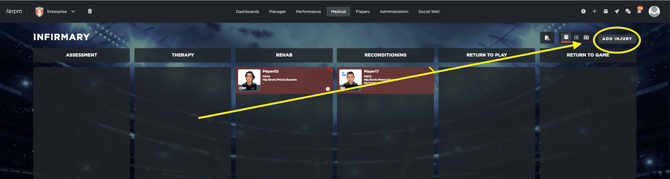
- Select the player who has sustained the injury from the list of squad members.
- Once the player is selected, enter all relevant details about the injury. This typically includes information such as the type of injury, the date it occurred, the affected body part, and any other relevant notes.
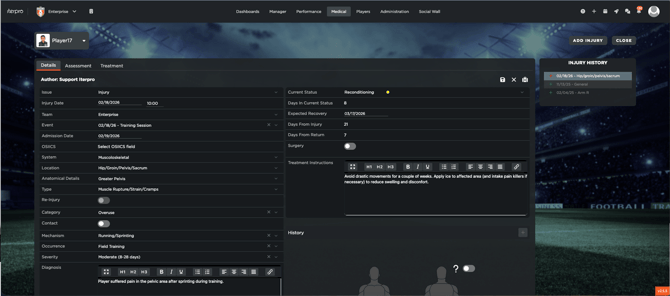
After the main injury details are recorded, move to the **Assessments** tab to monitor the player’s condition and availability. This is an ESSENTIAL step to be able to correctly track the player's availability in the squad, and communicate to other users when the player returns to the squad.
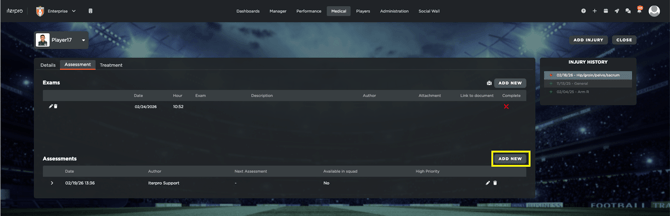
- Click **Add Assessment** to create a new assessment entry.
- Enter details about the player’s current status, including updates on mobility, pain levels, or availability for training and matches.
- Save the assessment. You can create **multiple assessments**, even on a daily basis, to track the player’s condition over time.
Treatments related to the injury can also be managed within the same injury record, by navigate to the **Treatments** section.
- Click **Add Treatment** to schedule a new treatment. Enter all necessary details, such as the type of treatment, time, duration, and any notes relevant to the procedure.
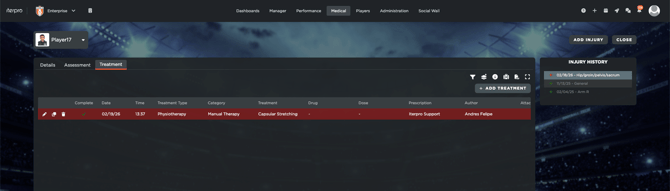
- If you need to add multiple treatments, click on the specific button and if they are scheduled for the same date and time, the system will automatically **group them into a single medical event** in the planning section.
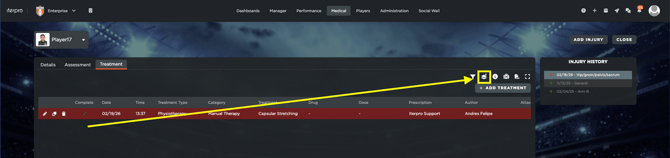
As the player progresses through recovery, the injury can be updated to reflect different **recovery phases**. This allows staff to track rehabilitation and monitor readiness for return to play.
Once a player has fully recovered, the injury can be closed by opening the injury card and select **Healed** within the injury status. You can also select the appropriate date when the player recovered. This can be the current date or a **retroactive date** if the injury had healed previously.
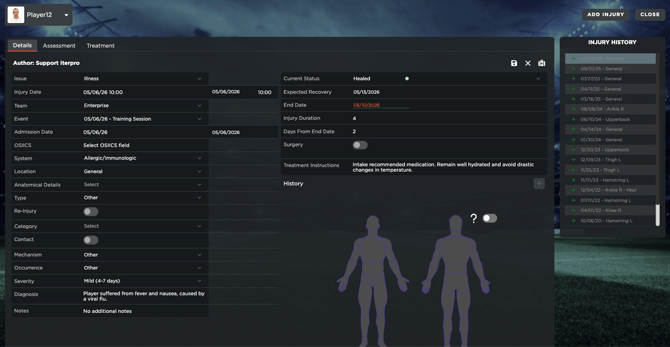
**Tracking player medical records and overall detail**
After closing the injury, the record remains in the system for reference, within the Medical Statistics and Medical Records profile for each player, but is no longer considered active in the Infirmary module.
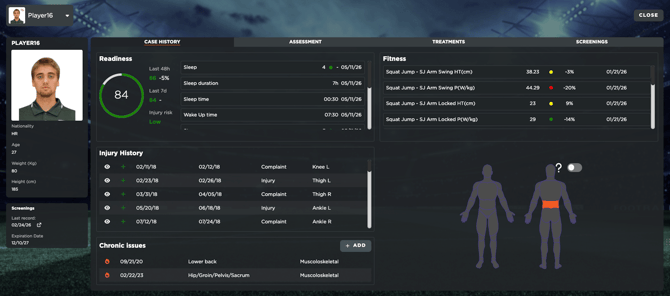
All of these records, linked to any tests or evaluations conducted on the players, will be visible directly from the Medical Records section. This enables the medical department to keep track at all times of what was done, by who, when, etc...
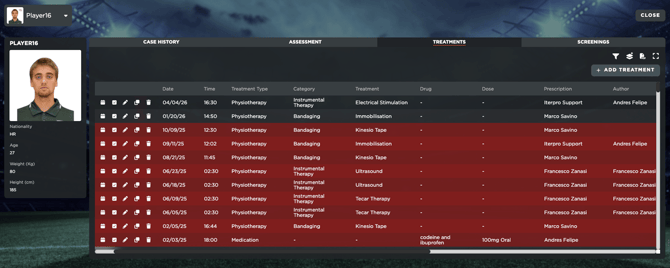
The Medical Records section acts as a automaticly fed section with all the medical details of all the team players, where staff can export reports and overall information about each.
- [What's New](https://support.iterpro.com/en/guide/whats-new?hsLang=en)
- [Quick Onboarding](https://support.iterpro.com/en/guide/quick-onboarding?hsLang=en)
- [Account set-up and other](https://support.iterpro.com/en/guide/account-set-up-and-other?hsLang=en#main-content)
- [Login & Iterpro overview](https://support.iterpro.com/en/guide/account-set-up-and-other?hsLang=en#login-iterpro-overview)
- [Settings](https://support.iterpro.com/en/guide/account-set-up-and-other?hsLang=en#settings)
- [Create, archive and delete players](https://support.iterpro.com/en/guide/account-set-up-and-other?hsLang=en#create-archive-and-delete-players)
- [Other](https://support.iterpro.com/en/guide/account-set-up-and-other?hsLang=en#other)
- [Manager](https://support.iterpro.com/en/guide/manager?hsLang=en#main-content)
- [Tactics](https://support.iterpro.com/en/guide/manager?hsLang=en#tactics)
- [Planning](https://support.iterpro.com/en/guide/manager?hsLang=en#planning)
- [Videogallery](https://support.iterpro.com/en/guide/manager?hsLang=en#videogallery)
- [Drills](https://support.iterpro.com/en/guide/manager?hsLang=en#drills)
- [Attendances](https://support.iterpro.com/en/guide/manager?hsLang=en#attendances)
- [Performance](https://support.iterpro.com/en/guide/performance?hsLang=en#main-content)
- [Session Analysis](https://support.iterpro.com/en/guide/performance?hsLang=en#session-analysis)
- [Workload Analysis](https://support.iterpro.com/en/guide/performance?hsLang=en#workload-analysis)
- [Assessments](https://support.iterpro.com/en/guide/performance?hsLang=en#assessments)
- [Readiness](https://support.iterpro.com/en/guide/performance?hsLang=en#readiness)
- [Medical](https://support.iterpro.com/en/guide/medical?hsLang=en#main-content)
- [Medical Records](https://support.iterpro.com/en/guide/medical?hsLang=en#medical-records)
- [Infirmary](https://support.iterpro.com/en/guide/medical?hsLang=en#infirmary)
- [Examinations](https://support.iterpro.com/en/guide/medical?hsLang=en#examinations)
- [Medical Statistics](https://support.iterpro.com/en/guide/medical?hsLang=en#medical-statistics)
- [Player](https://support.iterpro.com/en/guide/player?hsLang=en#main-content)
- [My Team](https://support.iterpro.com/en/guide/player?hsLang=en#my-team)
- [Scouting](https://support.iterpro.com/en/guide/player?hsLang=en#scouting)
- [Transfers](https://support.iterpro.com/en/guide/player?hsLang=en#transfers)
- [Administration](https://support.iterpro.com/en/guide/administration?hsLang=en#main-content)
- [Squads](https://support.iterpro.com/en/guide/administration?hsLang=en#squads)
- [Finance Overview](https://support.iterpro.com/en/guide/administration?hsLang=en#finance-overview)
- [Bonus Tracking](https://support.iterpro.com/en/guide/administration?hsLang=en#bonus-tracking)
- [Cash Flow](https://support.iterpro.com/en/guide/administration?hsLang=en#cash-flow)
- [Transactions](https://support.iterpro.com/en/guide/administration?hsLang=en#transactions)
- [Registrations](https://support.iterpro.com/en/guide/administration?hsLang=en#registrations)
- [Mobile apps](https://support.iterpro.com/en/guide/mobile-apps?hsLang=en#main-content)
- [Player App](https://support.iterpro.com/en/guide/mobile-apps?hsLang=en#player-app)
- [Coach App](https://support.iterpro.com/en/guide/mobile-apps?hsLang=en#coach-app)
- [Director App](https://support.iterpro.com/en/guide/mobile-apps?hsLang=en#director-app)
- [Iterpro Login Page](https://app.iterpro.com/auth/login)
- [Contact Support](https://share.hsforms.com/1rE7NvsvuTIWBm7WQ1dhslQ1uo0p)
- [Terms & Conditions](https://www.iubenda.com/terms-and-conditions/53739842)
- [Privacy Policy](https://www.iubenda.com/privacy-policy/53739842)
[](https://iterpro.com/)
Copyright © 2025, Iterpro Support Team