
.gif?width=688&height=387&name=KB%20-%20Tactics%20(Reading%20Data).gif)
Here you can find the pillar of our system: share feedback between different departments, information ready to be used supporting the daily decision-making process. It incorporates relevant information from the performance and the medical department to give you insights about the status and availability of your players.
Field View (Health Status)
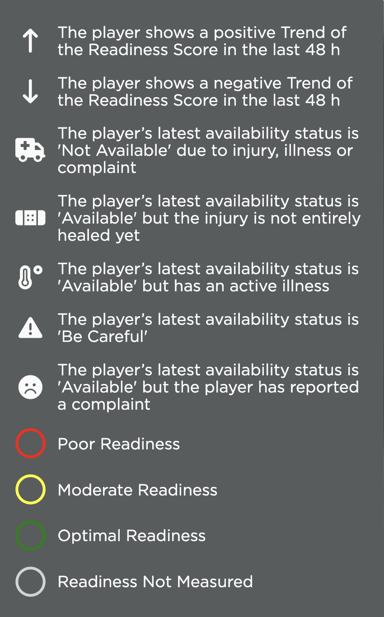
In the field view, you can check the health status of your players for the next game. The traffic light system represents the current levels of a player’s Readiness:
- Green = Good
- Yellow = Moderate
- Red = Poor
- Grey = Not Measured
The arrow inside the circle (e.g.  ) represents the trend of the Readiness score in the last 48 hours.
On top of the arrows, different icons can be present inside the circle, informing you about the player's availability & injury status. They go as follows:
- The Ambulance Icon
 means the player’s latest availability status from the Infirmary is 'Not Available', due to an injury or a complaint.
 - The Plaster Icon
 means that the player’s latest availability status from the Infirmary is 'Available' but the injury is not completely healed yet.
 - The Warning Icon
 means that the player’s latest availability status from the Infirmary is 'Be Careful', meaning that the medical staff has marked them as not entirely ready.
 - The Sad Face Icon
 means that the player’s latest availability status from the Infirmary is 'Available' but that the player has reported a complaint.
 -
The Thermometer Icon
 means that the player’s latest availability status from the Infirmary is 'Not Available' due to illness.
To better understand what these icons all mean, you can also click on the  icon in the middle of the screen, which will refer you to the legend. Here you will see what all the icons and colours mean:
If you wish to learn more about the sections that impact these details, you can do so from the following articles (Readiness and Infirmary).