---
title: Why can't I add a player to the scouting Field View (for accounts that have a team for only scouting enabled)?
description: This article explains how users that only have a team dedicated to scouting, should tackle utilizing the shadow team and scouting scenarios.
---
[Skip to content](https://support.iterpro.com/en/guide/why-cant-i-add-player-to-the-scouting-field-view-for-accounts-that-have-a-team-with-only-scouting-enabled#main-content)
- [English](https://support.iterpro.com/en/guide/why-cant-i-add-player-to-the-scouting-field-view-for-accounts-that-have-a-team-with-only-scouting-enabled)
- [Español](https://support.iterpro.com/es/guide/por-qué-no-puedo-agregar-un-jugador-a-la-vista-de-campo-de-scouting-para-cuentas-con-solo-scouting-habilitado)
- [Italiano](https://support.iterpro.com/it/guide/perché-non-posso-aggiungere-un-giocatore-alla-scouting-field-view-per-account-con-solo-scouting-abilitato)
- [Nederlands](https://support.iterpro.com/nl/guide/waarom-kan-ik-geen-speler-toevoegen-aan-de-scouting-field-view-voor-accounts-met-alleen-scouting-ingeschakeld)
- [العربية - مصر](https://support.iterpro.com/ar-eg/guide/لماذا-لا-يمكنني-إضافة-لاعب-إلى-عرض-الملعب-في-الاستكشاف-للحسابات-التي-لديها-فريق-مخصص-فقط-للاستكشاف)
- [日本語](https://support.iterpro.com/ja/guide/なぜスカウティングのフィールドビューに選手を追加できないのですか)
English
Show submenu for translations
[](https://app.iterpro.com/auth/login)
- [Iterpro Login Page](https://app.iterpro.com/auth/login)
- [Contact Support](https://share.hsforms.com/1rE7NvsvuTIWBm7WQ1dhslQ1uo0p)
Open main navigation
Close main navigation
- [Iterpro Login Page](https://app.iterpro.com/auth/login)
- [Contact Support](https://share.hsforms.com/1rE7NvsvuTIWBm7WQ1dhslQ1uo0p)
- - [English](https://support.iterpro.com/en/guide/why-cant-i-add-player-to-the-scouting-field-view-for-accounts-that-have-a-team-with-only-scouting-enabled)
- [Español](https://support.iterpro.com/es/guide/por-qué-no-puedo-agregar-un-jugador-a-la-vista-de-campo-de-scouting-para-cuentas-con-solo-scouting-habilitado)
- [Italiano](https://support.iterpro.com/it/guide/perché-non-posso-aggiungere-un-giocatore-alla-scouting-field-view-per-account-con-solo-scouting-abilitato)
- [Nederlands](https://support.iterpro.com/nl/guide/waarom-kan-ik-geen-speler-toevoegen-aan-de-scouting-field-view-voor-accounts-met-alleen-scouting-ingeschakeld)
- [العربية - مصر](https://support.iterpro.com/ar-eg/guide/لماذا-لا-يمكنني-إضافة-لاعب-إلى-عرض-الملعب-في-الاستكشاف-للحسابات-التي-لديها-فريق-مخصص-فقط-للاستكشاف)
- [日本語](https://support.iterpro.com/ja/guide/なぜスカウティングのフィールドビューに選手を追加できないのですか)
English
Show submenu for translations
How can we help you?
- There are no suggestions because the search field is empty.
1. [User Guide](https://support.iterpro.com/en/guide?hsLang=en)
2. [Player](https://support.iterpro.com/en/guide/player?hsLang=en)
3. [Scouting](https://support.iterpro.com/en/guide/player?hsLang=en#scouting)
# Why can't I add a player to the scouting Field View (for accounts that have a team for only scouting enabled)?
## This article explains how users that only have a team dedicated to scouting, should tackle utilizing the shadow team and scouting scenarios.
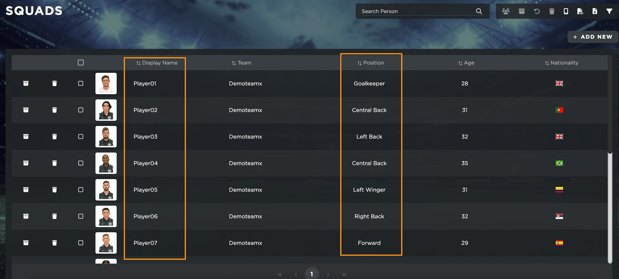
If you only have **Scouting** enabled in your team, you can still take full advantage of the **Shadow Team** function by setting up player profiles in **Admin \> Squads**. Since this feature is directly linked to the **Squads** section, you must have players assigned to each position.
#### **Setting Up Your Shadow Team**
If you don’t have specific players to add, you can create **fake players** to fill a standard formation, such as:
- **2 Goalkeepers** (naming them "Goalkeepers")
- **5 Defenders** (naming them "Left Back", "Center Back", "Right Back", etc.)
- **6 Midfielders** (naming them "Center Midfielder", "Attacking Midfielder", "Left Midfielder", etc.)
- **4 Attackers** (naming them "Striker", "Left Wing", "Forward", etc.)
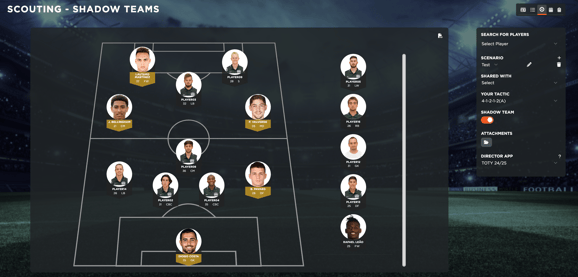
This setup allows you to display a lineup in **Scouting \> Field View** and link scouted players to the corresponding positions.
#### **Linking Scouted Players**
To create a **Shadow Team**, you must first **set up a scouting scenario**. Once done, you can link scouted players to the appropriate positions in your squad.
For further details, refer to the full [article](https://support.iterpro.com/en/guide/how-to-create-scouting-shadow-teams?hsLang=en) in our User Guide.
- [What's New](https://support.iterpro.com/en/guide/whats-new?hsLang=en)
- [Quick Onboarding](https://support.iterpro.com/en/guide/quick-onboarding?hsLang=en)
- [Account set-up and other](https://support.iterpro.com/en/guide/account-set-up-and-other?hsLang=en#main-content)
- [Login & Iterpro overview](https://support.iterpro.com/en/guide/account-set-up-and-other?hsLang=en#login-iterpro-overview)
- [Settings](https://support.iterpro.com/en/guide/account-set-up-and-other?hsLang=en#settings)
- [Create, archive and delete players](https://support.iterpro.com/en/guide/account-set-up-and-other?hsLang=en#create-archive-and-delete-players)
- [Other](https://support.iterpro.com/en/guide/account-set-up-and-other?hsLang=en#other)
- [Manager](https://support.iterpro.com/en/guide/manager?hsLang=en#main-content)
- [Tactics](https://support.iterpro.com/en/guide/manager?hsLang=en#tactics)
- [Planning](https://support.iterpro.com/en/guide/manager?hsLang=en#planning)
- [Videogallery](https://support.iterpro.com/en/guide/manager?hsLang=en#videogallery)
- [Drills](https://support.iterpro.com/en/guide/manager?hsLang=en#drills)
- [Attendances](https://support.iterpro.com/en/guide/manager?hsLang=en#attendances)
- [Performance](https://support.iterpro.com/en/guide/performance?hsLang=en#main-content)
- [Session Analysis](https://support.iterpro.com/en/guide/performance?hsLang=en#session-analysis)
- [Workload Analysis](https://support.iterpro.com/en/guide/performance?hsLang=en#workload-analysis)
- [Assessments](https://support.iterpro.com/en/guide/performance?hsLang=en#assessments)
- [Readiness](https://support.iterpro.com/en/guide/performance?hsLang=en#readiness)
- [Medical](https://support.iterpro.com/en/guide/medical?hsLang=en#main-content)
- [Medical Records](https://support.iterpro.com/en/guide/medical?hsLang=en#medical-records)
- [Infirmary](https://support.iterpro.com/en/guide/medical?hsLang=en#infirmary)
- [Examinations](https://support.iterpro.com/en/guide/medical?hsLang=en#examinations)
- [Medical Statistics](https://support.iterpro.com/en/guide/medical?hsLang=en#medical-statistics)
- [Player](https://support.iterpro.com/en/guide/player?hsLang=en#main-content)
- [My Team](https://support.iterpro.com/en/guide/player?hsLang=en#my-team)
- [Scouting](https://support.iterpro.com/en/guide/player?hsLang=en#scouting)
- [Transfers](https://support.iterpro.com/en/guide/player?hsLang=en#transfers)
- [Administration](https://support.iterpro.com/en/guide/administration?hsLang=en#main-content)
- [Squads](https://support.iterpro.com/en/guide/administration?hsLang=en#squads)
- [Finance Overview](https://support.iterpro.com/en/guide/administration?hsLang=en#finance-overview)
- [Bonus Tracking](https://support.iterpro.com/en/guide/administration?hsLang=en#bonus-tracking)
- [Cash Flow](https://support.iterpro.com/en/guide/administration?hsLang=en#cash-flow)
- [Transactions](https://support.iterpro.com/en/guide/administration?hsLang=en#transactions)
- [Registrations](https://support.iterpro.com/en/guide/administration?hsLang=en#registrations)
- [Mobile apps](https://support.iterpro.com/en/guide/mobile-apps?hsLang=en#main-content)
- [Player App](https://support.iterpro.com/en/guide/mobile-apps?hsLang=en#player-app)
- [Coach App](https://support.iterpro.com/en/guide/mobile-apps?hsLang=en#coach-app)
- [Director App](https://support.iterpro.com/en/guide/mobile-apps?hsLang=en#director-app)
- [Iterpro Login Page](https://app.iterpro.com/auth/login)
- [Contact Support](https://share.hsforms.com/1rE7NvsvuTIWBm7WQ1dhslQ1uo0p)
- [Terms & Conditions](https://www.iubenda.com/terms-and-conditions/53739842)
- [Privacy Policy](https://www.iubenda.com/privacy-policy/53739842)
[](https://iterpro.com/)
Copyright © 2025, Iterpro Support Team