---
title: Why can't I save my active metrics in Settings?
description: This article explains that, sometimes, the user cannot save the active metrics in Setting, displaying error icon(s) and an error notification, because the right number of active metrics have not been set.
---
[Skip to content](https://support.iterpro.com/en/guide/why-i-cant-save-my-active-metrics-section-in-settings#main-content)
- [English](https://support.iterpro.com/en/guide/why-i-cant-save-my-active-metrics-section-in-settings)
- [Español](https://support.iterpro.com/es/guide/por-qué-no-puedo-guardar-mi-sección-de-métricas-activas-en-configuración)
- [Italiano](https://support.iterpro.com/it/guide/perché-non-riesco-a-salvare-nella-sezione-le-mie-metriche-attive-nelle-impostazioni)
- [Nederlands](https://support.iterpro.com/nl/guide/waarom-kan-ik-mijn-actieve-metriekensectie-niet-opslaan-in-instellingen)
- [العربية - مصر](https://support.iterpro.com/ar-eg/guide/لماذا-لا-يمكنني-حفظ-قسم-المقاييس-النشطة-في-الإعدادات)
- [日本語](https://support.iterpro.com/ja/guide/なぜ設定でアクティブな指標セクションを保存できないのですか)
English
Show submenu for translations
[](https://app.iterpro.com/auth/login)
- [Iterpro Login Page](https://app.iterpro.com/auth/login)
- [Contact Support](https://share.hsforms.com/1rE7NvsvuTIWBm7WQ1dhslQ1uo0p)
Open main navigation
Close main navigation
- [Iterpro Login Page](https://app.iterpro.com/auth/login)
- [Contact Support](https://share.hsforms.com/1rE7NvsvuTIWBm7WQ1dhslQ1uo0p)
- - [English](https://support.iterpro.com/en/guide/why-i-cant-save-my-active-metrics-section-in-settings)
- [Español](https://support.iterpro.com/es/guide/por-qué-no-puedo-guardar-mi-sección-de-métricas-activas-en-configuración)
- [Italiano](https://support.iterpro.com/it/guide/perché-non-riesco-a-salvare-nella-sezione-le-mie-metriche-attive-nelle-impostazioni)
- [Nederlands](https://support.iterpro.com/nl/guide/waarom-kan-ik-mijn-actieve-metriekensectie-niet-opslaan-in-instellingen)
- [العربية - مصر](https://support.iterpro.com/ar-eg/guide/لماذا-لا-يمكنني-حفظ-قسم-المقاييس-النشطة-في-الإعدادات)
- [日本語](https://support.iterpro.com/ja/guide/なぜ設定でアクティブな指標セクションを保存できないのですか)
English
Show submenu for translations
How can we help you?
- There are no suggestions because the search field is empty.
1. [User Guide](https://support.iterpro.com/en/guide?hsLang=en)
2. [Account set-up and other](https://support.iterpro.com/en/guide/account-set-up-and-other?hsLang=en)
3. [Settings](https://support.iterpro.com/en/guide/account-set-up-and-other?hsLang=en#settings)
# Why can't I save my active metrics in Settings?
## This article explains that, sometimes, the user cannot save the active metrics in Setting, displaying error icon(s) and an error notification, because the right number of active metrics have not been set.
Sometimes may happen that, when a new user is created or an already existing user wants to change his/her active metrics (performance, tactical, test, or any other metric), from Settings - Metrics, the system displays some error icon(s) within the tab and an error notification is showwn when clicking on SAVE, as in the screenshot below:
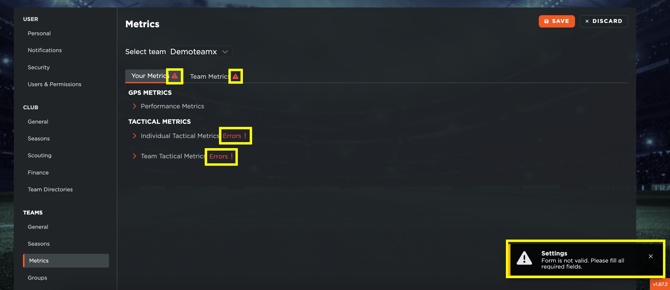
Such alerts mean that the user has not set the right number of active metrics for the highlighted section. Each area has a minimum and maximum number of active metrics that must be set, so the user must align the setting based on such criteria.
To fix the situation, the user can open the section/area where the error is displayed, and edit the active metrics based on the requirement.
- [What's New](https://support.iterpro.com/en/guide/whats-new?hsLang=en)
- [Quick Onboarding](https://support.iterpro.com/en/guide/quick-onboarding?hsLang=en)
- [Account set-up and other](https://support.iterpro.com/en/guide/account-set-up-and-other?hsLang=en#main-content)
- [Login & Iterpro overview](https://support.iterpro.com/en/guide/account-set-up-and-other?hsLang=en#login-iterpro-overview)
- [Settings](https://support.iterpro.com/en/guide/account-set-up-and-other?hsLang=en#settings)
- [Create, archive and delete players](https://support.iterpro.com/en/guide/account-set-up-and-other?hsLang=en#create-archive-and-delete-players)
- [Other](https://support.iterpro.com/en/guide/account-set-up-and-other?hsLang=en#other)
- [Manager](https://support.iterpro.com/en/guide/manager?hsLang=en#main-content)
- [Tactics](https://support.iterpro.com/en/guide/manager?hsLang=en#tactics)
- [Planning](https://support.iterpro.com/en/guide/manager?hsLang=en#planning)
- [Videogallery](https://support.iterpro.com/en/guide/manager?hsLang=en#videogallery)
- [Drills](https://support.iterpro.com/en/guide/manager?hsLang=en#drills)
- [Attendances](https://support.iterpro.com/en/guide/manager?hsLang=en#attendances)
- [Performance](https://support.iterpro.com/en/guide/performance?hsLang=en#main-content)
- [Session Analysis](https://support.iterpro.com/en/guide/performance?hsLang=en#session-analysis)
- [Workload Analysis](https://support.iterpro.com/en/guide/performance?hsLang=en#workload-analysis)
- [Assessments](https://support.iterpro.com/en/guide/performance?hsLang=en#assessments)
- [Readiness](https://support.iterpro.com/en/guide/performance?hsLang=en#readiness)
- [Medical](https://support.iterpro.com/en/guide/medical?hsLang=en#main-content)
- [Medical Records](https://support.iterpro.com/en/guide/medical?hsLang=en#medical-records)
- [Infirmary](https://support.iterpro.com/en/guide/medical?hsLang=en#infirmary)
- [Examinations](https://support.iterpro.com/en/guide/medical?hsLang=en#examinations)
- [Medical Statistics](https://support.iterpro.com/en/guide/medical?hsLang=en#medical-statistics)
- [Player](https://support.iterpro.com/en/guide/player?hsLang=en#main-content)
- [My Team](https://support.iterpro.com/en/guide/player?hsLang=en#my-team)
- [Scouting](https://support.iterpro.com/en/guide/player?hsLang=en#scouting)
- [Transfers](https://support.iterpro.com/en/guide/player?hsLang=en#transfers)
- [Administration](https://support.iterpro.com/en/guide/administration?hsLang=en#main-content)
- [Squads](https://support.iterpro.com/en/guide/administration?hsLang=en#squads)
- [Finance Overview](https://support.iterpro.com/en/guide/administration?hsLang=en#finance-overview)
- [Bonus Tracking](https://support.iterpro.com/en/guide/administration?hsLang=en#bonus-tracking)
- [Cash Flow](https://support.iterpro.com/en/guide/administration?hsLang=en#cash-flow)
- [Transactions](https://support.iterpro.com/en/guide/administration?hsLang=en#transactions)
- [Registrations](https://support.iterpro.com/en/guide/administration?hsLang=en#registrations)
- [Mobile apps](https://support.iterpro.com/en/guide/mobile-apps?hsLang=en#main-content)
- [Player App](https://support.iterpro.com/en/guide/mobile-apps?hsLang=en#player-app)
- [Coach App](https://support.iterpro.com/en/guide/mobile-apps?hsLang=en#coach-app)
- [Director App](https://support.iterpro.com/en/guide/mobile-apps?hsLang=en#director-app)
- [Iterpro Login Page](https://app.iterpro.com/auth/login)
- [Contact Support](https://share.hsforms.com/1rE7NvsvuTIWBm7WQ1dhslQ1uo0p)
- [Terms & Conditions](https://www.iubenda.com/terms-and-conditions/53739842)
- [Privacy Policy](https://www.iubenda.com/privacy-policy/53739842)
[](https://iterpro.com/)
Copyright © 2025, Iterpro Support Team