---
title: Why can't I see some planned drills in the training event?
description: This article explains why users may not be visualizing the drills in the planned section of a training event.
---
[Skip to content](https://support.iterpro.com/en/guide/why-i-cant-see-some-planned-drills-in-the-training-event#main-content)
- [English](https://support.iterpro.com/en/guide/why-i-cant-see-some-planned-drills-in-the-training-event)
- [Español](https://support.iterpro.com/es/guide/por-qué-no-puedo-ver-algunos-ejercicios-planificados-en-el-evento-de-entrenamiento)
- [Italiano](https://support.iterpro.com/it/guide/perché-non-riesco-a-vedere-alcuni-esercizi-pianificati-nellevento-di-allenamento)
- [Nederlands](https://support.iterpro.com/nl/guide/waarom-zie-ik-sommige-geplande-oefeningen-niet-in-het-trainingsevenement)
- [العربية - مصر](https://support.iterpro.com/ar-eg/guide/لماذا-لا-أستطيع-رؤية-بعض-التمارين-المخططة-في-فعالية-التدريب)
- [日本語](https://support.iterpro.com/ja/guide/なぜトレーニングイベントで一部の計画済みドリルが表示されないのか)
English
Show submenu for translations
[](https://app.iterpro.com/auth/login)
- [Iterpro Login Page](https://app.iterpro.com/auth/login)
- [Contact Support](https://share.hsforms.com/1rE7NvsvuTIWBm7WQ1dhslQ1uo0p)
Open main navigation
Close main navigation
- [Iterpro Login Page](https://app.iterpro.com/auth/login)
- [Contact Support](https://share.hsforms.com/1rE7NvsvuTIWBm7WQ1dhslQ1uo0p)
- - [English](https://support.iterpro.com/en/guide/why-i-cant-see-some-planned-drills-in-the-training-event)
- [Español](https://support.iterpro.com/es/guide/por-qué-no-puedo-ver-algunos-ejercicios-planificados-en-el-evento-de-entrenamiento)
- [Italiano](https://support.iterpro.com/it/guide/perché-non-riesco-a-vedere-alcuni-esercizi-pianificati-nellevento-di-allenamento)
- [Nederlands](https://support.iterpro.com/nl/guide/waarom-zie-ik-sommige-geplande-oefeningen-niet-in-het-trainingsevenement)
- [العربية - مصر](https://support.iterpro.com/ar-eg/guide/لماذا-لا-أستطيع-رؤية-بعض-التمارين-المخططة-في-فعالية-التدريب)
- [日本語](https://support.iterpro.com/ja/guide/なぜトレーニングイベントで一部の計画済みドリルが表示されないのか)
English
Show submenu for translations
How can we help you?
- There are no suggestions because the search field is empty.
1. [User Guide](https://support.iterpro.com/en/guide?hsLang=en)
2. [Manager](https://support.iterpro.com/en/guide/manager?hsLang=en)
3. [Planning](https://support.iterpro.com/en/guide/manager?hsLang=en#planning)
# Why can't I see some planned drills in the training event?
## This article explains why users may not be visualizing the drills in the planned section of a training event.
If a user is unable to see the created drills within the training session in Planning, displaying an empty raw within the event, this means that the exercise(s) has most probably not been shared with the said user(s). To solve this, you will simply need to speak to a user with the access the the specific drills and let him/her share it with your user, from Manager - Drills - Drill's card:
%20-%20Share%20drill%20with%20users%20(1).gif?width=670&height=377&name=Drills%20(KB)%20-%20Share%20drill%20with%20users%20(1).gif)
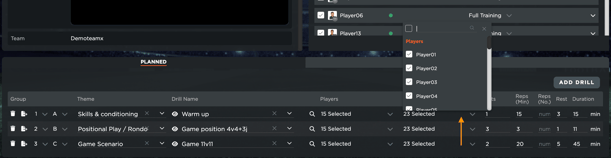
Additionally, to make sure that the users see the drill inside the planned section of the training event within the Mobile apps, you need to ensure that they are also selected in the list of 'Shared With' for the different planned drills. In case they are not, and this applies both to staff and to players, they won't be able to see the shared drills in the respective calendar sessions in the mobile app.
- [What's New](https://support.iterpro.com/en/guide/whats-new?hsLang=en)
- [Quick Onboarding](https://support.iterpro.com/en/guide/quick-onboarding?hsLang=en)
- [Account set-up and other](https://support.iterpro.com/en/guide/account-set-up-and-other?hsLang=en#main-content)
- [Login & Iterpro overview](https://support.iterpro.com/en/guide/account-set-up-and-other?hsLang=en#login-iterpro-overview)
- [Settings](https://support.iterpro.com/en/guide/account-set-up-and-other?hsLang=en#settings)
- [Create, archive and delete players](https://support.iterpro.com/en/guide/account-set-up-and-other?hsLang=en#create-archive-and-delete-players)
- [Other](https://support.iterpro.com/en/guide/account-set-up-and-other?hsLang=en#other)
- [Manager](https://support.iterpro.com/en/guide/manager?hsLang=en#main-content)
- [Tactics](https://support.iterpro.com/en/guide/manager?hsLang=en#tactics)
- [Planning](https://support.iterpro.com/en/guide/manager?hsLang=en#planning)
- [Videogallery](https://support.iterpro.com/en/guide/manager?hsLang=en#videogallery)
- [Drills](https://support.iterpro.com/en/guide/manager?hsLang=en#drills)
- [Attendances](https://support.iterpro.com/en/guide/manager?hsLang=en#attendances)
- [Performance](https://support.iterpro.com/en/guide/performance?hsLang=en#main-content)
- [Session Analysis](https://support.iterpro.com/en/guide/performance?hsLang=en#session-analysis)
- [Workload Analysis](https://support.iterpro.com/en/guide/performance?hsLang=en#workload-analysis)
- [Assessments](https://support.iterpro.com/en/guide/performance?hsLang=en#assessments)
- [Readiness](https://support.iterpro.com/en/guide/performance?hsLang=en#readiness)
- [Medical](https://support.iterpro.com/en/guide/medical?hsLang=en#main-content)
- [Medical Records](https://support.iterpro.com/en/guide/medical?hsLang=en#medical-records)
- [Infirmary](https://support.iterpro.com/en/guide/medical?hsLang=en#infirmary)
- [Examinations](https://support.iterpro.com/en/guide/medical?hsLang=en#examinations)
- [Medical Statistics](https://support.iterpro.com/en/guide/medical?hsLang=en#medical-statistics)
- [Player](https://support.iterpro.com/en/guide/player?hsLang=en#main-content)
- [My Team](https://support.iterpro.com/en/guide/player?hsLang=en#my-team)
- [Scouting](https://support.iterpro.com/en/guide/player?hsLang=en#scouting)
- [Transfers](https://support.iterpro.com/en/guide/player?hsLang=en#transfers)
- [Administration](https://support.iterpro.com/en/guide/administration?hsLang=en#main-content)
- [Squads](https://support.iterpro.com/en/guide/administration?hsLang=en#squads)
- [Finance Overview](https://support.iterpro.com/en/guide/administration?hsLang=en#finance-overview)
- [Bonus Tracking](https://support.iterpro.com/en/guide/administration?hsLang=en#bonus-tracking)
- [Cash Flow](https://support.iterpro.com/en/guide/administration?hsLang=en#cash-flow)
- [Transactions](https://support.iterpro.com/en/guide/administration?hsLang=en#transactions)
- [Registrations](https://support.iterpro.com/en/guide/administration?hsLang=en#registrations)
- [Mobile apps](https://support.iterpro.com/en/guide/mobile-apps?hsLang=en#main-content)
- [Player App](https://support.iterpro.com/en/guide/mobile-apps?hsLang=en#player-app)
- [Coach App](https://support.iterpro.com/en/guide/mobile-apps?hsLang=en#coach-app)
- [Director App](https://support.iterpro.com/en/guide/mobile-apps?hsLang=en#director-app)
- [Iterpro Login Page](https://app.iterpro.com/auth/login)
- [Contact Support](https://share.hsforms.com/1rE7NvsvuTIWBm7WQ1dhslQ1uo0p)
- [Terms & Conditions](https://www.iubenda.com/terms-and-conditions/53739842)
- [Privacy Policy](https://www.iubenda.com/privacy-policy/53739842)
[](https://iterpro.com/)
Copyright © 2025, Iterpro Support Team