---
title: Why do I not see a player in My Team (but I do in Squads)?
description: If you do not see one or more players in "Players - My Team", check whether they are active and included in the current season's squad. Follow these steps to resolve the issue.
---
[Skip to content](https://support.iterpro.com/en/guide/why-i-do-not-display-the-players-in-myteam#main-content)
- [English](https://support.iterpro.com/en/guide/why-i-do-not-display-the-players-in-myteam)
- [Español](https://support.iterpro.com/es/guide/por-qué-no-veo-al/los-jugadores-en-myteam)
- [Italiano](https://support.iterpro.com/it/guide/perché-non-visualizzo-il/i-giocatore/i-in-myteam)
- [Nederlands](https://support.iterpro.com/nl/guide/waarom-worden-de-spelers-niet-weergegeven-in-myteam)
- [العربية - مصر](https://support.iterpro.com/ar-eg/guide/لماذا-لا-أرى-اللاعبين-في-myteam)
- [日本語](https://support.iterpro.com/ja/guide/なぜ-マイチーム-に選手が表示されないのですか)
English
Show submenu for translations
[](https://app.iterpro.com/auth/login)
- [Iterpro Login Page](https://app.iterpro.com/auth/login)
- [Contact Support](https://share.hsforms.com/1rE7NvsvuTIWBm7WQ1dhslQ1uo0p)
Open main navigation
Close main navigation
- [Iterpro Login Page](https://app.iterpro.com/auth/login)
- [Contact Support](https://share.hsforms.com/1rE7NvsvuTIWBm7WQ1dhslQ1uo0p)
- - [English](https://support.iterpro.com/en/guide/why-i-do-not-display-the-players-in-myteam)
- [Español](https://support.iterpro.com/es/guide/por-qué-no-veo-al/los-jugadores-en-myteam)
- [Italiano](https://support.iterpro.com/it/guide/perché-non-visualizzo-il/i-giocatore/i-in-myteam)
- [Nederlands](https://support.iterpro.com/nl/guide/waarom-worden-de-spelers-niet-weergegeven-in-myteam)
- [العربية - مصر](https://support.iterpro.com/ar-eg/guide/لماذا-لا-أرى-اللاعبين-في-myteam)
- [日本語](https://support.iterpro.com/ja/guide/なぜ-マイチーム-に選手が表示されないのですか)
English
Show submenu for translations
How can we help you?
- There are no suggestions because the search field is empty.
1. [User Guide](https://support.iterpro.com/en/guide?hsLang=en)
2. [Player](https://support.iterpro.com/en/guide/player?hsLang=en)
3. [My Team](https://support.iterpro.com/en/guide/player?hsLang=en#my-team)
# Why do I not see a player in My Team (but I do in Squads)?
## If you do not see one or more players in "Players - My Team", check whether they are active and included in the current season's squad. Follow these steps to resolve the issue.
In "Players - My Team", users can view players belonging to the current squad and included in the current season. It is also possible to see players from past seasons. If one or more players are missing from this list, verify the following conditions:
- **Check Player Status:**
- Go to "Administration - Squads" and ensure that the player is **ACTIVE** and not **ARCHIVED**.
- If archived, activate the player.
- **Check Season Inclusion:**
- Navigate to "Settings - Team - Season - Current season - Line up" and confirm that the player is included in the team list.
- If not, add them to the current season.
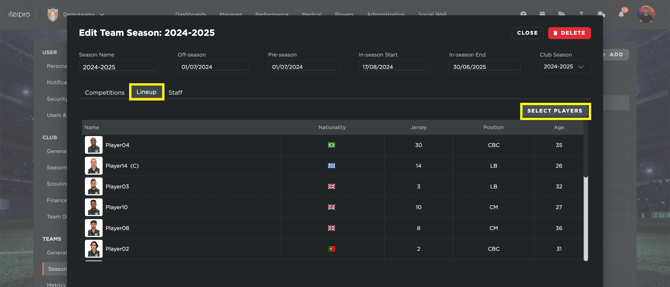
If, on the contrary, you see players who should not appear in the current team list, archive them. If they have never been part of the current season, remove them from the season.
- [What's New](https://support.iterpro.com/en/guide/whats-new?hsLang=en)
- [Quick Onboarding](https://support.iterpro.com/en/guide/quick-onboarding?hsLang=en)
- [Account set-up and other](https://support.iterpro.com/en/guide/account-set-up-and-other?hsLang=en#main-content)
- [Login & Iterpro overview](https://support.iterpro.com/en/guide/account-set-up-and-other?hsLang=en#login-iterpro-overview)
- [Settings](https://support.iterpro.com/en/guide/account-set-up-and-other?hsLang=en#settings)
- [Create, archive and delete players](https://support.iterpro.com/en/guide/account-set-up-and-other?hsLang=en#create-archive-and-delete-players)
- [Other](https://support.iterpro.com/en/guide/account-set-up-and-other?hsLang=en#other)
- [Manager](https://support.iterpro.com/en/guide/manager?hsLang=en#main-content)
- [Tactics](https://support.iterpro.com/en/guide/manager?hsLang=en#tactics)
- [Planning](https://support.iterpro.com/en/guide/manager?hsLang=en#planning)
- [Videogallery](https://support.iterpro.com/en/guide/manager?hsLang=en#videogallery)
- [Drills](https://support.iterpro.com/en/guide/manager?hsLang=en#drills)
- [Attendances](https://support.iterpro.com/en/guide/manager?hsLang=en#attendances)
- [Performance](https://support.iterpro.com/en/guide/performance?hsLang=en#main-content)
- [Session Analysis](https://support.iterpro.com/en/guide/performance?hsLang=en#session-analysis)
- [Workload Analysis](https://support.iterpro.com/en/guide/performance?hsLang=en#workload-analysis)
- [Assessments](https://support.iterpro.com/en/guide/performance?hsLang=en#assessments)
- [Readiness](https://support.iterpro.com/en/guide/performance?hsLang=en#readiness)
- [Medical](https://support.iterpro.com/en/guide/medical?hsLang=en#main-content)
- [Medical Records](https://support.iterpro.com/en/guide/medical?hsLang=en#medical-records)
- [Infirmary](https://support.iterpro.com/en/guide/medical?hsLang=en#infirmary)
- [Examinations](https://support.iterpro.com/en/guide/medical?hsLang=en#examinations)
- [Medical Statistics](https://support.iterpro.com/en/guide/medical?hsLang=en#medical-statistics)
- [Player](https://support.iterpro.com/en/guide/player?hsLang=en#main-content)
- [My Team](https://support.iterpro.com/en/guide/player?hsLang=en#my-team)
- [Scouting](https://support.iterpro.com/en/guide/player?hsLang=en#scouting)
- [Transfers](https://support.iterpro.com/en/guide/player?hsLang=en#transfers)
- [Administration](https://support.iterpro.com/en/guide/administration?hsLang=en#main-content)
- [Squads](https://support.iterpro.com/en/guide/administration?hsLang=en#squads)
- [Finance Overview](https://support.iterpro.com/en/guide/administration?hsLang=en#finance-overview)
- [Bonus Tracking](https://support.iterpro.com/en/guide/administration?hsLang=en#bonus-tracking)
- [Cash Flow](https://support.iterpro.com/en/guide/administration?hsLang=en#cash-flow)
- [Transactions](https://support.iterpro.com/en/guide/administration?hsLang=en#transactions)
- [Registrations](https://support.iterpro.com/en/guide/administration?hsLang=en#registrations)
- [Mobile apps](https://support.iterpro.com/en/guide/mobile-apps?hsLang=en#main-content)
- [Player App](https://support.iterpro.com/en/guide/mobile-apps?hsLang=en#player-app)
- [Coach App](https://support.iterpro.com/en/guide/mobile-apps?hsLang=en#coach-app)
- [Director App](https://support.iterpro.com/en/guide/mobile-apps?hsLang=en#director-app)
- [Iterpro Login Page](https://app.iterpro.com/auth/login)
- [Contact Support](https://share.hsforms.com/1rE7NvsvuTIWBm7WQ1dhslQ1uo0p)
- [Terms & Conditions](https://www.iubenda.com/terms-and-conditions/53739842)
- [Privacy Policy](https://www.iubenda.com/privacy-policy/53739842)
[](https://iterpro.com/)
Copyright © 2025, Iterpro Support Team