
FEATURES DESCRIPTION
Once your clubs are set up, go to the Matches section to create a new game.
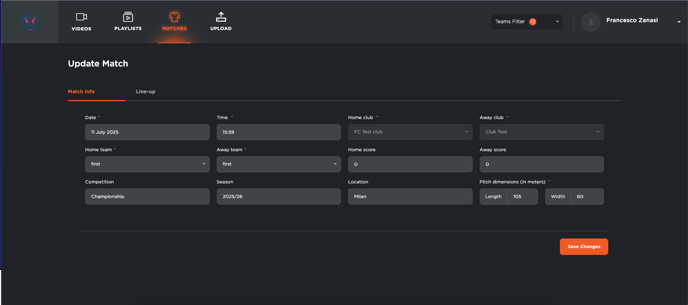
-
By default, your main team will appear as the Home Club.
-
If your team is playing away, you can easily replace the club listed under Away Club.
You can then fill in the following details:
-
Home Team and Away Team: select the category
-
Score: match result
-
Competition: name of the tournament or league
-
Season
-
Location of the game
-
Field dimensions
Once all the information has been entered, click Save.
The match will now appear in the match table, where you can:
-
Edit the match details
-
Delete the match if needed
If any videos are linked to the match, you can click on the video icon to access the footage directly related to that game.