
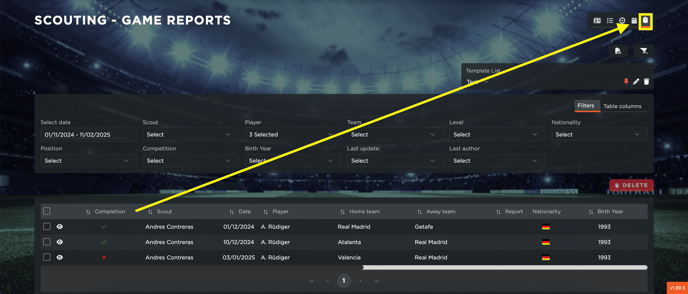
- 00.05: accessing game reports dynamic table
- 00.21: how to use the filters to customize the report
- 00.48: how to customize the data in the report through the table columns
- 01.05: PDF and CSV export
FEATURE DESCRIPTION
The Game Reports Dynamic Table is a powerful tool that allows you to analyze reports created by you and your scouts for players in your database. Through this table, you can review all game reports, examine specific player details, and gain valuable insights into their performances.
Filtering and Customizing Data
To refine your analysis, you can use the Filters feature:
- Select a specific time period to review reports from a particular timeframe.
- Filter by scouts, players, teams, and other relevant parameters to narrow down your search.
- Customize the Table Columns by selecting only the details that matter most to you. Simply check or uncheck the relevant fields, and the table will update automatically.
Exporting Reports
Once you have configured your view, you can export the data in PDF or CSV format, making it easy to share or store the reports for further analysis.
This tool provides a dynamic way to explore game reports, ensuring a more in-depth and efficient scouting process.