
CLUB SETTINGS (General & Seasons)
- 00:10 - club General Settings;
- 00:26 - seasons tab;
- 00:30 - configure new season;
- 00:40 - market window explanation
FEATURES DESCRIPTION
Club General Settings
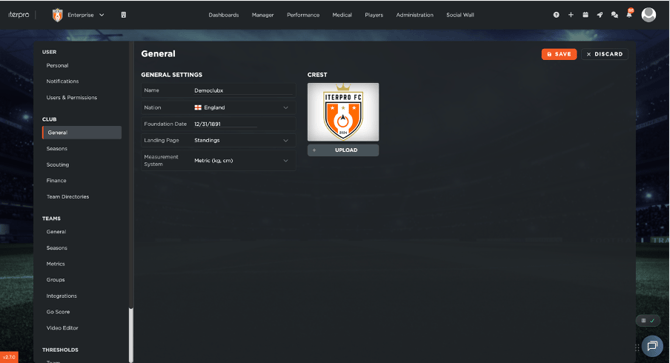
To edit your club General Settings, go to:
- Settings → Club → General, and click "Edit".
- Enter your club's official Name, Nationality, and Foundation Date.
- Upload your official club Logos to customize the interface.
- Set the default Landing Page and the preferred Measurement System (e.g., Metric or Imperial) for your organization.
- Click "Save".
Club Seasons
Defining your club seasons is a critical step that establishes the core logical timeline for the entire platform.
- Navigate to the Seasons tab under the Club menu.
- Click the "Add" button to open the season configuration window.
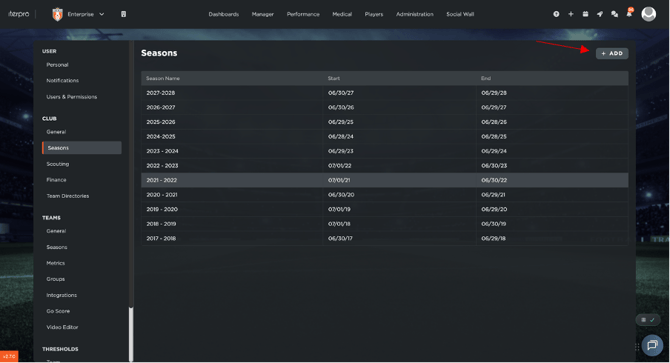
- Enter the official Season Name along with the precise Start Date and End Date.
- Configure the Market Window
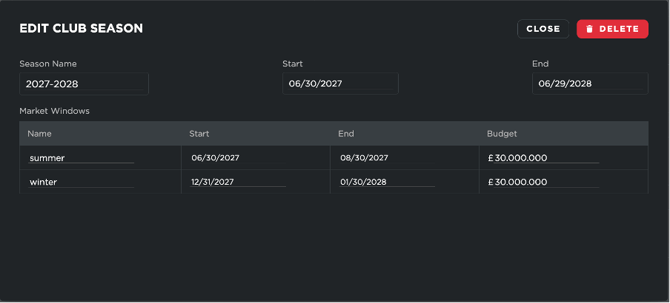
Note : The Market Window fields are strictly required by the system. If your club does not utilise transfer market windows for its daily operations, you can enter arbitrary placeholder dates to complete the setup.