
- 00.07: explanation of logic for inviting users to the coach and director app
- 00.15: permissions for the apps needed for users in User & Permissions
- 00.35: personalizing the areas visible to users within the apps
- 00.49: explanation of accessing staff members in administration - squads.
- 01.00: linking staff member to a user of the platform
- 01.10: explanation of how the user can log into the respective apps
FEATURE DESCRIPTION
This guide explains how to invite and register users for both the Director and Coach apps. The process is identical for both applications, with the only difference being the permissions assigned to each user.
Step 1: Access User Settings
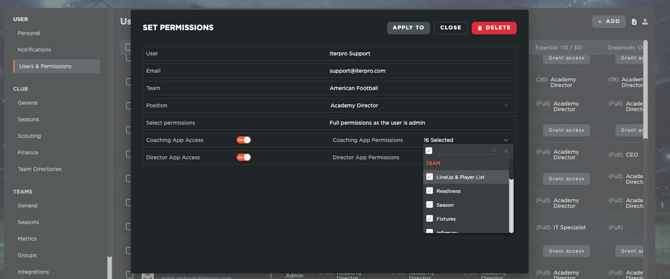
- Navigate to Settings > Users and Permissions.
- Ensure that the users you want to invite have access to the correct team(s).
- Assign the appropriate permissions for either the Coach App or the Director App.
- Customize the sections they can view within the application, if necessary.
- Click Save to apply the changes.
Step 2: Link Users to Staff Profiles
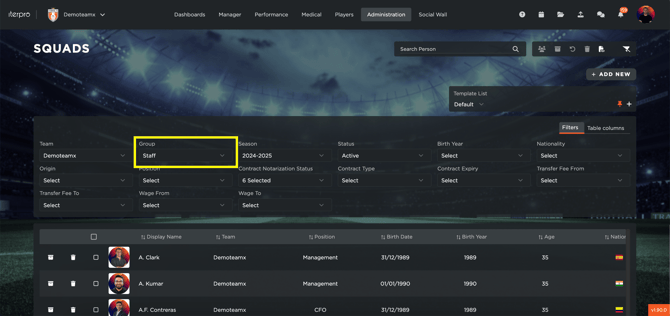
- Go to Administration > Squads and select the group of staff members (from the filters).
- Open the profile of a staff member.
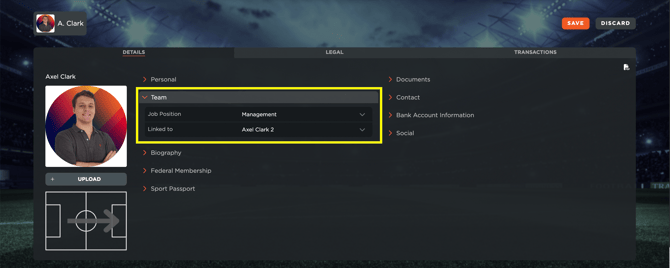
- Under the Team Section, link the staff member with the user created in the Users and Permissions settings.
- Save the changes.
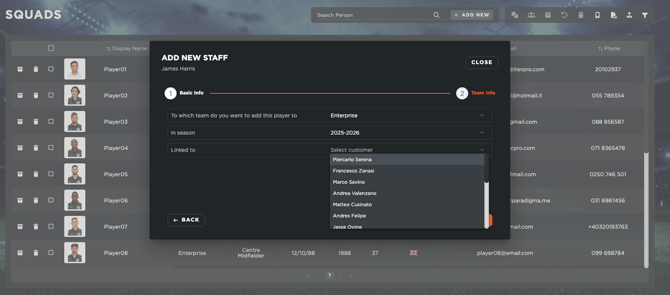
Keep in mind, that this operation can also be done when you create a new staff member. If you click on 'Add' and select Staff, you will be able to add his details, the team and season he belongs to, as well as linking him with the desired platform User.
Step 3: First-Time Login
- Once the setup is complete, the user can log in to either the Director or Coach app based on their assigned permissions.
- The login credentials are the same as those used for the web application.
- Important: The user must first log in to the web application before accessing the mobile app for the first time.