
- 00.11: comparison section
- 00.32: period section
FEATURE DESCRIPTION
To analyze the data you have entered into the system, you have two options:
- Click directly on the analysis icon (a lens within the records, in Assessments)
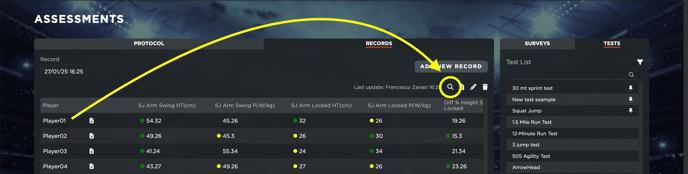
- Navigate to Performance > Test Analysis from the menu.
Test Analysis - Comparison
In this section, you can:
- Select the test you want to analyze.
- Filter records based on different criteria.
- Choose up to two metrics at a time to display.
- Select the players whose data you want to view.
You can also:
- Sort the data for better readability.
- Show labels for easier identification.
- Display thresholds (if previously set in the player section).
Test analysis - Period
This section allows you to analyze performance data over a selected time period. You can:
- Display one or multiple metrics.
- Compare data for one or multiple players.
- Display data labels and percentages.
Tip: We recommend selecting a maximum of one or two players at a time to keep the chart clear and readable.
In both sections within Test Analysis you can download reports in PDF or CSV format.