
WELLNESS (PRE-TRAINING)
- 00.19: questionnaire description
- 00.47: how to submit the survey
RPE (POST-TRAINING)
- 00.04: questionnaire description
- 00.32: how to submit the survey
FEATURE DESCRIPTION
Wellness (Pre-Training) Assessment
This section of the platform allows you to conduct wellness assessments before training. The Wellness Pre-Training Survey consists of five key questions that help evaluate a player’s readiness:
- How well did you sleep?
- How stressed are you feeling?
- How tired are you feeling?
- How sore do you feel?
- What mood are you in?
Each question is rated on a scale from 1 to 5:
- 1: Very bad
- 2: Bad
- 3: So-so (something is not going well)
- 4: Good
- 5: Very good
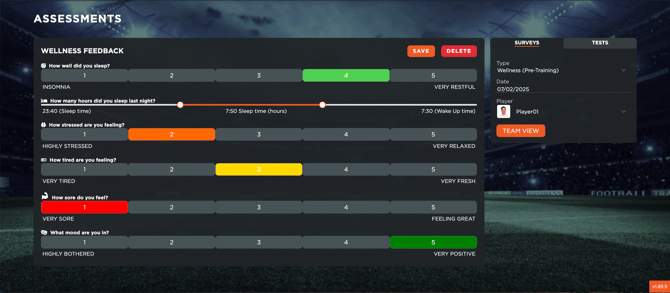
There are four ways to input the survey data:
- Manually for each player – You can click on the icon Go to survey, select a player and enter the responses directly.
- Via the Player App – If players have access to the mobile app, they can complete the survey themselves.
- Directly in the table – You can input the data manually in the assessment table.
- By uploading a CSV file – Download the CSV template, fill it out in Excel, and upload it back into the system.
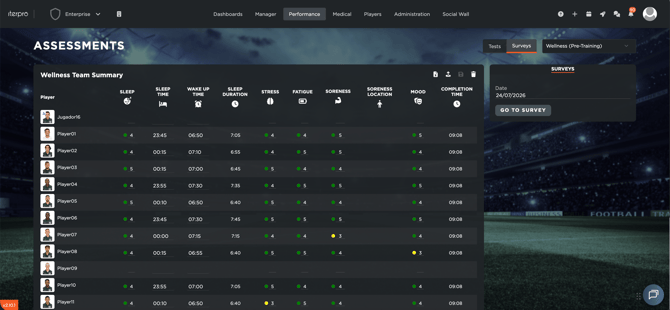
If you want to check the values submitted for the Wellbeing questionnaire, you can check the day-by-day view from the table in Assessments - Surveys:
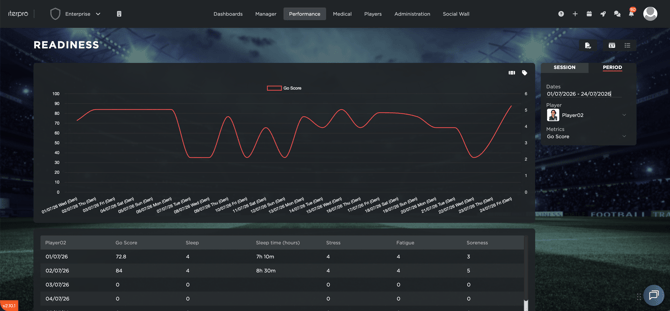
Or you can move to Readiness - Period and generate analysis for specific Wellbeing metrics:
RPE (Post-Training) Assessment
The Rate of Perceived Exertion (RPE) is an evaluation method used to measure the intensity of a training session. Players rate their perceived effort on a scale from 0 to 10. You can take into account the following considerations:
- 0: No effort (e.g., lying in bed)
- 4: Moderate effort (mid-point of the scale)
- 8: Typical match intensity
- 10: Maximum effort of their life
Players simply read the scale, select the appropriate number, and submit their response.
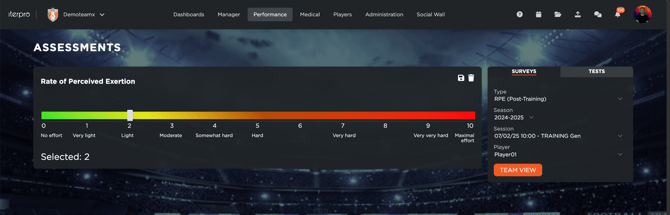
Players and staff can enter RPE values in three ways:
- Manually for each player – You can click on the icon Go to survey, select a player and enter the responses directly.
- Via the Player App – Players can submit their RPE scores through the mobile app.
- By uploading a CSV file – Download the CSV, fill it out in Excel, and upload it back to the platform.